Get Isl 101
How it works
-

Open form follow the instructions
-

Easily sign the form with your finger
-

Send filled & signed form or save
How to fill out the Isl 101 online
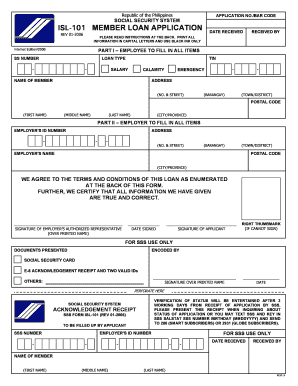
This guide provides detailed instructions on how to successfully complete the Isl 101 Member Loan Application form online. Whether you are familiar with online forms or navigating it for the first time, this comprehensive overview will assist you in filling out the necessary information accurately.
Follow the steps to complete the Isl 101 application form online.
- Press the ‘Get Form’ button to access the Isl 101 application form. This will allow you to download and open the document in your preferred editing software.
- Begin by entering your Social Security Number (SS Number) in the designated field. Ensure that you input this information accurately to prevent any complications with your application.
- Select the type of loan you are applying for by checking the appropriate option from the Loan Type section, indicating whether it is a Calamity or Emergency loan.
- Fill in your Tax Identification Number (TIN) and salary details as required. This information is essential for the evaluation of your loan application.
- In the Name of Member section, provide your first name, middle name, and last name. Be sure to print all information in capital letters as instructed.
- Complete your address by filling in the street number and name, barangay, town/district, city/province, and postal code. Each field must be filled out correctly to ensure proper communication.
- The employer must complete Part II of the application. Ensure that your employer fills in the Employer's ID Number, Employer's Name, and their address, following the same guidelines for formatting.
- Once both parts are completed, ensure your employer’s authorized representative, as well as you, sign the application where indicated. If you cannot sign, please provide your right thumbmark.
- Review all the information provided in the application for completeness and accuracy before you submit. Any inconsistencies could cause delays in processing.
- Save your changes, then download the completed document. You can also print the form or share it as necessary to submit your application.
Complete your Isl 101 application online today to secure your member loan.
Voluntary SSS contribution amounts vary based on your choice of salary credit, where you can select from a range of options. Regardless of the selected amount, regular contributions can enhance your benefits, particularly in retirement or if you need to access loans. Understanding the Isl 101 aspect of voluntary contributions allows you to plan effectively for your future. For detailed instructions and resources, consider visiting uslegalforms, which provides comprehensive guidance tailored to your needs.
Industry-leading security and compliance
-
In businnes since 199725+ years providing professional legal documents.
-
Accredited businessGuarantees that a business meets BBB accreditation standards in the US and Canada.
-
Secured by BraintreeValidated Level 1 PCI DSS compliant payment gateway that accepts most major credit and debit card brands from across the globe.