Loading
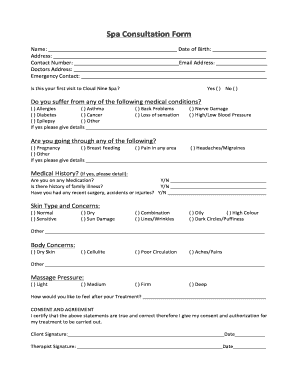
Get Consultation Form App For Spas 2020-2025
How it works
-

Open form follow the instructions
-

Easily sign the form with your finger
-

Send filled & signed form or save
How to fill out the Consultation Form App for Spas online
Navigating the Consultation Form for spas can be straightforward with the right guidance. This guide offers clear, step-by-step instructions to help users complete the form accurately and efficiently.
Follow the steps to complete your Consultation Form.
- To begin, click the ‘Get Form’ button to access the Consultation Form. Ensure you have a stable internet connection to avoid any interruptions while filling out the form.
- Start by entering your name in the designated field, followed by your date of birth. This personal information is crucial for identification.
- Next, provide your address, ensuring to include all necessary details for accurate communication.
- In the contact number field, enter a valid phone number where you can be reached. Additionally, fill in your email address to facilitate any necessary correspondence.
- Input your doctor's address, which may be required for health verification purposes.
- Identify an emergency contact by providing their name and contact information. This ensures safety during your spa visit.
- Indicate whether this is your first visit to the spa by selecting 'Yes' or 'No.' This information helps in tailoring your experience.
- Proceed to disclose any medical conditions by checking the relevant boxes. If applicable, provide additional details in the space provided.
- Address any current situations such as pregnancy or breastfeeding by marking the corresponding options.
- Share your medication status by responding 'Yes' or 'No.' If 'Yes,' provide details in the space available.
- Note any family history of illness, recent surgeries, or injuries by replying appropriately and offering additional details if necessary.
- Fill out your skin type and concerns by selecting the appropriate options. Be as thorough as possible to help your therapist assess your needs.
- Outline any body concerns you have by marking the relevant boxes, ensuring your therapist understands your expectations.
- Indicate your preferred massage pressure by choosing from light, medium, firm, or deep.
- Express how you would like to feel after your treatment in the provided space, helping to guide your therapist's approach.
- Finally, review all entries for accuracy. Once satisfied, provide your signature and the date to certify the authenticity of your statements.
- You can then save changes, download, print, or share the completed form as needed.
Complete your Consultation Form online today to ensure a tailored spa experience!
To create an intake form on Canva, start by picking a template that aligns with your spa's requirements. Add relevant questions to gather necessary information from clients, such as personal details and services requested. Using the Consultation Form App For Spas, you can manage and streamline the intake process, making it simple and efficient for both you and your clients.
Industry-leading security and compliance
US Legal Forms protects your data by complying with industry-specific security standards.
-
In businnes since 199725+ years providing professional legal documents.
-
Accredited businessGuarantees that a business meets BBB accreditation standards in the US and Canada.
-
Secured by BraintreeValidated Level 1 PCI DSS compliant payment gateway that accepts most major credit and debit card brands from across the globe.