Loading
Get Republic Bank Stop Payment Form 2020-2026
How it works
-

Open form follow the instructions
-

Easily sign the form with your finger
-

Send filled & signed form or save
How to fill out the Republic Bank Stop Payment Form online
Filling out the Republic Bank Stop Payment Form online is a straightforward process that allows users to request a stop payment on a lost, stolen, or otherwise compromised check. This guide aims to provide clear instructions for each step of the form to ensure a successful submission.
Follow the steps to complete your Stop Payment Form.
- Click ‘Get Form’ button to obtain the form and open it in your preferred editor.
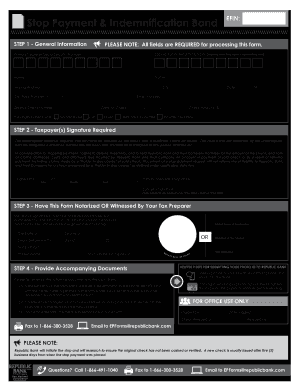
- In the general information section, all fields are required for processing. Begin by entering the primary taxpayer's Social Security number. If your filing status is 'Married Filing Joint,' also include your spouse's Social Security number. Next, fill in the names of both taxpayers, followed by the mailing address, city, state, and ZIP code.
- Provide a callback number for any queries Republic Bank may have. Enter the original check number and indicate the status of the original check by selecting from options such as 'Not Received,' 'Lost,' 'Stolen,' or others as applicable.
- Include the date on the check and the check amount. Select the type of check by circling the appropriate option provided.
- For the taxpayer(s) signature, sign and date the form. Both signatures are required when the filing status is 'Married Filing Joint.' Ensure the date is written by day, month, and year.
- The form must be notarized or witnessed by your tax preparer. Ensure that the notary public section is completed, with the printed name and signature of the notary.
- Gather accompanying documents, which include a legible copy of a government-issued photo ID, proof of address if it has changed, and the completed Stop Payment & Indemnification Bond Form.
- Finally, submit the form and accompanying documents to Republic Bank via fax or email, as indicated in the instructions. Review all entries to ensure accuracy before submitting.
Complete your Stop Payment Form online today for quick processing.
Related links form
Georgia Department Of Human Resources APPLICATION FOR TANF - Dfcs Dhr Georgia
Corporation License Application (RE201). Corporation License Application
Form 4430-023 Financial Guarantee Bond. Form 4430-023 Financial Guarantee Bond - Dnr Wi
Required Minimum Distribution (RMD) Retirement Application (State Form 53709).doc
Blocking a payment from coming out of your bank account is simple with the right steps. Start by completing the Republic Bank Stop Payment Form, specifying the payment you want to block. Once your bank processes this form, they will prevent the specified transaction from occurring. Additionally, ensure you double-check with your bank for confirmation.
Industry-leading security and compliance
US Legal Forms protects your data by complying with industry-specific security standards.
-
In businnes since 199725+ years providing professional legal documents.
-
Accredited businessGuarantees that a business meets BBB accreditation standards in the US and Canada.
-
Secured by BraintreeValidated Level 1 PCI DSS compliant payment gateway that accepts most major credit and debit card brands from across the globe.