Loading
Form preview
  • US Legal Forms
  • Form Library
  • More Forms
  • More Multi-State Forms
  • Fin 400 2020

Get Fin 400 2020-2025

How it works

  1. Open form

    Open form follow the instructions

  2. Easily sign form

    Easily sign the form with your finger

  3. Share form

    Send filled & signed form or save

How to fill out the Fin 400 online

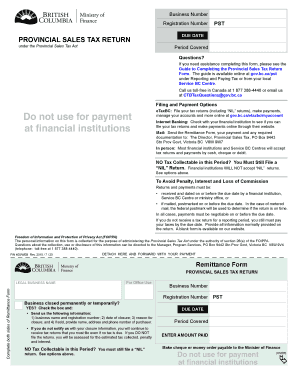
Filling out the Fin 400 form, also known as the Provincial Sales Tax Return, is an essential process for businesses in British Columbia. This guide will provide step-by-step instructions to ensure a smooth experience when completing the form online.

Follow the steps to effectively complete the Fin 400 form online

  1. Click 'Get Form' button to obtain the form and open it in the editable format.
  2. Enter your legal business name in the designated field. Make sure it matches your registered name to prevent any discrepancies.
  3. Input your Business Number and Registration Number accurately, as these are critical for your tax record.
  4. Indicate if your business has closed permanently or temporarily by checking the appropriate box and providing the required closure information.
  5. Specify the due date for the return, ensuring you remain compliant with tax regulations.
  6. Fill in the period covered by this tax return. Accurate dates help in maintaining clear records.
  7. Complete Box A by entering your total sales and leases, which should include taxable, non-taxable, and exempt sales.
  8. In Box B, enter the total tax collectable on those sales. Ensure you do not deduct any amounts and include applicable taxes.
  9. If applicable, calculate and enter the commission in Box C based on the total tax collectable outlined in Box B.
  10. In Box E, indicate the purchase and lease price of taxable goods and services consumed by your business.
  11. Input the tax due on those purchases in Box F.
  12. Enter any authorized adjustments, including amounts for bad debt write-offs and refunds in Boxes H and I respectively.
  13. Calculate the total adjustments in Box J by adding Boxes H and I.
  14. Determine the total amount due by completing Box K, which is the total amount calculated after all adjustments.
  15. Provide your certification by signing, printing your name, and including your daytime telephone number.
  16. Review all the information filled out for accuracy, then save your changes, and either download, print, or share the completed form.

Complete your Fin 400 form online today to ensure timely processing and compliance with tax regulations.

Get form

Experience a faster way to fill out and sign forms on the web. Access the most extensive library of templates available.
Get form

Related content

INFORMATION PACKAGE FOR PERMIT TRAFFIC SIGNALS
Apr 21, 2014 — One PSMT Form sent to Main Office Miscellaneous Revenue along with a FIN...
Learn more
Courses in Finance / Financial Analysis
This course covers money and capital markets and the analysis of fixed-income securities...
Learn more
Air Cooled Condensing Unit - RAUL...
Condenser fins: • Aluminum Fins with copper tubes (standard) with black epoxy paint...
Learn more

Related links form

PY 2015 WIOA Local Area Plan - High Country Workforce 2015 RMM Online Registration Form - API - The Australian Property CPD Record Form 2014 - API Queensland FOOD INVENTORY TRANSFER FORM

Questions & Answers

Get answers to your most pressing questions about US Legal Forms API.

Contact support

If you are selling tangible personal property or certain services in BC, you will need to register for a PST number. This registration enables you to collect PST from your customers and report it to the government. Utilizing the Fin 400 resource can help simplify your registration and ensure compliance with all PST regulations. It's essential to check your obligations to avoid any potential fines.

To fill out a return file, begin by determining the type of return you need to submit. Use the Fin 400 form as a guide, as it provides a structured way to report your income and deductions. Take your time to complete each section, ensuring that all information is accurate before submitting your return.

Filling out tax information can be simple when you follow a clear plan. Start by gathering all necessary documents, including your income sources and deductions, then transfer this data into the Fin 400 form step-by-step. Double-check your entries for any errors before submission to ensure accuracy and compliance.

The simplest tax form varies by individual circumstances, but many find the Fin 400 form straightforward and easy to navigate. This form allows for streamlined reporting of income and deductions, making it suitable especially for those with uncomplicated financial situations. Always review the specifics to ensure it meets your needs.

Filling out tax information can seem challenging, but with the Fin 400 form, it becomes manageable. Start by gathering your income documents, social security information, and any deductions you plan to claim. Ensure you input this information accurately to prevent any delays in processing your tax return.

To file a Saskatchewan PST return, first, collect your sales records for the reporting period. Next, complete the appropriate return form and submit it to the Saskatchewan Ministry of Finance either electronically or by mail. Utilizing the Fin 400 ensures you have accurate forms and deadlines, so you remain compliant with provincial regulations.

Closing a PST account in BC involves submitting a written request to the Ministry of Finance. Ensure to include your account number and any outstanding tax information. Using the Fin 400 can streamline this task by offering you templates and instructions to ensure all necessary details are included.

To claim a PST refund in BC, gather your original receipts and complete the refund application form. You can submit your application online or by mail. The Fin 400 can facilitate the process by providing you with the necessary forms and guidance, making everything simpler for you.

Overview. If you have paid PST in error or have overpaid PST you may be eligible for a refund of the tax. You may claim a refund by requesting a refund from your supplier or by applying to the Ministry of Finance. Note that refund applications may be subject to future audit verification.

How to claim the GST/HST rebate. To claim your rebate, use Form GST189, General Application for GST/HST Rebate. You can only use one reason code per rebate application. If you are eligible to claim a rebate under more than one code, use a separate rebate application for each reason code.

Get This Form Now!

Use professional pre-built templates to fill in and sign documents online faster. Get access to thousands of forms.
Get form
If you believe that this page should be taken down, please follow our DMCA take down processhere.

Industry-leading security and compliance

US Legal Forms protects your data by complying with industry-specific security standards.
  • In businnes since 1997
    25+ years providing professional legal documents.
  • Accredited business
    Guarantees that a business meets BBB accreditation standards in the US and Canada.
  • Secured by Braintree
    Validated Level 1 PCI DSS compliant payment gateway that accepts most major credit and debit card brands from across the globe.
Get Fin 400
Get form
Form Packages
Adoption
Bankruptcy
Contractors
Divorce
Home Sales
Employment
Identity Theft
Incorporation
Landlord Tenant
Living Trust
Name Change
Personal Planning
Small Business
Wills & Estates
Packages A-Z
Form Categories
Affidavits
Bankruptcy
Bill of Sale
Corporate - LLC
Divorce
Employment
Identity Theft
Internet Technology
Landlord Tenant
Living Wills
Name Change
Power of Attorney
Real Estate
Small Estates
Wills
All Forms
Forms A-Z
Form Library
Customer Service
Your Privacy Choices
Terms of Service
Privacy Notice
Legal Hub
Content Takedown Policy
Bug Bounty Program
About Us
Help Portal
Legal Resources
Blog
Affiliates
Contact Us
Delete My Account
Site Map
Industries
Forms in Spanish
Localized Forms
State-specific Forms
Forms Kit
Legal Guides
Real Estate Handbook
All Guides
Prepared for You
Notarize
Incorporation services
Our Customers
For Consumers
For Small Business
For Attorneys
Our Sites
US Legal Forms
USLegal
FormsPass
pdfFiller
signNow
altaFlow
DocHub
Instapage
Social Media
Call us now toll free:
+1 833 426 79 33
As seen in:
  • USA Today logo picture
  • CBC News logo picture
  • LA Times logo picture
  • The Washington Post logo picture
  • AP logo picture
  • Forbes logo picture
© Copyright 1997-2025
airSlate Legal Forms, Inc.
3720 Flowood Dr, Flowood, Mississippi 39232
Form Packages
Adoption
Bankruptcy
Contractors
Divorce
Home Sales
Employment
Identity Theft
Incorporation
Landlord Tenant
Living Trust
Name Change
Personal Planning
Small Business
Wills & Estates
Packages A-Z
Form Categories
Affidavits
Bankruptcy
Bill of Sale
Corporate - LLC
Divorce
Employment
Identity Theft
Internet Technology
Landlord Tenant
Living Wills
Name Change
Power of Attorney
Real Estate
Small Estates
Wills
All Forms
Forms A-Z
Form Library
Customer Service
Your Privacy Choices
Terms of Service
Privacy Notice
Legal Hub
Content Takedown Policy
Bug Bounty Program
About Us
Help Portal
Legal Resources
Blog
Affiliates
Contact Us
Delete My Account
Site Map
Industries
Forms in Spanish
Localized Forms
State-specific Forms
Forms Kit
Legal Guides
Real Estate Handbook
All Guides
Prepared for You
Notarize
Incorporation services
Our Customers
For Consumers
For Small Business
For Attorneys
Our Sites
US Legal Forms
USLegal
FormsPass
pdfFiller
signNow
altaFlow
DocHub
Instapage
Social Media
Call us now toll free:
+1 833 426 79 33
As seen in:
  • USA Today logo picture
  • CBC News logo picture
  • LA Times logo picture
  • The Washington Post logo picture
  • AP logo picture
  • Forbes logo picture
© Copyright 1997-2025
airSlate Legal Forms, Inc.
3720 Flowood Dr, Flowood, Mississippi 39232