Loading
Form preview
  • US Legal Forms
  • Other Templates
  • More Forms
  • More Uncategorized Forms
  • South Carolina Form Fr 402

Get South Carolina Form Fr 402

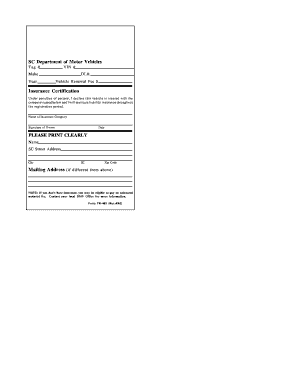
Name of Insurance Company Signature of Owner Date PLEASE PRINT CLEARLY Name SC Street Address City SC Zip Code Mailing Address if different from above NOTE If you don t have insurance you may be eligible to pay an uninsured motorist fee. Contact your local DMV Office for more information. Form FR-402 Rev.4/05 A NOTE ABOUT YOUR VEHICLE S LIABILITY INSURANCE If you sell your vehicle or let your insurance lapse you must return your plate to SCDMV im.

How it works

  1. Open form

    Open form follow the instructions

  2. Easily sign form

    Easily sign the form with your finger

  3. Share form

    Send filled & signed form or save

How to fill out the South Carolina Form Fr 402 online

Filling out the South Carolina Form Fr 402 online is a straightforward process that can help you manage your vehicle registration efficiently. This guide will provide you with clear instructions on how to complete the form accurately.

Follow the steps to complete the Form Fr 402 online.

  1. Click ‘Get Form’ button to access the form and open it in your preferred online editor.
  2. Begin by entering the Vehicle Identification Number (VIN) in the corresponding field. Ensure that you input this number accurately as it uniquely identifies your vehicle.
  3. Enter your driver's license number in the designated field. This is essential for verifying your identity as the vehicle owner.
  4. Input the Vehicle Renewal Fee in the appropriate section. Make sure to check the current fees and enter the correct amount.
  5. Clearly print your name, South Carolina street address, city, and zip code in the designated areas. If your mailing address differs, provide it in the corresponding fields.
  6. Once you have filled out the form, you can save your changes, download it for your records, print it for submission, or share it as needed.

Complete your vehicle registration documents online today.

Get form

Experience a faster way to fill out and sign forms on the web. Access the most extensive library of templates available.
Get form

Related content

Downloadable Paper Forms - S.C. Secretary of State
This form is used to reserve a name for a domestic LLC prior to organization. The name may...
Learn more
South Carolina Forms Index: SC Courts
Nov 8, 2024 — This program allows you to quickly and easily complete the child support...
Learn more
2013 Codebook Report Land-Line and Cell-Phone data
Aug 15, 2014 — Prologue: Description: (Ever told) you have some form of arthritis...
Learn more

Related links form

Graduation Requirements For Rufus King I - Www5 Milwaukee K12 Wi DIBELS Next Student Materials - Www5 Milwaukee K12 Wi OBJECTION TO HEARING OFFICERS RECOMMENDATION(S) AND INTERIM ORDER ZAPATA ENERGY CORPORATION - TORC Oil

Questions & Answers

Get answers to your most pressing questions about US Legal Forms API.

Contact support

To file for residency in South Carolina, you need to provide documents proving your physical presence and intent to live in the state, such as a lease agreement or utility bills. Complete the necessary forms and submit them to the appropriate local agency. The South Carolina Form Fr 402 can also assist you by presenting a clear outline for gathering your residency evidence.

In South Carolina, you should report an accident by contacting local law enforcement immediately. Gather all relevant information, such as witness statements and insurance details. After the initial report, ensure to file the necessary forms, like the South Carolina Form Fr 402, to formalize your report with the DMV.

Submitting a FR 10, which is required for certain accident situations, involves filling out the form and sending it to the South Carolina DMV. Ensure you include all necessary information and submit it within the required time frame. You can also use the South Carolina Form Fr 402 to assist in compiling any additional documents you may need for your submission.

To submit an accident report to the DMV in South Carolina, fill out the appropriate accident report form and deliver it to the DMV office. Make sure you include all required details about the accident. Utilizing the South Carolina Form Fr 402 can help to ensure that your report is complete and correctly formatted.

In South Carolina, you typically have three years from the date of the accident to file a personal injury claim. However, filing sooner helps protect your rights and gather essential evidence. Consider using the South Carolina Form Fr 402 to keep your filing organized and compliant.

Filing a rule to show cause in South Carolina involves submitting a motion to the court stating your reasons clearly. Include the necessary documentation and ensure you follow the procedural rules set by the court system. The South Carolina Form Fr 402 can serve as a guide to help format your documents correctly.

Yes, in South Carolina, you must report an accident to the DMV if it resulted in injury, death, or property damage exceeding a certain amount. This report contributes to maintaining accurate driving records and helps in processing claims. Use the South Carolina Form Fr 402 as part of your documentation process.

To file in the South Carolina Court of Appeals, start by preparing the appropriate documents, including a notice of appeal and a case brief. Make sure you comply with the deadlines and requirements set forth by the court. You can also utilize resources such as the South Carolina Form Fr 402 to ensure accuracy in your filings.

In South Carolina, both parties are not required to be present for a title transfer, but it is beneficial. If one party cannot attend, they can provide necessary documents like a bill of sale and a signed title. Not relying on both parties to be present can expedite the transfer process, especially if you utilize a straightforward form like the South Carolina Form FR 402. Always check local requirements to ensure compliance.

If You're the Buyer To register a vehicle in South Carolina, you will need to bring the following documentation to the DMV: Completed Title Application. Completed Statement of Vehicle Operation in South Carolina (SCDMV Form TI-006), if you do not have a South Carolina driver's license. Vehicle title.

Get This Form Now!

Use professional pre-built templates to fill in and sign documents online faster. Get access to thousands of forms.
Get form
If you believe that this page should be taken down, please follow our DMCA take down processhere.
Get South Carolina Form Fr 402
Get form
  • Adoption
  • Bankruptcy
  • Contractors
  • Divorce
  • Home Sales
  • Employment
  • Identity Theft
  • Incorporation
  • Landlord Tenant
  • Living Trust
  • Name Change
  • Personal Planning
  • Small Business
  • Wills & Estates
  • Packages A-Z
  • Affidavits
  • Bankruptcy
  • Bill of Sale
  • Corporate - LLC
  • Divorce
  • Employment
  • Identity Theft
  • Internet Technology
  • Landlord Tenant
  • Living Wills
  • Name Change
  • Power of Attorney
  • Real Estate
  • Small Estates
  • Wills
  • All Forms
  • Forms A-Z
  • Other Templates
  • Legal Hub
  • About Us
  • Help Portal
  • Legal Resources
  • Blog
  • Affiliates
  • Contact Us
  • Delete My Account
  • Site Map
  • Industries
  • Forms in Spanish
  • Localized Forms
  • State-specific Forms
  • Forms Kit
  • Real Estate Handbook
  • All Guides
  • Notarize
  • Incorporation services
  • For Consumers
  • For Small Business
  • For Attorneys
  • USLegal
  • FormsPass
  • pdfFiller
  • signNow
  • altaFlow
  • DocHub
  • Instapage
Form Packages
  • Adoption
  • Bankruptcy
  • Contractors
  • Divorce
  • Home Sales
  • Employment
  • Identity Theft
  • Incorporation
  • Landlord Tenant
  • Living Trust
  • Name Change
  • Personal Planning
  • Small Business
  • Wills & Estates
  • Packages A-Z
Form Categories
  • Affidavits
  • Bankruptcy
  • Bill of Sale
  • Corporate - LLC
  • Divorce
  • Employment
  • Identity Theft
  • Internet Technology
  • Landlord Tenant
  • Living Wills
  • Name Change
  • Power of Attorney
  • Real Estate
  • Small Estates
  • Wills
  • All Forms
  • Forms A-Z
  • Other Templates
Customer Service
  • Legal Hub
  • About Us
  • Help Portal
  • Legal Resources
  • Blog
  • Affiliates
  • Contact Us
  • Delete My Account
  • Site Map
  • Industries
  • Forms in Spanish
  • Localized Forms
  • State-specific Forms
  • Forms Kit
Legal Guides
  • Real Estate Handbook
  • All Guides
Prepared for you
  • Notarize
  • Incorporation services
Our Customers
  • For Consumers
  • For Small Business
  • For Attorneys
Our Sites
  • USLegal
  • FormsPass
  • pdfFiller
  • signNow
  • altaFlow
  • DocHub
  • Instapage
Social Media
Call us now toll free:
+1 833 426 79 33
As seen in:
© Copyright 1999-2026 airSlate Legal Forms, Inc. 17 Station Street, Ste. 203, Brookline, MA 02445
  • Your Privacy Choices
  • Terms of Service
  • Privacy Notice
  • Content Takedown Policy
  • Bug Bounty Program