Loading
Form preview
  • US Legal Forms
  • Other Templates
  • More Forms
  • More Multi-State Forms
  • Notice To Employee - Dir Ca 2020

Get Notice To Employee - Dir Ca 2020-2026

How it works

  1. Open form

    Open form follow the instructions

  2. Easily sign form

    Easily sign the form with your finger

  3. Share form

    Send filled & signed form or save

How to fill out the NOTICE TO EMPLOYEE - Dir Ca online

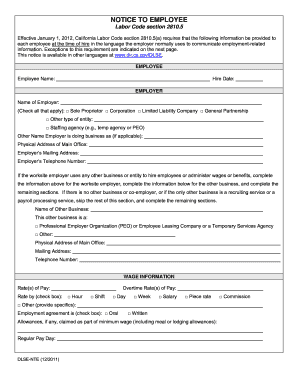
The NOTICE TO EMPLOYEE - Dir Ca is an essential document that employers must provide to new employees at the time of hire, ensuring compliance with California Labor Code section 2810.5. This guide will walk you through the process of filling out this form online, step by step, to ensure accuracy and completeness.

Follow the steps to complete the form effectively.

  1. Begin by locating and pressing the ‘Get Form’ button to access the NOTICE TO EMPLOYEE - Dir Ca form in your preferred online editor.
  2. Fill in the employee name and hire date in the designated fields. Ensure that the information is accurate and reflects the legal name as per identification documents.
  3. In the employer section, enter the name of the employer. Then, check all applicable boxes to indicate the type of entity — whether it is a sole proprietor, corporation, limited liability company, general partnership, or other.
  4. If the employer operates under a different business name, include that information in the corresponding field. Next, provide the physical address of the main office as well as the mailing address.
  5. Input the employer’s telephone number to ensure easy communication. If there is another business hiring employees, fill out that section with the required information about the other business.
  6. In the wage information section, state the rate(s) of pay and check the box for the pay method (hourly, salary, commission, etc.). Indicate the applicable overtime rate(s) as well.
  7. Specify any allowances claimed as part of minimum wage, such as meal or lodging allowances, and indicate the regular pay day.
  8. For workers’ compensation, enter the insurance carrier’s name, address, telephone number, and policy number. If self-insured, indicate this and provide the certificate number.
  9. In the acknowledgment of receipt section, print the names of both the employer representative and the employee. Both parties need to sign and date the document to confirm receipt.
  10. After completing all sections, save the changes made to the form. You can download, print, or share the form as required for your records.

Complete your documentation process online to ensure compliance and accuracy.

Get form

Experience a faster way to fill out and sign forms on the web. Access the most extensive library of templates available.
Get form

Related content

Notice to Employee (Labor Code section 2810.5)
Labor Code section 2810.5(b) requires that the employer notify you in writing of any...
Learn more
NOTICE TO EMPLOYEE Labor Code section 90.2
Jan 1, 2018 — A copy of the Notice of Inspection of I-9 Employment Eligibility...
Learn more
CA COVID-19 Supplemental Paid Sick Leave for Food...
Apr 16, 2020 — Any food sector worker denied COVID-19 supplemental paid sick leave can...
Learn more

Related links form

Identify Similar Triangles With Proofs 5 Pack - Math Worksheets Land - Blogs Reeths-puffer INSTALLATION OPERATION GUIDE MRZ-6 - Niles Audio Exploring Diasporic Identities In Selected Plays By - Rmmla - Rmmla Innoved The Attached Application Must Be Completed In Its Entirety And Returned

Questions & Answers

Get answers to your most pressing questions about US Legal Forms API.

Contact support

Under California Labor Code 2802, employers must reimburse employees for all necessary expenditures incurred while performing their job duties. This includes costs for tools, equipment, and other necessary items that enable employees to complete their work. Understanding these rights can help you claim rightful reimbursements, making the NOTICE TO EMPLOYEE - Dir Ca essential for employee awareness.

In California, an employer is required to correct payroll errors promptly, typically within a reasonable timeframe, usually after receiving notice of the mistake. Employees should report discrepancies as soon as they arise, which helps ensure compliance. This is important in maintaining trust and transparency, following guidelines set in the NOTICE TO EMPLOYEE - Dir Ca.

The Notice of the Wage Theft Prevention Act is a written notification employers must provide to employees at the time of hire. This notice informs employees about their wage rates, benefits, and other employment terms. It serves as a vital tool for employee awareness, aligning with the NOTICE TO EMPLOYEE - Dir Ca requirements, ensuring workers are informed of their rights.

Yes, you can request your employee file in California. Employers are required to provide you access to your personnel records under the California Labor Code. This includes documents related to your employment and any performance evaluations, ensuring you stay informed about your work history. Make sure to utilize the NOTICE TO EMPLOYEE - Dir Ca for proper process.

Dealing with unwanted staff can be a sensitive issue that requires a strategic approach. First, identify the reasons for your dissatisfaction and document relevant incidents. Then, engage in open discussions to address concerns and explore options. If termination becomes necessary, ensure compliance with laws and consider issuing a NOTICE TO EMPLOYEE - Dir Ca for record keeping.

To report an employer in California, document specific instances of wrongdoing or policy violations. Then contact the appropriate agency, such as the California Department of Fair Employment and Housing or the Division of Labor Standards Enforcement. Be prepared to provide evidence and details to support your claim. A NOTICE TO EMPLOYEE - Dir Ca may be beneficial if your rights are being compromised.

When asking an employee to resign, approach the situation with respect and clarity. Schedule a private meeting to discuss your concerns regarding their performance or fit within the company. Be supportive and open to dialogue while emphasizing the mutual benefits of their resignation. Providing a NOTICE TO EMPLOYEE - Dir Ca during this conversation can help outline their options and rights.

To encourage an employee to quit, create an environment where they feel comfortable exploring other opportunities. Discuss their career goals and how their current role may not align with them. You can also address issues openly and provide resources for job searching. A well-structured NOTICE TO EMPLOYEE - Dir Ca may serve as part of this process.

Encouraging an employee to resign requires a careful approach. Have a candid conversation about their role and any concerns with their performance or fit within the team. Offering support through transitional resources can help facilitate their decision. Keep in mind that providing a NOTICE TO EMPLOYEE - Dir Ca may aid in making the situation clearer.

You cannot force an employee to leave without a legitimate reason. Under California law, any termination must comply with employment regulations. If an employee does not meet performance expectations, it's best to document these issues before considering termination. In this context, a proper NOTICE TO EMPLOYEE - Dir Ca can clarify expectations and provide necessary documentation.

Get This Form Now!

Use professional pre-built templates to fill in and sign documents online faster. Get access to thousands of forms.
Get form
If you believe that this page should be taken down, please follow our DMCA take down processhere.
Get NOTICE TO EMPLOYEE - Dir Ca
Get form
  • Adoption
  • Bankruptcy
  • Contractors
  • Divorce
  • Home Sales
  • Employment
  • Identity Theft
  • Incorporation
  • Landlord Tenant
  • Living Trust
  • Name Change
  • Personal Planning
  • Small Business
  • Wills & Estates
  • Packages A-Z
  • Affidavits
  • Bankruptcy
  • Bill of Sale
  • Corporate - LLC
  • Divorce
  • Employment
  • Identity Theft
  • Internet Technology
  • Landlord Tenant
  • Living Wills
  • Name Change
  • Power of Attorney
  • Real Estate
  • Small Estates
  • Wills
  • All Forms
  • Forms A-Z
  • Other Templates
  • Legal Hub
  • About Us
  • Help Portal
  • Legal Resources
  • Blog
  • Affiliates
  • Contact Us
  • Delete My Account
  • Site Map
  • Industries
  • Forms in Spanish
  • Localized Forms
  • State-specific Forms
  • Forms Kit
  • Real Estate Handbook
  • All Guides
  • Notarize
  • Incorporation services
  • For Consumers
  • For Small Business
  • For Attorneys
  • USLegal
  • FormsPass
  • pdfFiller
  • signNow
  • altaFlow
  • DocHub
  • Instapage
Form Packages
  • Adoption
  • Bankruptcy
  • Contractors
  • Divorce
  • Home Sales
  • Employment
  • Identity Theft
  • Incorporation
  • Landlord Tenant
  • Living Trust
  • Name Change
  • Personal Planning
  • Small Business
  • Wills & Estates
  • Packages A-Z
Form Categories
  • Affidavits
  • Bankruptcy
  • Bill of Sale
  • Corporate - LLC
  • Divorce
  • Employment
  • Identity Theft
  • Internet Technology
  • Landlord Tenant
  • Living Wills
  • Name Change
  • Power of Attorney
  • Real Estate
  • Small Estates
  • Wills
  • All Forms
  • Forms A-Z
  • Other Templates
Customer Service
  • Legal Hub
  • About Us
  • Help Portal
  • Legal Resources
  • Blog
  • Affiliates
  • Contact Us
  • Delete My Account
  • Site Map
  • Industries
  • Forms in Spanish
  • Localized Forms
  • State-specific Forms
  • Forms Kit
Legal Guides
  • Real Estate Handbook
  • All Guides
Prepared for you
  • Notarize
  • Incorporation services
Our Customers
  • For Consumers
  • For Small Business
  • For Attorneys
Our Sites
  • USLegal
  • FormsPass
  • pdfFiller
  • signNow
  • altaFlow
  • DocHub
  • Instapage
Social Media
Call us now toll free:
+1 833 426 79 33
As seen in:
© Copyright 1999-2026 airSlate Legal Forms, Inc. 17 Station Street, Suite 303, Brookline, MA 02445
  • Your Privacy Choices
  • Terms of Service
  • Privacy Notice
  • Content Takedown Policy
  • Bug Bounty Program