We use cookies to improve security, personalize the user experience, enhance our marketing activities (including cooperating with our marketing partners) and for other business use.
Click "here" to read our Cookie Policy. By clicking "Accept" you agree to the use of cookies. Read less
Read more
Accept
Loading
Form preview
  • US Legal Forms
  • Form Library
  • More Forms
  • More Uncategorized Forms
  • Unauthorized Transaction Forms From Chase

Get Unauthorized Transaction Forms From Chase

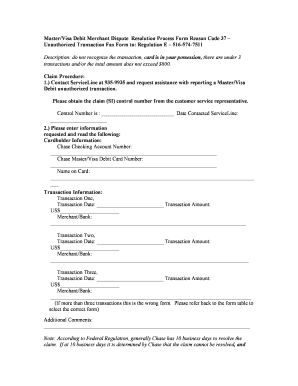
Master/Visa Debit Merchant Dispute Resolution Process Form Reason Code 37 Unauthorized Transaction Fax Form to Regulation E 516-574-7511 Description do not recognize the transaction card is in your possession there are under 3 transactions and/or the total amount does not exceed 800. Claim Procedure 1. Contact ServiceLine at 935-9935 and request assistance with reporting a Master/Visa Debit unauthorized transaction. Please obtain the claim SI c.

How it works

  1. Open form

    Open form follow the instructions

  2. Easily sign form

    Easily sign the form with your finger

  3. Share form

    Send filled & signed form or save

How to fill out the Unauthorized Transaction Forms From Chase online

This guide provides clear and comprehensive instructions on how to effectively complete the Unauthorized Transaction Forms From Chase online. Whether you are familiar with online forms or new to the process, this step-by-step approach will help you file your claim smoothly.

Follow the steps to fill out the form accurately and efficiently.

  1. Click 'Get Form' button to access the form and open it in the editor.
  2. Contact ServiceLine at 935-9935 and request assistance with reporting a Master/Visa Debit unauthorized transaction. Ensure you obtain the claim control number from the customer service representative.
  3. Enter the Cardholder Information: Provide your Chase Checking Account Number and Chase Master/Visa Debit Card Number, ensuring accuracy to avoid processing delays.
  4. Fill in the Name on the Card exactly as it appears. This section is crucial for verifying your identity.
  5. Report Transaction Information. For each transaction you do not recognize:
  6. If you have additional comments or notes pertaining to your claim, fill in the Additional Comments section.
  7. Review the statement regarding your status as the cardholder. Ensure all provided information is correct before signing.
  8. Fax the completed form to Regulation E Investigations at 516-574-7511 or mail to JP Morgan Chase & Co., Regulation E Investigations, PO Box 1200, Hicksville, NY 11802.
  9. Keep a copy of the form and any correspondence for your records. Upon submission, a letter with your Regulation E claim number will be generated automatically.

Act now to complete your Unauthorized Transaction Forms From Chase online and ensure your case is processed.

Get form

Experience a faster way to fill out and sign forms on the web. Access the most extensive library of templates available.
Get form

Related content

Dispute Guide - US Department of Commerce
Processing of required forms (i.e., affidavit, dispute form). â–¡. Assisting cardholders...
Learn more
JPMorgan Chase
What the Fraud Department Does at JPMorgan Chase 5 ... Occurs when true cardholder uses...
Learn more
Bank fraud - Wikipedia
Bank fraud is the use of potentially illegal means to obtain money, assets, or other...
Learn more

Related links form

Shawn Phillips' 4-week Blitz Weight - Bodybuilding.com Forums Chantry Primary Academy Parent Order Form Crba Casablanca AUTOMATIC REVALIDATION OF VISAS

Questions & Answers

Get answers to your most pressing questions about US Legal Forms API.

Contact support

To report an unauthorized transaction in Chase, start by logging into your account or calling Chase customer service. Request the Unauthorized Transaction Forms From Chase, and make sure to document your case accurately. Fill out the form and submit it as directed, helping Chase investigate the matter quickly and efficiently for a resolution.

You can report an unauthorized transaction on Chase by accessing your online account or using the mobile app. Navigate to the section for unauthorized transactions and complete the Unauthorized Transaction Forms From Chase. Provide details about the transaction, including the date, amount, and reason for reporting. Chase will then review your claim and take appropriate action.

To obtain proof of your banking activities from Chase, you can log into your account and print transaction statements. If you need a specific verification document, reach out to customer service for guidance on the necessary steps. Using the Unauthorized Transaction Forms From Chase may expedite any requests related to unauthorized activities.

To obtain a bank verification letter from Chase, log into your online banking, and search for the request option under account services. You can also visit a local branch to speak with a teller, who will help you fill out the necessary forms. Make sure to mention the need for Unauthorized Transaction Forms From Chase if applicable.

To verify your identity with Chase Bank, you usually need to provide personal information such as your Social Security number and account details. This information helps Chase confirm your identity securely. If you require additional verification, consider filling out the Unauthorized Transaction Forms From Chase if your identity has been compromised.

You can easily export a PDF of your transactions through the Chase app. Log into your account and navigate to your account details, where you will find an option to download your transaction history. For further assistance, you may also refer to the Unauthorized Transaction Forms From Chase if you encounter any issues.

To cancel an unauthorized transaction on Chase, first log into your account or call customer service immediately. You will need to complete the Unauthorized Transaction Forms From Chase to report the incident. This will assist in the investigation and help you receive a refund faster.

You can get a bank verification document from Chase by logging into your online banking account or using the mobile app. Look for the 'Documents' section, where you can download the required document. Alternatively, contact Chase customer service for help, and they can send the Unauthorized Transaction Forms From Chase directly to you.

To obtain a bank verification form from Chase, start by logging into your Chase account online or through the mobile app. Navigate to the 'Account Services' section, where you can request the form directly. If you prefer, you can also visit a local Chase branch and ask a representative for assistance with the Unauthorized Transaction Forms From Chase.

To authorize a transaction on Chase, use your debit or credit card as usual at the point of sale or online. Ensure that you enter your card details correctly to avoid any issues. If you prefer additional security, you can also set up notifications through the Chase app to approve specific transactions, enhancing your control over your finances.

Get This Form Now!

Use professional pre-built templates to fill in and sign documents online faster. Get access to thousands of forms.
Get form
If you believe that this page should be taken down, please follow our DMCA take down processhere.

Industry-leading security and compliance

US Legal Forms protects your data by complying with industry-specific security standards.
  • In businnes since 1997
    25+ years providing professional legal documents.
  • Accredited business
    Guarantees that a business meets BBB accreditation standards in the US and Canada.
  • Secured by Braintree
    Validated Level 1 PCI DSS compliant payment gateway that accepts most major credit and debit card brands from across the globe.
Get Unauthorized Transaction Forms From Chase
Get form
Form Packages
Adoption
Bankruptcy
Contractors
Divorce
Home Sales
Employment
Identity Theft
Incorporation
Landlord Tenant
Living Trust
Name Change
Personal Planning
Small Business
Wills & Estates
Packages A-Z
Form Categories
Affidavits
Bankruptcy
Bill of Sale
Corporate - LLC
Divorce
Employment
Identity Theft
Internet Technology
Landlord Tenant
Living Wills
Name Change
Power of Attorney
Real Estate
Small Estates
Wills
All Forms
Forms A-Z
Form Library
Customer Service
Terms of Service
Privacy Notice
Legal Hub
Content Takedown Policy
Bug Bounty Program
About Us
Help Portal
Legal Resources
Blog
Affiliates
Contact Us
Delete My Account
Site Map
Industries
Forms in Spanish
Localized Forms
State-specific Forms
Forms Kit
Legal Guides
Real Estate Handbook
All Guides
Prepared for You
Notarize
Incorporation services
Our Customers
For Consumers
For Small Business
For Attorneys
Our Sites
US Legal Forms
USLegal
FormsPass
pdfFiller
signNow
altaFlow
DocHub
Instapage
Social Media
Call us now toll free:
+1 833 426 79 33
As seen in:
  • USA Today logo picture
  • CBC News logo picture
  • LA Times logo picture
  • The Washington Post logo picture
  • AP logo picture
  • Forbes logo picture
© Copyright 1997-2025
airSlate Legal Forms, Inc.
3720 Flowood Dr, Flowood, Mississippi 39232
Form Packages
Adoption
Bankruptcy
Contractors
Divorce
Home Sales
Employment
Identity Theft
Incorporation
Landlord Tenant
Living Trust
Name Change
Personal Planning
Small Business
Wills & Estates
Packages A-Z
Form Categories
Affidavits
Bankruptcy
Bill of Sale
Corporate - LLC
Divorce
Employment
Identity Theft
Internet Technology
Landlord Tenant
Living Wills
Name Change
Power of Attorney
Real Estate
Small Estates
Wills
All Forms
Forms A-Z
Form Library
Customer Service
Terms of Service
Privacy Notice
Legal Hub
Content Takedown Policy
Bug Bounty Program
About Us
Help Portal
Legal Resources
Blog
Affiliates
Contact Us
Delete My Account
Site Map
Industries
Forms in Spanish
Localized Forms
State-specific Forms
Forms Kit
Legal Guides
Real Estate Handbook
All Guides
Prepared for You
Notarize
Incorporation services
Our Customers
For Consumers
For Small Business
For Attorneys
Our Sites
US Legal Forms
USLegal
FormsPass
pdfFiller
signNow
altaFlow
DocHub
Instapage
Social Media
Call us now toll free:
+1 833 426 79 33
As seen in:
  • USA Today logo picture
  • CBC News logo picture
  • LA Times logo picture
  • The Washington Post logo picture
  • AP logo picture
  • Forbes logo picture
© Copyright 1997-2025
airSlate Legal Forms, Inc.
3720 Flowood Dr, Flowood, Mississippi 39232