Loading
Form preview
  • US Legal Forms
  • Form Library
  • Foreign Forms
  • Foreign UK Other Forms
  • Uk Booths Sts 02

Get Uk Booths Sts 02

How it works

  1. Open form

    Open form follow the instructions

  2. Easily sign form

    Easily sign the form with your finger

  3. Share form

    Send filled & signed form or save

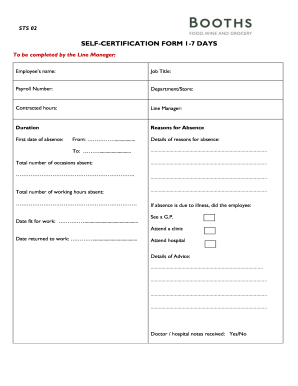
How to fill out the UK Booths STS 02 online

Filling out the UK Booths STS 02 self-certification form is an essential process for employees to document their absences. This guide provides a clear, step-by-step approach to help you successfully complete the form online.

Follow the steps to accurately complete your self-certification form

  1. Click ‘Get Form’ button to obtain the form and access it in your online editor.
  2. Begin by entering the employee’s name in the designated field. Make sure this matches the name on your payroll details.
  3. Fill in your job title accurately as it appears on your employment records.
  4. Input your payroll number, ensuring you use the correct number assigned to your employment.
  5. Declare your department or store where you are employed.
  6. Enter the number of contracted hours you are expected to work each week.
  7. Provide the name of your line manager who will review your absence.
  8. Indicate the duration of your absence, including the first date of absence and the last date if applicable.
  9. Detail the specific reasons for your absence in the provided text fields.
  10. Record the total number of occasions you have been absent over the relevant period.
  11. Calculate and state the total number of working hours you have been absent.
  12. If your absence was due to illness, mark whether you saw a General Practitioner or attended a clinic, and provide the date you were fit for work.
  13. Document the date you returned to work and include any relevant advice noted during your medical visits.
  14. Indicate whether doctor or hospital notes were received, and answer if you have been certified as fit to return to work.
  15. Select the category that applies to your absence, such as sick leave or compassionate leave, and input the hours or days related.
  16. Sign the form in the designated area, printing your name and the date beside your signature.
  17. Once the form is completed, ensure to submit any required administrative actions, such as copying the self-certification form to send it to Payroll.

Complete your self-certification forms online efficiently and accurately.

Get form

Experience a faster way to fill out and sign forms on the web. Access the most extensive library of templates available.
Get form

Related content

Unraveling the causal role of sleep traits in...
by Y Huang · 2025 — To evaluate the potential causal role of sleep traits (STs) on...
Learn more
UK Title V Permit | Environmental Quality...
The University is permitted to operate 10 dual-fired natural gas/diesel boilers, 4...
Learn more
Starkey Programming Device NOAHlink
Starting in May/June 2002, HIMSA will begin certifying NOAH 3 modules for use with...
Learn more

Related links form

PTX PRM ZGL T5 SL5 174779G.book Tuition Commitment Deposit Form - Qc.cuny.edu - Qc Cuny Eprh Federal Verification Worksheet 2017-2018 - Liu

Questions & Answers

Get answers to your most pressing questions about US Legal Forms API.

Contact support

To secure a UK access code for Global Entry, start by visiting the Global Entry registration site. Complete your application and await approval, along with guidelines for obtaining your specific access code. Utilizing the UK Booths STS 02 can make your international travel more rewarding while ensuring smooth entry into the UK.

The northern supermarket chain in the UK is Booths, known for its high-quality food and local products. When shopping there, you may come across selections that reflect the region's unique tastes. Consider exploring the UK Booths STS 02 to discover an enjoyable grocery experience in the north of England.

Yes, you can use your US Global Entry in the UK, though it works differently than in the U.S. The UK Booths STS 02 allows for expedited processing upon arrival, making it easier to navigate your entry. Always verify specific rules for using your Global Entry privileges in the UK before departure.

To get access to the UK, you need a valid passport and may require a visa depending on your nationality. Applying for a Global Entry access code through the UK Booths STS 02 can greatly simplify your arrival process. Ensure you check entry requirements before traveling to avoid any inconveniences.

The UK does not have a TSA Precheck system like the United States. However, the UK Booths STS 02 facilitates expedited entry for U.S. travelers, making the process smoother. For seamless travel, look into services that can help with faster onboarding when you travel between the U.S. and the UK.

To obtain a UK access code for Global Entry, you must first register for the program through the official Global Entry website. After your application is approved, you will receive instructions on how to set up your access code. Remember, using the UK Booths STS 02 can help streamline your travel experience, allowing for efficient processing at the border.

However, it will no longer give out free hot drinks, and is ending the unlimited half-price hot drinks at cafés offer. Also, where previously members would get the cost of a weekend newspaper taken off their receipt if they spent £15, the minimum spend will now be raised to £25.

Importantly, Booths remains a family owned and run business, with 5th generation Edwin Booth, the current Chairman. The remainder of the Booths board consists of experienced directors with long standing industry expertise.

In 2008, Booths was under pressure by Waitrose with rumours of a takeover, which was later ruled out. Booths and Waitrose then formed a buying group together.

Be rewarded with 5% back on 1000s of products when you see the piggy bank symbol. You have the option to donate your 5% reward to local charities in your community. Click here for more information and our FAQs. Be rewarded with exclusive deals when you dine in our café.

Get This Form Now!

Use professional pre-built templates to fill in and sign documents online faster. Get access to thousands of forms.
Get form
If you believe that this page should be taken down, please follow our DMCA take down processhere.

Industry-leading security and compliance

US Legal Forms protects your data by complying with industry-specific security standards.
  • In businnes since 1997
    25+ years providing professional legal documents.
  • Accredited business
    Guarantees that a business meets BBB accreditation standards in the US and Canada.
  • Secured by Braintree
    Validated Level 1 PCI DSS compliant payment gateway that accepts most major credit and debit card brands from across the globe.
Get UK Booths STS 02
Get form
  • Adoption
  • Bankruptcy
  • Contractors
  • Divorce
  • Home Sales
  • Employment
  • Identity Theft
  • Incorporation
  • Landlord Tenant
  • Living Trust
  • Name Change
  • Personal Planning
  • Small Business
  • Wills & Estates
  • Packages A-Z
  • Affidavits
  • Bankruptcy
  • Bill of Sale
  • Corporate - LLC
  • Divorce
  • Employment
  • Identity Theft
  • Internet Technology
  • Landlord Tenant
  • Living Wills
  • Name Change
  • Power of Attorney
  • Real Estate
  • Small Estates
  • Wills
  • All Forms
  • Forms A-Z
  • Form Library
  • Legal Hub
  • About Us
  • Help Portal
  • Legal Resources
  • Blog
  • Affiliates
  • Contact Us
  • Delete My Account
  • Site Map
  • Industries
  • Forms in Spanish
  • Localized Forms
  • State-specific Forms
  • Forms Kit
  • Real Estate Handbook
  • All Guides
  • Notarize
  • Incorporation services
  • For Consumers
  • For Small Business
  • For Attorneys
  • USLegal
  • FormsPass
  • pdfFiller
  • signNow
  • altaFlow
  • DocHub
  • Instapage
Form Packages
  • Adoption
  • Bankruptcy
  • Contractors
  • Divorce
  • Home Sales
  • Employment
  • Identity Theft
  • Incorporation
  • Landlord Tenant
  • Living Trust
  • Name Change
  • Personal Planning
  • Small Business
  • Wills & Estates
  • Packages A-Z
Form Categories
  • Affidavits
  • Bankruptcy
  • Bill of Sale
  • Corporate - LLC
  • Divorce
  • Employment
  • Identity Theft
  • Internet Technology
  • Landlord Tenant
  • Living Wills
  • Name Change
  • Power of Attorney
  • Real Estate
  • Small Estates
  • Wills
  • All Forms
  • Forms A-Z
  • Form Library
Customer Service
  • Legal Hub
  • About Us
  • Help Portal
  • Legal Resources
  • Blog
  • Affiliates
  • Contact Us
  • Delete My Account
  • Site Map
  • Industries
  • Forms in Spanish
  • Localized Forms
  • State-specific Forms
  • Forms Kit
Legal Guides
  • Real Estate Handbook
  • All Guides
Prepared for you
  • Notarize
  • Incorporation services
Our Customers
  • For Consumers
  • For Small Business
  • For Attorneys
Our Sites
  • USLegal
  • FormsPass
  • pdfFiller
  • signNow
  • altaFlow
  • DocHub
  • Instapage
Social Media
Call us now toll free:
+1 833 426 79 33
As seen in:
© Copyright 1999-2026 airSlate Legal Forms, Inc. 3720 Flowood Dr, Flowood, Mississippi 39232
  • Your Privacy Choices
  • Terms of Service
  • Privacy Notice
  • Content Takedown Policy
  • Bug Bounty Program