Loading
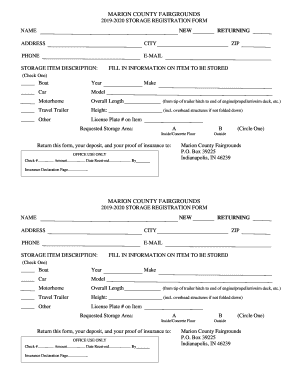
Get Fl Fairgrounds Storage Registration Form - Marion County 2019-2026
How it works
-

Open form follow the instructions
-

Easily sign the form with your finger
-

Send filled & signed form or save
How to fill out the FL Fairgrounds Storage Registration Form - Marion County online
Completing the FL Fairgrounds Storage Registration Form - Marion County online is a straightforward process that allows users to securely register their storage items. This guide will provide comprehensive, step-by-step instructions to facilitate a smooth experience.
Follow the steps to correctly fill out the registration form.
- Press the ‘Get Form’ button to access the registration form and open it online.
- Begin by filling in your personal information, including your name, address, city, zip code, phone number, and email. Ensure all details are accurate to facilitate communication.
- Identify the item you plan to store by checking the appropriate box. Options include Boat, Car, Motorhome, Travel Trailer, or Other.
- For the selected item, provide the specific details such as the year of the boat or model and make for the car or motorhome. If applicable, also include overall length for motorhomes and height for travel trailers.
- Enter the license plate number for the item you are registering to ensure proper identification.
- Select your requested storage area by checking either option A or B, and indicate if you prefer Inside/Concrete Floor or Outside storage.
- Attach your deposit and proof of insurance documentation as required. This is essential for the completion of your registration.
- Once you have filled out the form completely, review all entered information for accuracy to avoid any issues.
- Save your changes, and then you can download the form for your records, print it for physical submission, or share it as needed.
Start filling out your FL Fairgrounds Storage Registration Form online today!