Loading
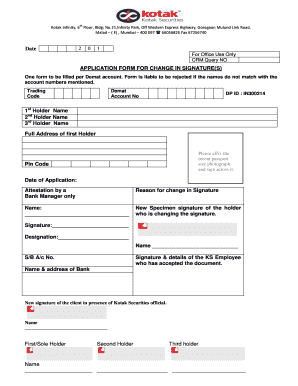
Get Application Form For Change In Signature(s) - Kotak Securities
How it works
-

Open form follow the instructions
-

Easily sign the form with your finger
-

Send filled & signed form or save
How to fill out the Application Form For Change In Signature(s) - Kotak Securities online
Filling out the Application Form For Change In Signature(s) - Kotak Securities online is a straightforward process that requires careful attention to detail. This guide will walk you through each section of the form, ensuring you complete it accurately to facilitate the signature change.
Follow the steps to complete your application form effectively.
- Click 'Get Form' button to obtain the form and open it in the editor.
- Begin by entering your Trading Code and Demat Account Number in the designated fields. Ensure that these details match your registered account to avoid rejection.
- Provide the names of all account holders (1st, 2nd, and 3rd Holder). Make sure to spell names correctly and as they appear on your account.
- Fill in the full address of the first holder, including the pin code. This information helps verify your identity and supports your application.
- Attach a recent passport size photograph of the first holder. Make sure to sign across the photograph as indicated on the form.
- Indicate the date of application in the given field, ensuring it reflects the current date.
- State the reason for the change in signature in the provided space, being concise but descriptive.
- In the next section, provide your new specimen signature. This new signature should be written clearly and match your expected signing format.
- Complete the details of the Kotak Securities employee who will be accepting the document, including their name and designation.
- Ensure you sign again in the presence of a Kotak Securities official, confirming your new signature acceptance.
- Prepare the supporting documents, including a self-attested identity proof (like a PAN card) and the bank attestation in the required format.
- Review all entries for accuracy and completeness before submitting the form. After completing all steps, save any changes, and choose to print, download, or share the form as needed.
Complete your documents online today for a seamless signature change process.
Related links form
Inserting your signature into a form can be done either by signing electronically or by uploading a scanned version of your signature. When filling the Application Form For Change In Signature(s) - Kotak Securities, look for the signature field, and either draw your signature or attach the scanned image. Ensure clarity for easy validation.
Industry-leading security and compliance
US Legal Forms protects your data by complying with industry-specific security standards.
-
In businnes since 199725+ years providing professional legal documents.
-
Accredited businessGuarantees that a business meets BBB accreditation standards in the US and Canada.
-
Secured by BraintreeValidated Level 1 PCI DSS compliant payment gateway that accepts most major credit and debit card brands from across the globe.