Loading
Get Who Membership
How it works
-

Open form follow the instructions
-

Easily sign the form with your finger
-

Send filled & signed form or save
How to fill out the Who Membership online
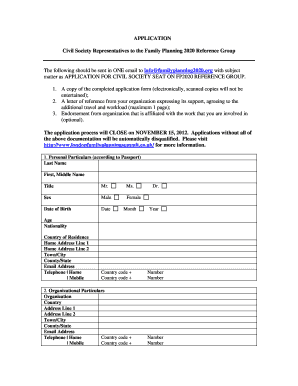
Filling out the Who Membership application form is a straightforward process that allows you to apply for civil society representation on the Family Planning 2020 Reference Group. This guide will provide step-by-step instructions to ensure you complete the form accurately and efficiently.
Follow the steps to complete your application form.
- Click ‘Get Form’ button to access the application form and open it in your preferred editor.
- Enter your personal particulars as per your passport. Provide your last name, first name, title, sex, date of birth, age, nationality, country of residence, and complete your home address including town/city and county/state. Ensure that your email address and telephone numbers (home and mobile) are filled out correctly.
- In the organizational particulars section, input the name of your organization, its country, and the address details including town/city and county/state. Add the organization’s email address and telephone numbers.
- Describe your position held, duties and responsibilities, and the communities served by your organization as well as its geographic presence and approximate annual funding.
- Indicate your language proficiency. Use the drop-down boxes to specify your fluency in understanding, speaking, reading, and writing in relevant languages.
- If applicable, detail your prior experience on a governing body of an organization. Provide the dates, organization names, and the nature/level of your affiliation.
- Briefly describe your personal experience related to the preferred criteria listed in the form, focusing on service delivery, access for marginalized groups, rights-based approaches, internet connectivity, community networks, previous civil society work, and any other relevant experiences.
- Compose a short narrative of less than 500 words expressing your interest in the role, including your previous and current work in family planning and related areas. Clearly outline your goals and expected involvement relating to FP2020.
- If you have an endorsement from a relevant organization, please include the organization's name, contact person, email address, and phone numbers.
- Complete the declaration section by certifying that the information provided is accurate. Type your name as an electronic signature and provide the date.
- Review your application to ensure all fields are complete and accurate. Save your changes, and then submit the form via email as elaborated in the instructions provided in the document.
Begin filling out your Who Membership application online today!
Taiwan is not a member of the WHO due to political reasons, despite its robust healthcare system. International relations impact WHO Membership, and some territories may not be recognized as independent countries. This situation can affect global health responses. For more insights into WHO Membership complexities, our platform offers detailed information.
Industry-leading security and compliance
US Legal Forms protects your data by complying with industry-specific security standards.
-
In businnes since 199725+ years providing professional legal documents.
-
Accredited businessGuarantees that a business meets BBB accreditation standards in the US and Canada.
-
Secured by BraintreeValidated Level 1 PCI DSS compliant payment gateway that accepts most major credit and debit card brands from across the globe.