We use cookies to improve security, personalize the user experience, enhance our marketing activities (including cooperating with our marketing partners) and for other business use.
Click "here" to read our Cookie Policy. By clicking "Accept" you agree to the use of cookies. Read less
Read more
Accept
Loading
Form preview
  • US Legal Forms
  • Form Library
  • More Forms
  • More Uncategorized Forms
  • Team User Access Request Form

Get Team User Access Request Form

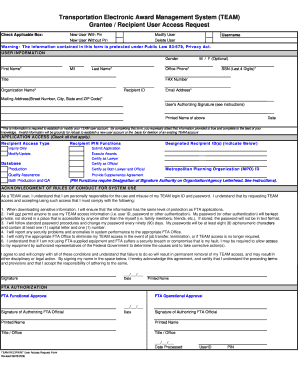
Blic Law 93-579, Privacy Act. USER INFORMATION Gender First Name* M/I Last Name* M / F (Optional) Office Phone* Title FAX Number Organization Name* SSN (Last 4 Digits)* Email Address* Mailing Address(Street Number, City, State and ZIP Code)* FTA Functional Approval MUST be provided below (see instructions for required approvals and where to submit this form) *This is information is required to establish or modify your TEAM user account. By completing this form, you expressly attest t.

How it works

  1. Open form

    Open form follow the instructions

  2. Easily sign form

    Easily sign the form with your finger

  3. Share form

    Send filled & signed form or save

How to fill out the Team User Access Request Form online

Filling out the Team User Access Request Form online is an essential step for accessing the Transportation Electronic Award Management System (TEAM). This guide aims to provide clear, step-by-step instructions to ensure that all users can successfully complete the form with confidence and efficiency.

Follow the steps to complete the Team User Access Request Form online

  1. Click the ‘Get Form’ button to obtain the form and open it in your editing tool.
  2. Select the applicable box to indicate whether you are a new user with a PIN, a new user without a PIN, modifying an existing user, or deleting a user.
  3. Enter your username, followed by your gender, first name, middle initial, last name, and office phone number.
  4. Provide your title, the last four digits of your Social Security Number, fax number, organization name, recipient ID, email address, and complete mailing address.
  5. Make sure the user’s authorizing signature is included, along with the printed name and date.
  6. Check all applicable boxes under the application access area based on what functions you require within the TEAM system.
  7. Ensure you acknowledge the rules of conduct for system use by signing and dating the form.
  8. Submit the completed form by scanning and emailing, faxing, or mailing it to the appropriate office.
  9. After submission, you can follow up to ensure the processing of the request and access permissions.

Complete your Team User Access Request Form online today!

Get form

Experience a faster way to fill out and sign forms on the web. Access the most extensive library of templates available.
Get form

Related content

(TEAM) Grantee / Recipient User Access Request...
Transportation Electronic Award Management System (TEAM). Grantee / Recipient User Access...
Learn more
Step 12.1 - Submit Tableau License and Access...
Tableau License and Access Request Form is required to request "Viewer" access on Tableau...
Learn more
Custom Forms - the ServicePRO Wiki
Mar 16, 2015 — Associate Categories and Teams to a Request Type; 7. ... NOTE: There is...
Learn more

Related links form

16 2 Pronouns Practice 1 Answer Key Kentucky-small-estate-affidavit.doc How To Surrender Indian Passport In Canada Arkansas Weatherization Assistance Program State Plan July 1 ...

Questions & Answers

Get answers to your most pressing questions about US Legal Forms API.

Contact support

A user access request is a formal submission from a team member asking for permission to access certain resources or information. This process helps maintain security and control within teams. By utilizing the Team User Access Request Form, you can streamline and document these requests.

Yes, you can create a fillable form in Microsoft Teams using Microsoft Forms. This tool allows you to design forms that your team can fill out easily. Consider utilizing the Team User Access Request Form for managing access requests effectively.

Creating a request form in Microsoft Teams is easy. You can use Microsoft Forms to design a custom request form tailored to your needs. Integrate this with the Team User Access Request Form to enable seamless access requests within your team.

To request access to someone's screen on Teams, start a chat or video call with them. While in the call, ask them to share their screen, and they can approve your request easily. Make sure to use the Team User Access Request Form if there are additional access requirements.

To request someone on Teams, simply click on the 'Chat' icon, type their name in the search bar, and start a conversation. If you need to add them to a Team, consider using the Team User Access Request Form for an organized request and approval process.

To request access during Teams sharing, first identify the file or folder you need. Then, click on 'Request access' when prompted. For a more efficient process, rely on the Team User Access Request Form to keep track of your requests.

Requesting access on Microsoft Teams is straightforward. Start by locating the Team you wish to join and then either use a joining code or click on the 'Request access' button. For a more organized approach, utilize the Team User Access Request Form to facilitate your request.

To request access to a channel in Teams, navigate to the desired channel and click on the 'Request access' option. Fill out the necessary information in the popup. You can also streamline this process by submitting a request through the Team User Access Request Form.

To approve a SharePoint access request, log into SharePoint and locate the 'Site Permissions' section. Here, you can view pending access requests and select 'Approve.' For seamless permission management, you can also use the Team User Access Request Form to track requests.

To provide a user access to Teams, select the appropriate Team and go to the 'Manage team' option. Click on 'Add members', enter the user's name or email, and send the invitation. For more efficient management, consider utilizing the Team User Access Request Form available on our platform.

Get This Form Now!

Use professional pre-built templates to fill in and sign documents online faster. Get access to thousands of forms.
Get form
If you believe that this page should be taken down, please follow our DMCA take down processhere.

Industry-leading security and compliance

US Legal Forms protects your data by complying with industry-specific security standards.
  • In businnes since 1997
    25+ years providing professional legal documents.
  • Accredited business
    Guarantees that a business meets BBB accreditation standards in the US and Canada.
  • Secured by Braintree
    Validated Level 1 PCI DSS compliant payment gateway that accepts most major credit and debit card brands from across the globe.
Get Team User Access Request Form
Get form
Form Packages
Adoption
Bankruptcy
Contractors
Divorce
Home Sales
Employment
Identity Theft
Incorporation
Landlord Tenant
Living Trust
Name Change
Personal Planning
Small Business
Wills & Estates
Packages A-Z
Form Categories
Affidavits
Bankruptcy
Bill of Sale
Corporate - LLC
Divorce
Employment
Identity Theft
Internet Technology
Landlord Tenant
Living Wills
Name Change
Power of Attorney
Real Estate
Small Estates
Wills
All Forms
Forms A-Z
Form Library
Customer Service
Terms of Service
Privacy Notice
Legal Hub
Content Takedown Policy
Bug Bounty Program
About Us
Help Portal
Legal Resources
Blog
Affiliates
Contact Us
Delete My Account
Site Map
Industries
Forms in Spanish
Localized Forms
State-specific Forms
Forms Kit
Legal Guides
Real Estate Handbook
All Guides
Prepared for You
Notarize
Incorporation services
Our Customers
For Consumers
For Small Business
For Attorneys
Our Sites
US Legal Forms
USLegal
FormsPass
pdfFiller
signNow
airSlate WorkFlow
DocHub
Instapage
Social Media
Call us now toll free:
+1 833 426 79 33
As seen in:
  • USA Today logo picture
  • CBC News logo picture
  • LA Times logo picture
  • The Washington Post logo picture
  • AP logo picture
  • Forbes logo picture
© Copyright 1997-2025
airSlate Legal Forms, Inc.
3720 Flowood Dr, Flowood, Mississippi 39232
Form Packages
Adoption
Bankruptcy
Contractors
Divorce
Home Sales
Employment
Identity Theft
Incorporation
Landlord Tenant
Living Trust
Name Change
Personal Planning
Small Business
Wills & Estates
Packages A-Z
Form Categories
Affidavits
Bankruptcy
Bill of Sale
Corporate - LLC
Divorce
Employment
Identity Theft
Internet Technology
Landlord Tenant
Living Wills
Name Change
Power of Attorney
Real Estate
Small Estates
Wills
All Forms
Forms A-Z
Form Library
Customer Service
Terms of Service
Privacy Notice
Legal Hub
Content Takedown Policy
Bug Bounty Program
About Us
Help Portal
Legal Resources
Blog
Affiliates
Contact Us
Delete My Account
Site Map
Industries
Forms in Spanish
Localized Forms
State-specific Forms
Forms Kit
Legal Guides
Real Estate Handbook
All Guides
Prepared for You
Notarize
Incorporation services
Our Customers
For Consumers
For Small Business
For Attorneys
Our Sites
US Legal Forms
USLegal
FormsPass
pdfFiller
signNow
airSlate WorkFlow
DocHub
Instapage
Social Media
Call us now toll free:
+1 833 426 79 33
As seen in:
  • USA Today logo picture
  • CBC News logo picture
  • LA Times logo picture
  • The Washington Post logo picture
  • AP logo picture
  • Forbes logo picture
© Copyright 1997-2025
airSlate Legal Forms, Inc.
3720 Flowood Dr, Flowood, Mississippi 39232