Get Da Form 5184
How it works
-

Open form follow the instructions
-

Easily sign the form with your finger
-

Send filled & signed form or save
How to fill out the DA Form 5184 online
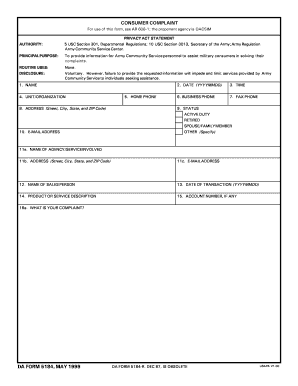
The DA Form 5184 is a consumer complaint form used by Army Community Service to assist military consumers in resolving their complaints. This guide provides comprehensive instructions for filling out the form online, ensuring users can effectively communicate their issues.
Follow the steps to successfully complete the DA Form 5184 online.
- Click ‘Get Form’ button to access the form and open it in the editor.
- Enter your name in the designated field at the top of the form. This information is essential for identifying the complainant.
- Fill in your unit or organization in the corresponding section to assist in contextualizing the complaint.
- Provide your complete address, including street, city, state, and ZIP code, ensuring accurate contact information.
- Input your email address to facilitate communication regarding your complaint.
- Record your home phone, business phone, and fax phone numbers, allowing for multiple contact methods.
- Select your status from the options provided (active duty, retired, spouse/family member, or other), which is important for processing your complaint appropriately.
- In the agency/service involved section, state the name and address of the entity related to your complaint.
- Indicate the name of the salesperson, if applicable, who was involved in your transaction.
- Provide the date of the transaction in the format YYYYMMDD, as this will help track the timeline of your complaint.
- Describe the product or service related to your complaint clearly and specifically.
- If you have an account number associated with the transaction, enter it in the designated field.
- Clearly articulate your complaint in the provided section, outlining the issue you are experiencing.
- Answer whether you have complained to the company and specify the details of their response if applicable.
- Provide a description of how you feel the problem should be resolved and any actions being taken in regard to the complaint.
- Indicate if the consumer was referred to another agency for assistance.
- Describe the final resolution of the case, ensuring you summarize the outcome of the complaint process.
- Include any additional comments that may be relevant to your complaint.
- Lastly, enter the typed name and signature of the interviewer if applicable, along with the date in the format YYYYMMDD.
- Once you have filled out all sections, review the information for accuracy before proceeding to save changes, download, print, or share the form as needed.
Complete your DA Form 5184 online today and ensure your complaint is heard!
DA Form 2142 is primarily used for evaluating an individual’s service history and professional qualifications within the armed forces. This form helps document key elements such as training and assignments, which can impact future opportunities. Understanding its significance can assist you in accurately filling the form. If you're looking for additional information, uslegalforms can provide insights into using this form effectively to serve your needs.
Industry-leading security and compliance
-
In businnes since 199725+ years providing professional legal documents.
-
Accredited businessGuarantees that a business meets BBB accreditation standards in the US and Canada.
-
Secured by BraintreeValidated Level 1 PCI DSS compliant payment gateway that accepts most major credit and debit card brands from across the globe.