Get Contractor Appraisal
How it works
-

Open form follow the instructions
-

Easily sign the form with your finger
-

Send filled & signed form or save
How to fill out the Contractor Appraisal online
Completing the Contractor Appraisal is a crucial step in applying to join the HomeServe USA Contractor Network. This guide will provide you with a clear, step-by-step approach to efficiently fill out the form online, ensuring you provide all necessary information accurately.
Follow the steps to successfully complete your Contractor Appraisal.
- Click ‘Get Form’ button to obtain the form and open it in the editor.
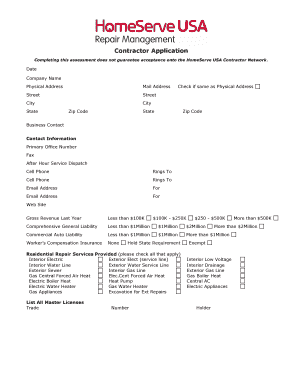
- Fill in the date and your company name at the top of the form. Ensure you provide the correct physical address and mailing address, checking the box if they are the same.
- Complete the business contact information by listing the primary office number, fax number, after-hours service dispatch number, and cell phone. Note who the cell phone rings to, and provide the email address for business communication.
- Indicate your gross revenue for the last year by selecting one of the provided ranges. Next, fill in your insurance details for comprehensive general liability, commercial auto liability, and worker’s compensation insurance.
- In the residential repair services section, check all applicable services provided by your company, such as electrical work, plumbing, gas services, or excavation.
- List any master licenses you hold, specifying the trade and license number. Provide details about the distance traveled under regular service and your company's hours of operation.
- Answer questions regarding company vehicles, technician equipment, and employee management practices, ensuring to provide clear details.
- Detail two residential references, and indicate whether your company has a health and safety program and designated representative.
- Complete the contractor acknowledgment section, certifying that the information provided is correct and that your company will comply with health and safety standards.
- Finally, submit the application by emailing it to the provided address. Ensure all sections are completed and checked for accuracy.
Complete your Contractor Appraisal online today to take the first step towards joining the HomeServe USA Contractor Network.
When assessing contractor performance, the Contracting Officer Representative (COR) must consider quality, timeliness, and compliance with contract terms. Regularly reviewing these aspects ensures the project stays on track and meets its objectives. Employing a structured Contractor Appraisal framework can guide the COR in monitoring these critical factors effectively.
Industry-leading security and compliance
-
In businnes since 199725+ years providing professional legal documents.
-
Accredited businessGuarantees that a business meets BBB accreditation standards in the US and Canada.
-
Secured by BraintreeValidated Level 1 PCI DSS compliant payment gateway that accepts most major credit and debit card brands from across the globe.