Loading
Form preview
  • US Legal Forms
  • Other Templates
  • More Forms
  • More Uncategorized Forms
  • San Joaquin Court Records Form

Get San Joaquin Court Records Form

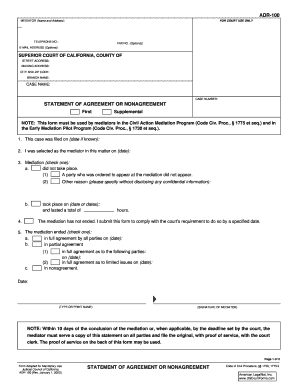
TY AND ZIP CODE: BRANCH NAME: CASE NAME: CASE NUMBER: STATEMENT OF AGREEMENT OR NONAGREEMENT First Supplemental NOTE: This form must be used by mediators in the Civil Action Mediation Program (Code Civ. Proc., 1775 et seq.) and in the Early Mediation Pilot Program (Code Civ. Proc., 1730 et seq.). 1. This case was filed on (date if known): 2. I was selected as the mediator in this matter on (date): 3. Mediation (check one): a. did not take place. (1) A party who was ordered to appear a.

How it works

  1. Open form

    Open form follow the instructions

  2. Easily sign form

    Easily sign the form with your finger

  3. Share form

    Send filled & signed form or save

How to fill out the San Joaquin Court Records Form online

Filling out the San Joaquin Court Records Form online is a straightforward process that ensures proper compliance with mediation requirements. This guide provides clear, step-by-step instructions tailored to help users of all backgrounds successfully complete the form.

Follow the steps to fill out the San Joaquin Court Records Form online:

  1. Press the ‘Get Form’ button to obtain the San Joaquin Court Records Form and open it in your preferred online editor.
  2. Begin by entering the mediator's name and address in the specified fields. Make sure to include their telephone number, and you may also provide a fax number and email address if desired.
  3. Specify the superior court information by entering the street address, mailing address, city, zip code, and branch name.
  4. In the case information section, input the case name and case number accurately to avoid any discrepancies.
  5. Fill out the statement of agreement or nonagreement section. Include the date the case was filed and the date you were selected as the mediator.
  6. Indicate whether mediation took place by checking the appropriate box. Provide additional details as necessary, including the dates the mediation occurred and its duration.
  7. Complete the section regarding the outcome of the mediation by checking the applicable agreement status and providing the relevant dates.
  8. Type or print your name, and provide your signature as the mediator.
  9. If required, complete the proof of service section by detailing your age, residence/business address, and how the statement was served to the involved parties.
  10. Review all fields for accuracy, save your progress, and then opt to download, print, or share the completed form as needed.

Start filling out your documents online today for a smooth experience.

Get form

Experience a faster way to fill out and sign forms on the web. Access the most extensive library of templates available.
Get form

Related content

San Joaquin County, Stockton Courthouse...
Project Information · Background · San Joaquin County, Stockton Courthouse · California...
Learn more
California Courts - Home
Updates will be communicated through local court websites as appropriate. ... a new...
Learn more
FL-306 - California Courts - CA.gov
I ask that the court reschedule the hearing date for the (select one) ... I am the party...
Learn more

Related links form

Elementary Education - Frostburg State University - Frostburg Access The Registration Form - Fordham University Doctoring 201. Florida Statutes (1983), Volume 3This Set Of Files Contains A True And Correct Copy Office Of Student Activities Club Reimbursement Form $50 Or More

Questions & Answers

Get answers to your most pressing questions about US Legal Forms API.

Contact support

A proof of service form in California family law is a document that confirms a party has formally delivered legal papers to another party involved in a case. This form is essential for establishing that all parties received proper notice, which is a crucial aspect of the legal process. When dealing with San Joaquin Court Records Forms, ensure that your proof of service is completed accurately, as this can affect the outcome of your case. You can rely on uslegalforms to provide you with the correct templates and support.

To make a public records request in California, you must submit your request to the appropriate government agency. Ensure that you include specific details about the records you seek, such as the type of document and any relevant dates. For San Joaquin Court Records Forms, you can visit the official court website or use uslegalforms for guidance. This platform streamlines the process, providing you with the necessary templates and instructions.

Filing a document with the court means officially submitting your paperwork for consideration and action by the judge. When you file a document, you are entering it into the public record, which is why choosing the correct San Joaquin Court Records Form is essential. This process helps initiate legal proceedings or communicate information to the court. Ensure that all forms are accurately filled out to avoid delays in your case.

To reach the San Joaquin County Court Records department, you can call their main line at (209) 992-5500. This number will connect you with helpful staff who can assist you with inquiries related to court records and filing procedures. It’s a great way to get direct answers about the San Joaquin Court Records Form and any other court-related questions you may have. Remember to note their hours of operation for the best service.

Serving court documents in California requires following specific procedures to ensure proper delivery. You can hire a process server or have someone over 18 and not involved in the case deliver the documents. After serving the papers, you must complete the proof of service form, which is also part of the San Joaquin Court Records Form package. Make sure to file this proof with the court to confirm that the documents have been served correctly.

To file confidential documents in California, start by ensuring that your documents meet the criteria for confidentiality under California laws. Use the appropriate San Joaquin Court Records Form designated for confidential filings, which you can find on the court's website. Submit the documents to the court clerk either in person or using the e-filing service. It's wise to consult the court for specific guidelines on handling sensitive information.

The San Francisco Superior Court's website, .sfsuperiorcourt.org, now offers an online case calendar that allows litigants, attorneys and others to look up cases by date and case type, Presiding Judge John K.

There are three ways to look at court records: Go to the courthouse and ask to look at paper records. Go to the courthouse and look at electronic court records. If your court offers it, look at electronic records over the internet. This is called “remote access.”

There are three ways to get the case number: If the case was filed in 2004 or later, use the criminal case index search. ... Go to the Clerk's Office where the case is filed. ... Mail or take a letter to the Clerk's Office asking them to search for you.

When, where and what time is my court date? You may obtain that information by conducting a case search on the court's website. If the case has not been updated, you will need to contact the Clerk's office by phone or at the counter to obtain that information.

Get This Form Now!

Use professional pre-built templates to fill in and sign documents online faster. Get access to thousands of forms.
Get form
If you believe that this page should be taken down, please follow our DMCA take down processhere.
Get San Joaquin Court Records Form
Get form
  • Adoption
  • Bankruptcy
  • Contractors
  • Divorce
  • Home Sales
  • Employment
  • Identity Theft
  • Incorporation
  • Landlord Tenant
  • Living Trust
  • Name Change
  • Personal Planning
  • Small Business
  • Wills & Estates
  • Packages A-Z
  • Affidavits
  • Bankruptcy
  • Bill of Sale
  • Corporate - LLC
  • Divorce
  • Employment
  • Identity Theft
  • Internet Technology
  • Landlord Tenant
  • Living Wills
  • Name Change
  • Power of Attorney
  • Real Estate
  • Small Estates
  • Wills
  • All Forms
  • Forms A-Z
  • Other Templates
  • Legal Hub
  • About Us
  • Help Portal
  • Legal Resources
  • Blog
  • Affiliates
  • Contact Us
  • Delete My Account
  • Site Map
  • Industries
  • Forms in Spanish
  • Localized Forms
  • State-specific Forms
  • Forms Kit
  • Real Estate Handbook
  • All Guides
  • Notarize
  • Incorporation services
  • For Consumers
  • For Small Business
  • For Attorneys
  • USLegal
  • FormsPass
  • pdfFiller
  • signNow
  • altaFlow
  • DocHub
  • Instapage
Form Packages
  • Adoption
  • Bankruptcy
  • Contractors
  • Divorce
  • Home Sales
  • Employment
  • Identity Theft
  • Incorporation
  • Landlord Tenant
  • Living Trust
  • Name Change
  • Personal Planning
  • Small Business
  • Wills & Estates
  • Packages A-Z
Form Categories
  • Affidavits
  • Bankruptcy
  • Bill of Sale
  • Corporate - LLC
  • Divorce
  • Employment
  • Identity Theft
  • Internet Technology
  • Landlord Tenant
  • Living Wills
  • Name Change
  • Power of Attorney
  • Real Estate
  • Small Estates
  • Wills
  • All Forms
  • Forms A-Z
  • Other Templates
Customer Service
  • Legal Hub
  • About Us
  • Help Portal
  • Legal Resources
  • Blog
  • Affiliates
  • Contact Us
  • Delete My Account
  • Site Map
  • Industries
  • Forms in Spanish
  • Localized Forms
  • State-specific Forms
  • Forms Kit
Legal Guides
  • Real Estate Handbook
  • All Guides
Prepared for you
  • Notarize
  • Incorporation services
Our Customers
  • For Consumers
  • For Small Business
  • For Attorneys
Our Sites
  • USLegal
  • FormsPass
  • pdfFiller
  • signNow
  • altaFlow
  • DocHub
  • Instapage
Social Media
Call us now toll free:
+1 833 426 79 33
As seen in:
© Copyright 1999-2026 airSlate Legal Forms, Inc. 17 Station Street, Ste. 203, Brookline, MA 02445
  • Your Privacy Choices
  • Terms of Service
  • Privacy Notice
  • Content Takedown Policy
  • Bug Bounty Program