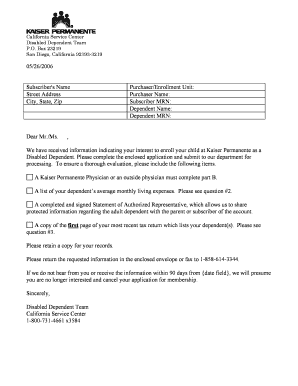
Get Kaiser Dependent Certification Form
How it works
-

Open form follow the instructions
-

Easily sign the form with your finger
-

Send filled & signed form or save
How to fill out the Kaiser Dependent Certification Form online
Filling out the Kaiser Dependent Certification Form is an essential step in ensuring your dependent child is recognized for coverage under your health plan as a disabled individual. This guide provides a clear, step-by-step approach to completing the form online, making the process as straightforward and efficient as possible.
Follow the steps to complete the application seamlessly.
- Click the 'Get Form' button to access the Kaiser Dependent Certification Form and open it in your preferred editor.
- Begin with Part A, where you need to enter the subscriber's name, address, and other personal details such as the social security number and medical record number.
- Fill out the dependent's information, including their name, date of birth, and relationship to the subscriber. Ensure you indicate the dependent’s physician.
- In Part A Section IV, respond to the questions regarding your dependent’s current enrollment status, financial support, and whether they live with you.
- Complete the average monthly living expenses section by estimating the costs for rent, transportation, food, and medical expenses. Include any additional expenses as applicable.
- Attach a copy of the first page of your most recent tax return that lists your dependent(s) as this is required for verification purposes.
- Ensure that a physician completes Part B, providing necessary medical information about the dependent's condition and limitations to proceed with the application.
- Sign the application to certify that all information provided is complete and accurate. If submitting online, ensure that you save your changes.
- Finally, download, print, or share the completed form as needed, and submit it to Kaiser Permanente by mail or fax using the details provided.
Start filling out the Kaiser Dependent Certification Form online today to secure your dependent's health coverage.
To add your son to your Kaiser app, open the app and navigate to the 'Family' section within your account. Select the option to add a dependent and proceed to enter your son's information, including his full name and date of birth. Make sure to have your Kaiser Dependent Certification Form ready, as it may be necessary for verification purposes. Should you encounter any issues, the US Legal Forms platform can provide straightforward forms and guidance to simplify the process.
Industry-leading security and compliance
-
In businnes since 199725+ years providing professional legal documents.
-
Accredited businessGuarantees that a business meets BBB accreditation standards in the US and Canada.
-
Secured by BraintreeValidated Level 1 PCI DSS compliant payment gateway that accepts most major credit and debit card brands from across the globe.