Get General Oral Form 6.05.doc
How it works
-

Open form follow the instructions
-

Easily sign the form with your finger
-

Send filled & signed form or save
How to use or fill out the General Oral Form 6.05.doc online
Filling out the General Oral Form 6.05.doc online can be straightforward with the right guidance. This user-friendly guide aims to walk you through each component of the form, ensuring that you provide the necessary information accurately and effectively.
Follow the steps to fill out the General Oral Form 6.05.doc online
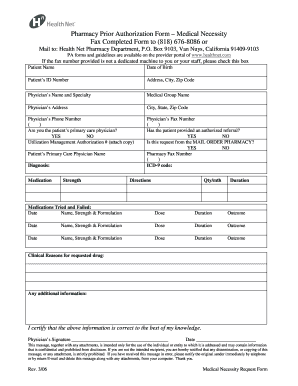
- Locate and press the ‘Get Form’ button to access the General Oral Form 6.05.doc. This action will allow you to open the form in your online editor.
- Begin by entering the patient’s name in the designated field. Ensure spelling is correct to avoid any issues.
- Next, input the patient’s date of birth. This information is critical for identification purposes.
- Fill out the patient’s ID number accurately, as this uniquely identifies the patient within the healthcare system.
- Provide the patient’s address, including city and zip code. Verify that the address is current and complete.
- Input the physician’s name and specialty in the relevant fields. This helps clarify who is requesting the authorization.
- Include the medical group name associated with the physician for record-keeping and administrative purposes.
- Fill in the physician’s address, followed by the city, state, and zip code to ensure all contact information is available.
- Enter the physician’s phone number in the specified format. This will allow for easy communication if required.
- Indicate whether you are the patient’s primary care physician by selecting 'YES' or 'NO'.
- If applicable, add the Utilization Management Authorization number; make sure to attach a copy as instructed.
- Input the physician’s fax number, ensuring it corresponds to a machine that can receive documents.
- Specify if the patient has provided an authorized referral by selecting 'YES' or 'NO'.
- Determine if the request is coming from the mail order pharmacy by answering 'YES' or 'NO' as well.
- Fill out the pharmacy’s fax number to ensure secure communication with the pharmacy.
- Enter the ICD-9 code relevant to the patient's condition, if necessary.
- Document the patient’s diagnosis clearly to facilitate the review process.
- For the medication requested, specify the strength, directions, and quantity per month, along with the duration for which it is needed.
- In detail, list any medications that have been tried and failed by the patient, including relevant dates, names, strengths, dosages, durations, and outcomes.
- Provide clinical reasons for requesting the drug in the specified section, ensuring all relevant medical justification is included.
- Add any additional information that may support the authorization request.
- Finally, certify the information provided is correct by signing and dating the form.
- Once you have completed all sections, save your changes, and choose to download, print, or share the form as required.
Start completing your General Oral Form 6.05.doc online today!
Yes, a certified dental assistant is often permitted to administer local anesthesia, depending on the regulations of the state in which they practice. They must complete appropriate training programs and hold a valid certification. Understanding the laws in your region is crucial for compliance and patient safety. Resources like General Oral Form 6.05.doc can provide valuable insights into the responsibilities and limitations of roles within dental practices.
Industry-leading security and compliance
-
In businnes since 199725+ years providing professional legal documents.
-
Accredited businessGuarantees that a business meets BBB accreditation standards in the US and Canada.
-
Secured by BraintreeValidated Level 1 PCI DSS compliant payment gateway that accepts most major credit and debit card brands from across the globe.