Loading
Get Ohio Beer & Malt Beverage Tax Return
How it works
-

Open form follow the instructions
-

Easily sign the form with your finger
-

Send filled & signed form or save
How to fill out the Ohio Beer & Malt Beverage Tax Return online
Filling out the Ohio Beer & Malt Beverage Tax Return online can streamline your reporting process and ensure accuracy. This guide will provide you with a step-by-step approach to completing the form effectively.
Follow the steps to accurately complete your tax return.
- Click 'Get Form' button to obtain the Ohio Beer & Malt Beverage Tax Return document, opening it in your preferred editor.
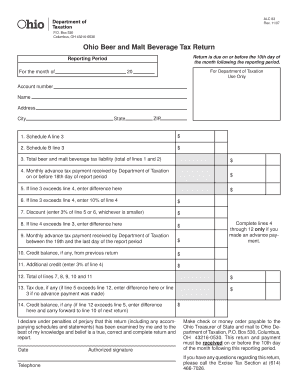
- Enter your account number, name, address, city, state, and ZIP code at the top of the form. Ensure that all details are correct to avoid any issues with processing your return.
- Report the relevant figures for Schedule A and B. For Schedule A, indicate the totals sold in barrels and for Schedule B, provide totals sold in cases. These amounts will be used to calculate your tax liability.
- Calculate the total beer and malt beverage tax liability by summing up lines from Schedule A and Schedule B. Enter this total on line 3.
- If you have made any monthly advance tax payments to the Department of Taxation on or before the 18th day of the report period, enter the amount on line 4.
- If your total tax liability on line 3 exceeds the amount on line 4, calculate the difference and enter it on line 5. Additionally, compute 10% of line 4 and enter it on line 6.
- Determine the discount applicable by entering the smaller of 3% of line 5 or line 6 on line 7.
- If your advance payments on line 4 exceed your tax liability on line 3, document the difference on line 8.
- Report any monthly advance tax payments received by the Department of Taxation between the 19th and the last day of the report period on line 9.
- If applicable, enter any remaining credit balance from a previous return on line 10.
- Calculate an additional credit, which is 3% of line 4, and enter it on line 11 if you made an advance payment.
- Sum lines 7, 8, 9, 10, and 11 and enter the total on line 12.
- To find the tax due, subtract line 12 from line 5 if line 5 exceeds line 12; otherwise, enter the total from line 3.
- Document any credit balance, if applicable, on line 14 for your next return, if line 12 exceeds line 5.
- Provide the date, your telephone number, and an authorized signature at the bottom of the form. This declaration confirms the accuracy of your return.
- Finally, save your changes, download the completed form, and print it for submission. Ensure that it is sent to the Ohio Department of Taxation by the due date.
Complete your Ohio Beer & Malt Beverage Tax Return online today!
Yes, candy is taxable in Ohio, similar to many other goods except for certain exceptions. When you sell candy, be sure to include this in your sales tax calculations. Knowing the rules about taxable items can prevent oversight and ensure you remain compliant in your business operations.