Loading
Get Sos Registration Fee
How it works
-

Open form follow the instructions
-

Easily sign the form with your finger
-

Send filled & signed form or save
How to fill out the Sos Registration Fee online
This guide provides clear instructions on how to complete the Sos Registration Fee form online. Whether you are renewing your registration or filing for the first time, this step-by-step guide will help you navigate each section effectively.
Follow the steps to complete your Sos Registration Fee form online.
- Click ‘Get Form’ button to obtain the form and open it in the editor.
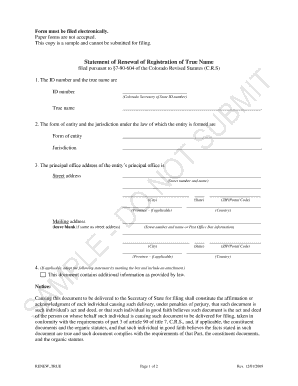
- Enter the ID number and true name of the entity. In the designated fields, input the Colorado Secretary of State ID number and the official true name of your entity. Ensure that this information is accurate to avoid any issues with your filing.
- Specify the form of entity and jurisdiction. Select the appropriate entity type from the drop-down options and input the jurisdiction where the entity is formed.
- Provide the principal office address. Enter the street address, city, state, and ZIP/postal code of the entity's primary office. If applicable, include the province and any other necessary information. If the mailing address is the same as the street address, leave the mailing address section blank.
- Complete the additional information section if necessary. If your form includes additional information required by law, mark the applicable box and attach the necessary documents.
- Fill in the details of the individual submitting the form. Input the full name of the individual causing the document delivery, along with their mailing address, ensuring accuracy in all fields.
- Review and affirm the statement regarding document filing. Make sure you understand the penalties for perjury and confirm that all provided information is accurate.
- Finally, save changes, download, and print the form if necessary. You may also choose to share the completed document as needed.
Complete your Sos Registration Fee form online today for a streamlined filing experience.
The SOI fee, or Sos Registration Fee, in California is generally $20 for most businesses. It’s important to confirm this amount as it can change depending on various factors, like your business entity type. Additionally, any additional processing fees may apply if you choose expedited services. To stay updated and find the necessary forms, uslegalforms provides an efficient way to stay informed.
Industry-leading security and compliance
US Legal Forms protects your data by complying with industry-specific security standards.
-
In businnes since 199725+ years providing professional legal documents.
-
Accredited businessGuarantees that a business meets BBB accreditation standards in the US and Canada.
-
Secured by BraintreeValidated Level 1 PCI DSS compliant payment gateway that accepts most major credit and debit card brands from across the globe.