Get Medicaid Credit Balance Report
How it works
-

Open form follow the instructions
-

Easily sign the form with your finger
-

Send filled & signed form or save
How to fill out the Medicaid Credit Balance Report online
The Medicaid Credit Balance Report is an essential document used to report credit balances associated with Medicaid services. Completing this form accurately is crucial for proper record-keeping and compliance with regulations.
Follow the steps to fill out the Medicaid Credit Balance Report accurately.
- Press the ‘Get Form’ button to access the Medicaid Credit Balance Report and open it in the editor.
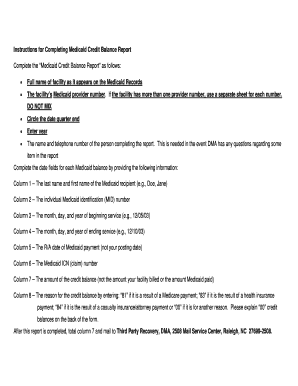
- Fill in the full name of the facility as it appears on Medicaid records. Ensure accuracy to avoid any processing issues.
- Enter the facility's Medicaid provider number. If there are multiple provider numbers, use a separate sheet for each; do not mix them.
- Circle the date quarter end relevant to the report and enter the year.
- Provide the name and telephone number of the person completing the report. This is important for any follow-up questions from the Department of Medical Assistance.
- For each Medicaid balance, fill in the following columns: Column 1 – Last name and first name of the Medicaid recipient; Column 2 – Individual Medicaid identification (MID) number; Column 3 – Date of beginning service (month/day/year); Column 4 – Date of ending service (month/day/year).
- Continue filling out the report: Column 5 – R/A date of Medicaid payment; Column 6 – Medicaid ICN (claim) number; Column 7 – Amount of the credit balance; Column 8 – Reason for the credit balance using the designated codes.
- If using code '00' for the reason for the credit balance, provide an explanation on the back of the form.
- After completing the report, total the amounts in column 7.
- Mail the completed report to Third Party Recovery, DMA, 2508 Mail Service Center, Raleigh, NC 27699-2508.
Complete your Medicaid Credit Balance Report online today to ensure compliance and accuracy.
You should send your Medicaid Credit Balance Report to the designated address provided by your state’s Medicaid program. Typically, this information can be found on your state's Medicaid website or in the guidelines they provide. Submitting your report correctly ensures that you meet compliance requirements and maintain a good standing with Medicaid. If you need assistance, USLegalForms can guide you through submission processes to ensure accuracy.
Industry-leading security and compliance
-
In businnes since 199725+ years providing professional legal documents.
-
Accredited businessGuarantees that a business meets BBB accreditation standards in the US and Canada.
-
Secured by BraintreeValidated Level 1 PCI DSS compliant payment gateway that accepts most major credit and debit card brands from across the globe.