Loading
Form preview
  • US Legal Forms
  • Form Library
  • More Forms
  • More Uncategorized Forms
  • Employee Application July 2011 - Panolivo

Get Employee Application July 2011 - Panolivo

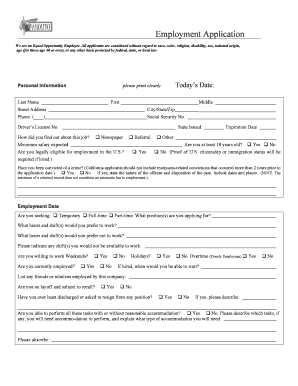
Employment Application We are an Equal Opportunity Employer. All applicants are considered without regard to race, color, religion, disability, sex, national origin, age (for those age 40 or over),.

How it works

  1. Open form

    Open form follow the instructions

  2. Easily sign form

    Easily sign the form with your finger

  3. Share form

    Send filled & signed form or save

How to fill out the Employee Application July 2011 - Panolivo online

Completing the Employee Application July 2011 - Panolivo online is a straightforward process that allows individuals to apply for employment safely and efficiently. This guide provides clear, step-by-step instructions to help users navigate the application with confidence.

Follow the steps to successfully fill out the Employee Application.

  1. Press the ‘Get Form’ button to access and open the Employee Application in an editable format.
  2. Begin by entering your personal information in the designated fields. Clearly print your last name, first name, middle name, street address, city, state, zip code, phone number, social security number, and driver's license details.
  3. Indicate how you learned about the job by selecting the appropriate method, such as newspaper, referral, or other.
  4. State your minimum salary expectations and confirm if you are at least 18 years old by selecting ‘Yes’ or ‘No’.
  5. Indicate your legal eligibility for employment in the U.S. by choosing ‘Yes’ or ‘No’. Note that proof of citizenship or immigration status is required if hired.
  6. If applicable, disclose any criminal convictions and provide details if you select ‘Yes’. Remember, certain marijuana-related convictions do not need to be disclosed if more than 2 years have passed.
  7. Specify whether you are seeking temporary, full-time, or part-time employment and list the positions you are applying for.
  8. Indicate your preferred working hours and shifts, including any times you are not available to work.
  9. Answer whether you are currently employed, if you are willing to work weekends, holidays, or overtime, and state your availability to start if hired.
  10. List any friends or relatives employed by Panolivo and mention if you are on layoff status and subject to recall.
  11. Provide details from your education history, including the highest level attained and any associated programs.
  12. In the military service section, indicate if you are a veteran and provide any special skills or training acquired.
  13. Complete the work history section by listing your last four employers, including contact information, dates of employment, job title, salary details, and a brief description of your duties and reasons for leaving.
  14. Confirm whether you permit Panolivo to contact your previous employers and provide explanations for any you wish to exclude.
  15. Upon completion of all sections, sign and date the application to formally acknowledge your acceptance of employment terms.
  16. Finally, save your changes to the completed application form, then download, print, or share it as necessary.

Complete your Employee Application online today and take the next step toward your career with Panolivo.

Get form

Experience a faster way to fill out and sign forms on the web. Access the most extensive library of templates available.
Get form

Related content

Superior Court of California - County of San Luis...
Oct 20, 2020 — At its July 24, 2020 business meeting, the Judicial Council of California...
Learn more
Retirement Plans - Benefits - Human Resources...
The California Public Employees' Retirement System (CalPERS) is an agency in the...
Learn more
Morro Bay, California - Wikipedia
Morro Bay is an incorporated waterfront city in San Luis Obispo County, California located...
Learn more

Related links form

Canada IMM 5556 F 2019 Canada IMM 5556 F 2018 Canada IMM 5556 F 2014 Canada IMM 5558 F 2018

Questions & Answers

Get answers to your most pressing questions about US Legal Forms API.

Contact support

To fill out a job application correctly, start by reviewing the entire application to familiarize yourself with its contents. Then, provide accurate and relevant information, making sure to tailor your responses to the job you are applying for. For the Employee Application July 2011 - Panolivo, adhere to any specific instructions or sections it includes. Finally, proofread your application to catch any mistakes before submitting it.

Filling out a paper application requires careful attention to detail. Begin by reading the entire application form, including the instructions, so you know what information is needed. As you complete the form, write neatly and legibly, using black or blue ink. If you're referencing the Employee Application July 2011 - Panolivo, ensure you follow its specific formatting and requirements to avoid any issues.

The 3 C's for a job application are clarity, conciseness, and correctness. Clarity involves providing clear and direct answers to each question, making it easy for the employer to understand your qualifications. Conciseness means avoiding unnecessary details while still covering essential information. Correctness emphasizes the importance of accuracy in your application, especially when referencing the Employee Application July 2011 - Panolivo.

To fill out an application for employment, start by gathering all necessary personal information, such as your contact details and work history. Next, review the Employee Application July 2011 - Panolivo thoroughly to understand the required sections. Take your time to provide accurate and honest information, ensuring you highlight relevant skills and experiences. Lastly, double-check your application for any errors before submitting it.

Reverse the concatenate function to split cell value to multiple cells with Kutools for Excel Select the data range that you want to split. Click Kutools > Merge & Split > Split Cells, see screenshot:

One way to match formatting when concatenating in Excel is to use the & character. This character will preserve any formatting that is applied to the cell. For example, if a cell has bold text and you use the & character to concatenate it with another cell, the resulting cell will also have bold text.

In this case, the common thing combining different columns into one is a comma (,). We must select the data first. Then, go to Data > Text to Columns in excel. This is done either by using a delimiter such as a comma, space or hyphen, or using fixed defined width to separate a text in the adjacent columns.

There are two ways to do this: Add double quotation marks with a space between them " ". For example: =CONCATENATE("Hello", " ", "World!"). Add a space after the Text argument. For example: =CONCATENATE("Hello ", "World!"). The string "Hello " has an extra space added.

The opposite of concatenate in Excel is splitting the contents of one cell into multiple cells. This can be done in a few different ways: Text to Columns feature. Flash Fill option in Excel 2013 and higher. TEXTSPLIT function in Excel 365.

We must select the data first. Then, go to Data > Text to Columns in excel. This is done either by using a delimiter such as a comma, space or hyphen, or using fixed defined width to separate a text in the adjacent columns.

Get This Form Now!

Use professional pre-built templates to fill in and sign documents online faster. Get access to thousands of forms.
Get form
If you believe that this page should be taken down, please follow our DMCA take down processhere.
Get Employee Application July 2011 - Panolivo
Get form
  • Adoption
  • Bankruptcy
  • Contractors
  • Divorce
  • Home Sales
  • Employment
  • Identity Theft
  • Incorporation
  • Landlord Tenant
  • Living Trust
  • Name Change
  • Personal Planning
  • Small Business
  • Wills & Estates
  • Packages A-Z
  • Affidavits
  • Bankruptcy
  • Bill of Sale
  • Corporate - LLC
  • Divorce
  • Employment
  • Identity Theft
  • Internet Technology
  • Landlord Tenant
  • Living Wills
  • Name Change
  • Power of Attorney
  • Real Estate
  • Small Estates
  • Wills
  • All Forms
  • Forms A-Z
  • Form Library
  • Legal Hub
  • About Us
  • Help Portal
  • Legal Resources
  • Blog
  • Affiliates
  • Contact Us
  • Delete My Account
  • Site Map
  • Industries
  • Forms in Spanish
  • Localized Forms
  • State-specific Forms
  • Forms Kit
  • Real Estate Handbook
  • All Guides
  • Notarize
  • Incorporation services
  • For Consumers
  • For Small Business
  • For Attorneys
  • USLegal
  • FormsPass
  • pdfFiller
  • signNow
  • altaFlow
  • DocHub
  • Instapage
Form Packages
  • Adoption
  • Bankruptcy
  • Contractors
  • Divorce
  • Home Sales
  • Employment
  • Identity Theft
  • Incorporation
  • Landlord Tenant
  • Living Trust
  • Name Change
  • Personal Planning
  • Small Business
  • Wills & Estates
  • Packages A-Z
Form Categories
  • Affidavits
  • Bankruptcy
  • Bill of Sale
  • Corporate - LLC
  • Divorce
  • Employment
  • Identity Theft
  • Internet Technology
  • Landlord Tenant
  • Living Wills
  • Name Change
  • Power of Attorney
  • Real Estate
  • Small Estates
  • Wills
  • All Forms
  • Forms A-Z
  • Form Library
Customer Service
  • Legal Hub
  • About Us
  • Help Portal
  • Legal Resources
  • Blog
  • Affiliates
  • Contact Us
  • Delete My Account
  • Site Map
  • Industries
  • Forms in Spanish
  • Localized Forms
  • State-specific Forms
  • Forms Kit
Legal Guides
  • Real Estate Handbook
  • All Guides
Prepared for you
  • Notarize
  • Incorporation services
Our Customers
  • For Consumers
  • For Small Business
  • For Attorneys
Our Sites
  • USLegal
  • FormsPass
  • pdfFiller
  • signNow
  • altaFlow
  • DocHub
  • Instapage
Social Media
Call us now toll free:
+1 833 426 79 33
As seen in:
© Copyright 1999-2026 airSlate Legal Forms, Inc. 3720 Flowood Dr, Flowood, Mississippi 39232
  • Your Privacy Choices
  • Terms of Service
  • Privacy Notice
  • Content Takedown Policy
  • Bug Bounty Program