Loading
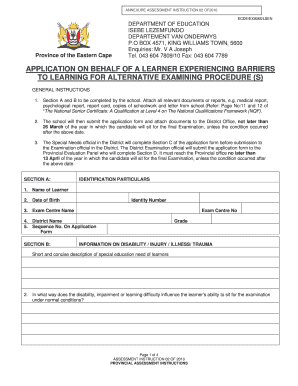
Get Application On Behalf Of A Learner With Barriers To Learning For A Special Concession
How it works
-

Open form follow the instructions
-

Easily sign the form with your finger
-

Send filled & signed form or save
How to fill out the Application On Behalf Of A Learner With Barriers To Learning For A Special Concession online
Filling out the Application On Behalf Of A Learner With Barriers To Learning For A Special Concession can be a crucial step in ensuring that learners receive the necessary support during examinations. This guide provides a comprehensive, step-by-step approach to assist you in completing the application online.
Follow the steps to successfully complete the application form.
- Press the ‘Get Form’ button to access the application form and open it in your preferred document editor.
- Begin by filling out Section A, which contains identification particulars. Include the name of the learner, date of birth, identity number, exam center name and number, district name, and sequence number on the application form.
- Move to Section B, which focuses on information regarding the learner's disability, injury, illness, or trauma. Provide a short description of the special education needs and detail how these factors affect the learner's ability to complete the exam under normal conditions.
- Indicate any alternative measures that will be applied for the learner, such as extra time and any special equipment, by marking with an 'X'. Specify the subjects that require these accommodations.
- Complete the scholastic information that details the schools attended, grades failed, and the marks obtained in each subject at the end of the year. Ensure accurate reporting of any previous concessions applied for.
- Provide details regarding any specific support or assistance received by the learner, including the type, frequency, duration, and outcome of the assistance offered.
- Make sure to include the date when a medical practitioner last examined the learner if applicable, attaching all relevant documentation supporting the application.
- Once all sections are completed, ensure to review the form thoroughly for accuracy. After this, you can save changes, download a copy, print, or share the completed application form.
Take the next step to support learners by completing the application online today!
Related links form
Reasons for their emergence may vary, but barriers to learning fall into three basic categories: emotional, motivational, and personal.
Industry-leading security and compliance
US Legal Forms protects your data by complying with industry-specific security standards.
-
In businnes since 199725+ years providing professional legal documents.
-
Accredited businessGuarantees that a business meets BBB accreditation standards in the US and Canada.
-
Secured by BraintreeValidated Level 1 PCI DSS compliant payment gateway that accepts most major credit and debit card brands from across the globe.