Loading
Get Ac 1641
How it works
-

Open form follow the instructions
-

Easily sign the form with your finger
-

Send filled & signed form or save
How to fill out the Ac 1641 online
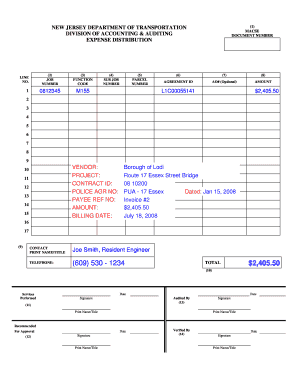
Filling out the Ac 1641 expense distribution form correctly is essential for ensuring smooth fiscal operations. This guide offers clear, step-by-step instructions to help you complete the form accurately, whether you are working with limited experience in this area or are a seasoned professional.
Follow the steps to successfully complete the Ac 1641 form online.
- Click the ‘Get Form’ button to access the Ac 1641 form and open it in the digital environment.
- Begin by entering the MACSE document number. This will be filled in by the Accounting Operations processor once the payment voucher is keyed into MACSE.
- Input the job number, which is a 7-digit code defining the basic units of work related to the task.
- Fill in the function code, a necessary 4-digit code that signifies the type of work or expenditure. Use 'M155' for federally funded agreements and 'M156' for state funded agreements.
- If applicable, enter the sub job number, a 4-digit code linked to the job number identifying specific tasks or locations. This field is optional.
- Provide the parcel number, which is required for Right of Way Acquisition payments.
- Fill in the agreement ID, an 11-digit alphanumeric code needed when the fund source is non-state.
- Optionally, include the agency obligation number, which designates the fund use. Contract Manager completion of this field is not mandatory.
- Enter the amount incurred related to the job number or agreement ID.
- Specify contact details for the Contract Manager or their designee, responsible for submitting the expense distribution form.
- Ensure that the total reflects the grand total of individual job numbers or agreement IDs being charged.
- Indicate services performed, which should be filled out by the Contract Manager.
- Obtain the signature of the individual recommending approval, a supervisory or managerial staff person confirming the Contract Manager's details.
- Include the signature of the auditor, signifying that the payment adheres to departmental policies.
- Finally, secure the approval from the authorization officer, confirming the processing of the document within MACSE.
- After completing the form, you may save your changes, download the document, print it, or share it as necessary.
Begin completing the Ac 1641 form online today for hassle-free expense distribution.
Industry-leading security and compliance
US Legal Forms protects your data by complying with industry-specific security standards.
-
In businnes since 199725+ years providing professional legal documents.
-
Accredited businessGuarantees that a business meets BBB accreditation standards in the US and Canada.
-
Secured by BraintreeValidated Level 1 PCI DSS compliant payment gateway that accepts most major credit and debit card brands from across the globe.