Loading
Get Tableau De Commande
How it works
-

Open form follow the instructions
-

Easily sign the form with your finger
-

Send filled & signed form or save
How to fill out the Tableau De Commande online
This guide provides a comprehensive walkthrough for filling out the Tableau De Commande form online. Users will find clear, step-by-step instructions to ensure accurate completion of the form.
Follow the steps to complete your Tableau De Commande effectively.
- Click ‘Get Form’ button to obtain the form and open it in your editor.
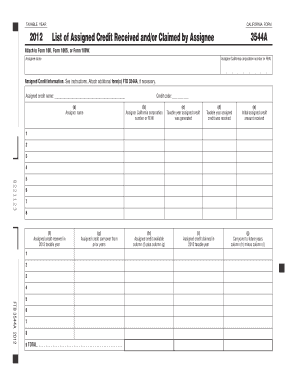
- Enter the Assignee name in the designated field. This should be the name of the person or entity receiving the assigned credits.
- Fill in the Assignee California corporation number or FEIN. Ensure that this number is accurate to facilitate proper processing.
- Proceed to the assigned credit information section. Enter the assigned credit name and credit code in the provided spaces.
- For each assigned credit, provide the associated Assignor name and their California corporation number or FEIN in the respective fields.
- Document the taxable year the credit was generated and the year it was received from the assignor.
- Input the initial assigned credit amount received and the assigned credit received in the current taxable year.
- Enter any assigned credit carryover from prior years, and calculate the total available assigned credit by adding the current year’s credit to the carryover.
- Record the total amount of assigned credit claimed in the taxable year and determine any carryover to future years by subtracting the claimed amount from the total available credits.
- After completing all sections of the form, review your entries for accuracy. Once confirmed, save any changes.
- You can then download, print, or share the completed form as needed.
Complete your tax documents online with confidence and ensure all forms are filled out accurately.
Initiating a Tableau Server involves using the tsm start command, which launches the server and its associated services. This command should be executed from the command line interface where Tableau Server is installed. Once initiated, you can access your Tableau dashboards and analytics seamlessly. Familiarizing yourself with these commands will empower you to utilize Tableau De Commande effectively.
Industry-leading security and compliance
US Legal Forms protects your data by complying with industry-specific security standards.
-
In businnes since 199725+ years providing professional legal documents.
-
Accredited businessGuarantees that a business meets BBB accreditation standards in the US and Canada.
-
Secured by BraintreeValidated Level 1 PCI DSS compliant payment gateway that accepts most major credit and debit card brands from across the globe.