Loading
Get 8669592864
How it works
-

Open form follow the instructions
-

Easily sign the form with your finger
-

Send filled & signed form or save
How to fill out the 8669592864 online
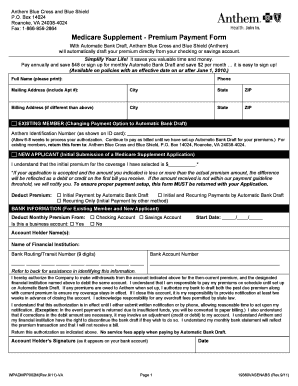
This guide provides comprehensive instructions for filling out the 8669592864 form, a premium payment form for Anthem Blue Cross and Blue Shield. By following these steps, you can easily complete your form online and set up automatic bank drafts for your premiums.
Follow the steps to complete the 8669592864 form online
- Press the ‘Get Form’ button to obtain the form and open it in the editor.
- Start by entering your full name in the designated field. This section requires you to print your name clearly.
- Provide your phone number, ensuring that it is accurate for any potential follow-up communication.
- Fill in your mailing address, including any apartment number, city, state, and ZIP code.
- If your billing address differs from your mailing address, complete this section with the necessary details including city, state, and ZIP code.
- If you are an existing member, indicate this by checking the appropriate box and entering your Anthem identification number as shown on your ID card.
- For new applicants, input the initial premium amount you are applying for, confirming your understanding of the application terms.
- Select how you would like to organize your payments by checking the appropriate box for your payment option—initial or recurring payments.
- Complete the bank information section by selecting whether you are using a checking or savings account and providing your start date.
- Enter the account holder name(s), name of the financial institution, bank routing number, and bank account number.
- Read the authorization clause carefully and sign as the account holder, then include the date of signing.
- Once everything is complete, you can save changes, download or print the filled form, and return it as indicated in the instructions.
Complete and submit your 8669592864 form online to streamline your premium payment process.
How to add a signature line in the Word doc Place your cursor where you would like to add the signature line. Go to the “Insert” tab, and select “Signature line.” A dialogue box will pop up — fill in the required details (name of the signer, work title of the signer, and email ID of the signer).
Industry-leading security and compliance
US Legal Forms protects your data by complying with industry-specific security standards.
-
In businnes since 199725+ years providing professional legal documents.
-
Accredited businessGuarantees that a business meets BBB accreditation standards in the US and Canada.
-
Secured by BraintreeValidated Level 1 PCI DSS compliant payment gateway that accepts most major credit and debit card brands from across the globe.