Loading
Get Pro-forma Invoice - Milgram
How it works
-

Open form follow the instructions
-

Easily sign the form with your finger
-

Send filled & signed form or save
How to fill out the Pro-forma Invoice - Milgram online
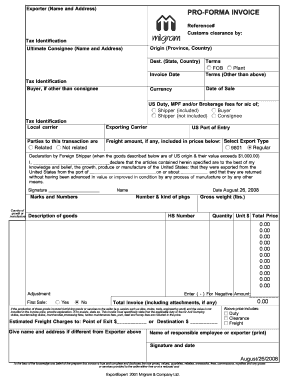
Filling out a Pro-forma Invoice is an essential task for exporters, providing necessary details for customs and trade. This guide offers step-by-step instructions on how to accurately complete the Pro-forma Invoice - Milgram online, ensuring that all required fields are filled correctly.
Follow the steps to complete the Pro-forma Invoice effectively.
- Click ‘Get Form’ button to obtain the form and access it in the online editor.
- Enter the exporter’s name and address in the designated fields. This should include the full address and tax identification number for accurate identification.
- Provide the reference number for tracking and identification within your records.
- Specify the customs clearance by detailing the name of the responsible customs broker or clearing agent, along with their tax identification number.
- Identify the ultimate consignee's name and address. This is the person or entity who will receive the goods.
- Fill in the destination state and country, ensuring that it correctly reflects where the goods are being sent.
- If the buyer is different from the consignee, provide their name and tax identification number.
- State the invoice date, which should reflect the day the invoice is prepared.
- Outline the terms of sale, including Free on Board (FOB) and any other relevant terms, specifying the currency used.
- Indicate the date of sale, and declare the applicable duties, fees, and whether they are included or excluded from the listed prices.
- Select the export type and specify the freight amount if applicable, only if it is included in the prices.
- Complete the declaration by the foreign shipper stating the origins of the goods, the port of departure, and confirm it aligns with the required legal standards.
- Fill out the section for marks and numbers, describing the goods, quantity, gross weight, HS number, and providing unit prices and total values.
- Address any additional adjustments as necessary, and ensure that any applicable duties are included or addressed in the total price.
- Insert the estimated freight charges and confirm whether any additional responsibilities are included in the pricing.
- Print your name, sign the document, and date it before final submission.
- Once all fields are completed, review the form for accuracy, and then proceed to save changes, download, print, or share the form as required.
Complete your Pro-forma Invoice - Milgram online today to ensure smooth export processing.
A proforma invoice is an estimate of the cost of the goods or services for the buyer. It is only meant for buyers to understand how much something will cost them. A tax invoice, on the other hand, is an official document that includes the final price and tax details.
Industry-leading security and compliance
US Legal Forms protects your data by complying with industry-specific security standards.
-
In businnes since 199725+ years providing professional legal documents.
-
Accredited businessGuarantees that a business meets BBB accreditation standards in the US and Canada.
-
Secured by BraintreeValidated Level 1 PCI DSS compliant payment gateway that accepts most major credit and debit card brands from across the globe.