Loading
Form preview
  • US Legal Forms
  • Form Library
  • More Forms
  • More Uncategorized Forms
  • Petition For Divorce

Get Petition For Divorce

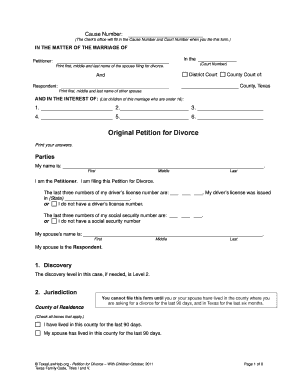
Cause Number: (The Clerk s office will fill in the Cause Number and Court Number when you file this form.) IN THE MATTER OF THE MARRIAGE OF In the Petitioner: (Court Number) Print first, middle and.

How it works

  1. Open form

    Open form follow the instructions

  2. Easily sign form

    Easily sign the form with your finger

  3. Share form

    Send filled & signed form or save

How to fill out the Petition for Divorce online

Filing for divorce can be a challenging process, but understanding how to complete the Petition for Divorce online can make it more manageable. This guide will walk you through each section of the form, ensuring you provide accurate and necessary information.

Follow the steps to successfully complete your form.

  1. Click ‘Get Form’ button to access the Petition for Divorce and open it in your preferred document editor.
  2. Begin by entering the Cause Number and Court Number, which will be filled in by the Clerk’s office once you file the form.
  3. In the header, specify the names of the Petitioner and Respondent. Enter your name (first, middle, last) as the Petitioner and the name of your partner as the Respondent.
  4. Indicate the county and state where you are filing the Petition. Note the requirement for residency, stating that either you or your partner have lived in the county for at least 90 days and in Texas for the last six months.
  5. Provide information on your driver’s license or social security number. Choose the applicable option and fill in the last three digits, or state that you do not possess these identifiers.
  6. Fill out the details regarding any children involved, including their names, dates, and places of birth.
  7. Describe the circumstances surrounding your marriage, such as the date of marriage and date of separation. State the grounds for divorce clearly.
  8. If you have court orders related to children, indicate whether any exist. If there are no current orders, check the appropriate box.
  9. Address issues regarding custody, visitation, and child support. Provide details on your current agreements or request the court to make decisions.
  10. Include information about property ownership. Specify community and separate property. Clearly indicate if you request the court to confirm certain properties as yours.
  11. If applicable, provide details regarding any protective orders against you or your partner.
  12. Finalize by filling out any necessary family information and request confidentiality if needed.
  13. State your request for a name change if desired.
  14. Complete the petition with a prayer for divorce and sign with your printed name, phone number, mailing address, and date.
  15. Review your completed Petition for Divorce to ensure accuracy, then save your changes, download a copy, print, or share the document as needed.

Start completing your Petition for Divorce online today to navigate your legal journey.

Get form

Experience a faster way to fill out and sign forms on the web. Access the most extensive library of templates available.
Get form

Related content

Forms - divorce_or_separation_selfhelp...
Petition — Marriage/Domestic Partnership. FL-100 PDF file type icon. To start a divorce...
Learn more
PRO SE DIVORCE HANDBOOK
Filing the Petition: The spouse who files for divorce is called the Petitioner. The other...
Learn more
FL-800 Joint Petition for Summary Dissolution...
will allow us to divorce. We are filing this case in the county in which we married. 6...
Learn more

Related links form

How To Fill Convention Registration Form Of Lions Club ENVIRONMENTAL CHECKLIST FORM CITY OF ... - Huntington Beach - Ci Huntington-beach Ca Material Request Form - Union Plus - Unionplus MINISTRY OF EDUCATION APPLICATION FORM FOR THE POST ...

Questions & Answers

Get answers to your most pressing questions about US Legal Forms API.

Contact support

When a party files a Petition for Dissolution of Marriage, they are asking the court to open their case and grant their divorce. ... As a result, as long as you file a Counter-Petition, your case will not be dismissed even if your spouse decides he or she wants to dismiss your case.

In a divorce case, the person who starts the court case by filing the petition is called the petitioner. The other spouse is called the respondent because that spouse can file a paper answering the petition that is called a response.

Receiving a divorce petition Once you've received the petition, you have 8 days to return the acknowledgement of service form to the court. If you don't respond within this time, the divorce might be able to go ahead anyway.

STEP 1: First Motion involves joint filing of divorce petition. STEP 2: Husband & wife appear before court to record statements after filing of petition. STEP 3: Court examines petition, documents, tries reconciliation, records statements. STEP 4: Court passes order on First Motion.

Divorce papers that have not been filed do not expire (whereas if a marital settlement agreement that has been filed but not ratified will be dismissed by the court for lack of record activity in 1 year). When you say you signed a petition I assume you also mean a marital settlement agreement.

The Advantages of Filing First There are, of course, other pros for submitting a divorce petition first. Have a Say in Divorce Proceedings The spouse who files first may have the chance to decide when court dates are established. ... It can also stop your spouse from hiding money or assets before the break up.

The name given to the spouse that files first for divorce is the Petitioner and the spouse that files second is called the Respondent. The clearest advantage to filing for divorce first is that at trial the Petitioner gets to present his/her evidence first.

There is often very little advantage or disadvantage to being the petitioner as opposed to the respondent. ... As the petitioner is the party effectively bringing the divorce, unless they are relying upon the parties having been separated for more than 2 years, they will have to assign some form of blame to the respondent.

Thanks to no-fault divorce laws there is no legal way to stop a divorce once the process begins. ... However, if you and your spouse decide to reconcile, the legal process can be stopped by withdrawing the petition for divorce. This would have to be done by the spouse who filed the original divorce petition.

A divorce decree has no termination date, only the specific order in the divorce judgment that might have termination dates. Sign up to receive a 10-part series of useful information and legal advice about the divorce process.

Get This Form Now!

Use professional pre-built templates to fill in and sign documents online faster. Get access to thousands of forms.
Get form
If you believe that this page should be taken down, please follow our DMCA take down processhere.

Industry-leading security and compliance

US Legal Forms protects your data by complying with industry-specific security standards.
  • In businnes since 1997
    25+ years providing professional legal documents.
  • Accredited business
    Guarantees that a business meets BBB accreditation standards in the US and Canada.
  • Secured by Braintree
    Validated Level 1 PCI DSS compliant payment gateway that accepts most major credit and debit card brands from across the globe.
Get Petition For Divorce
Get form
Form Packages
Adoption
Bankruptcy
Contractors
Divorce
Home Sales
Employment
Identity Theft
Incorporation
Landlord Tenant
Living Trust
Name Change
Personal Planning
Small Business
Wills & Estates
Packages A-Z
Form Categories
Affidavits
Bankruptcy
Bill of Sale
Corporate - LLC
Divorce
Employment
Identity Theft
Internet Technology
Landlord Tenant
Living Wills
Name Change
Power of Attorney
Real Estate
Small Estates
Wills
All Forms
Forms A-Z
Form Library
Customer Service
Your Privacy Choices
Terms of Service
Privacy Notice
Legal Hub
Content Takedown Policy
Bug Bounty Program
About Us
Help Portal
Legal Resources
Blog
Affiliates
Contact Us
Delete My Account
Site Map
Industries
Forms in Spanish
Localized Forms
State-specific Forms
Forms Kit
Legal Guides
Real Estate Handbook
All Guides
Prepared for You
Notarize
Incorporation services
Our Customers
For Consumers
For Small Business
For Attorneys
Our Sites
US Legal Forms
USLegal
FormsPass
pdfFiller
signNow
altaFlow
DocHub
Instapage
Social Media
Call us now toll free:
+1 833 426 79 33
As seen in:
  • USA Today logo picture
  • CBC News logo picture
  • LA Times logo picture
  • The Washington Post logo picture
  • AP logo picture
  • Forbes logo picture
© Copyright 1997-2025
airSlate Legal Forms, Inc.
3720 Flowood Dr, Flowood, Mississippi 39232
Form Packages
Adoption
Bankruptcy
Contractors
Divorce
Home Sales
Employment
Identity Theft
Incorporation
Landlord Tenant
Living Trust
Name Change
Personal Planning
Small Business
Wills & Estates
Packages A-Z
Form Categories
Affidavits
Bankruptcy
Bill of Sale
Corporate - LLC
Divorce
Employment
Identity Theft
Internet Technology
Landlord Tenant
Living Wills
Name Change
Power of Attorney
Real Estate
Small Estates
Wills
All Forms
Forms A-Z
Form Library
Customer Service
Your Privacy Choices
Terms of Service
Privacy Notice
Legal Hub
Content Takedown Policy
Bug Bounty Program
About Us
Help Portal
Legal Resources
Blog
Affiliates
Contact Us
Delete My Account
Site Map
Industries
Forms in Spanish
Localized Forms
State-specific Forms
Forms Kit
Legal Guides
Real Estate Handbook
All Guides
Prepared for You
Notarize
Incorporation services
Our Customers
For Consumers
For Small Business
For Attorneys
Our Sites
US Legal Forms
USLegal
FormsPass
pdfFiller
signNow
altaFlow
DocHub
Instapage
Social Media
Call us now toll free:
+1 833 426 79 33
As seen in:
  • USA Today logo picture
  • CBC News logo picture
  • LA Times logo picture
  • The Washington Post logo picture
  • AP logo picture
  • Forbes logo picture
© Copyright 1997-2025
airSlate Legal Forms, Inc.
3720 Flowood Dr, Flowood, Mississippi 39232