Loading
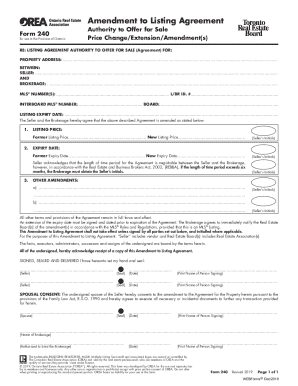
Get Amendment To Listing Agreement
How it works
-

Open form follow the instructions
-

Easily sign the form with your finger
-

Send filled & signed form or save
How to fill out the Amendment To Listing Agreement online
This guide provides a clear and supportive overview of how to efficiently complete the Amendment To Listing Agreement online. Whether you are a property seller or an agent, following these steps will ensure that your amendments are accurately documented.
Follow the steps to successfully complete your amendment.
- Click ‘Get Form’ button to obtain the document and open it in your preferred editor.
- Begin by entering the property address in the designated field. This information is crucial to identify the specific listing you are amending.
- In the section labeled 'Seller,' provide the names of all sellers involved. Ensure that each name is clearly listed to avoid any confusion.
- Next, fill in the listing brokerage name, which in this case is eMARKET REAL ESTATE LTD. Fill out the required information accurately.
- Enter the MLS® number(s) associated with the listing. This number is vital for identifying your listing within the Multiple Listing Service system.
- Specify the listing expiry date. Input the former expiry date and the new expiry date to reflect the changes being made.
- In the section labeled 'Listing Price,' indicate both the former and new listing prices to document the price change clearly.
- For any other amendments, provide brief details and have the seller initial as required. This part can include any additional notes regarding the changes.
- Ensure all parties involved sign and date the document as indicated. All signatures must be present for the amendment to take effect.
- Finally, review the form for accuracy. Once complete, save your changes, then download, print, or share the Amendment To Listing Agreement as necessary.
Complete your documents online today for a seamless experience.
Step 1 Get the Original Purchase Agreement. The buyer and seller should get a copy of the original purchase agreement. ... Step 2 Write the Addendum. Complete a blank addendum (Adobe PDF, Microsoft Word (. ... Step 3 Parties Agree and Sign. ... Step 4 Add to the Purchase Agreement.
Industry-leading security and compliance
US Legal Forms protects your data by complying with industry-specific security standards.
-
In businnes since 199725+ years providing professional legal documents.
-
Accredited businessGuarantees that a business meets BBB accreditation standards in the US and Canada.
-
Secured by BraintreeValidated Level 1 PCI DSS compliant payment gateway that accepts most major credit and debit card brands from across the globe.