Loading
Get Purchase Form - Ph&n Investment Services
How it works
-

Open form follow the instructions
-

Easily sign the form with your finger
-

Send filled & signed form or save
How to fill out the Purchase Form - PH&N Investment Services online
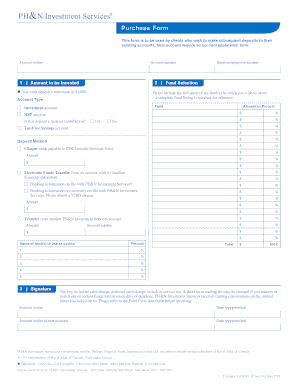
This guide provides a comprehensive overview of how to complete the Purchase Form for PH&N Investment Services online. It offers clear, step-by-step instructions tailored to assist all users, regardless of their experience with this type of document.
Follow the steps to effectively complete the Purchase Form.
- Press the ‘Get Form’ button to access the Purchase Form, allowing you to open it in your preferred electronic editor.
- In the 'Account Holder' section, enter your full name as the account holder. Make sure to provide your 'Account Number' if applicable.
- Specify the 'Amount to be Invested' by entering a value of at least $1,000.
- Provide your 'Daytime Telephone Number' to ensure easy communication regarding your investment.
- In the 'Fund Selection' section, list the full names of the fund(s) in which you wish to invest based on the attached comprehensive fund listing.
- Indicate your 'Account Type' by selecting from the available options such as 'Investment Account,' 'RSP Account,' or 'Tax-Free Savings Account.'
- Select whether the deposit is a spousal contribution by checking 'Yes' or 'No.'
- Choose your 'Deposit Method' from the available options, whether by 'Cheque,' 'Electronic Funds Transfer,' or using existing banking information.
- If using a cheque or electronic funds transfer, fill in the corresponding amount and percentage as applicable.
- Provide the necessary banking information if it is not currently on file, attaching a VOID cheque if necessary.
- If transferring from another PH&N Investment Services account, enter the account number and amount of the transfer. Specify the names of the funds to use as sources.
- Complete the 'Signature' section by signing and dating the form. If it is a joint account, include the second account holder's details.
- Once you have finished filling out the form, save any changes you have made. You may now download, print, or share the completed form as needed.
Complete your Purchase Form online now for a seamless investment experience.
An invoice hold occurs if an invoice and its corresponding PO don't match and/or items cannot be confirmed as received. When details on the invoice do not match the supporting document (purchase order, receipt of goods, supplier invoice) in terms of amount, this is considered a quantity deviation.