Loading
Get Transfer-in Recommendation Form - Pasadena City College - Pasadena
How it works
-

Open form follow the instructions
-

Easily sign the form with your finger
-

Send filled & signed form or save
How to fill out the Transfer-in Recommendation Form - Pasadena City College - Pasadena online
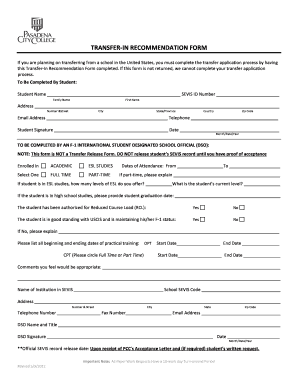
The Transfer-in Recommendation Form is a crucial document for students who are transferring to Pasadena City College from another school in the United States. This guide will provide you with step-by-step instructions to help you complete this form accurately and efficiently online.
Follow the steps to fill out the form online effectively.
- Press the ‘Get Form’ button to acquire the Transfer-in Recommendation Form and open it for editing.
- Begin by filling out your personal information in the 'To Be Completed By Student' section, including your name, SEVIS ID number, address, email address, and telephone number.
- Next, provide your signature and the date of signature at the bottom of this section.
- Proceed to the 'To Be Completed By An F-1 International Student Designated School Official (DSO)' section. Enter the institution's name and SEVIS code, along with the contact details for the DSO.
- Indicate your enrollment status by selecting either full-time or part-time and, if part-time, provide an explanation.
- If applicable, fill in the dates of attendance and complete the questions regarding ESL studies and practical training.
- If you have been authorized for a reduced course load, indicate 'Yes' or 'No' and provide any necessary explanations.
- Finally, the DSO should provide comments if necessary, sign the form, and include the date.
- Once all sections are completed, save your changes, and choose to download, print, or share the form as required.
Complete your Transfer-in Recommendation Form online today to ensure a smooth transfer process.
While a minimum 2.0 is required for admission, some majors may require a higher GPA.