Loading
Get Duplicate Tax Statement Request (please Print) - Stony Brook University - Naples Cc Sunysb
How it works
-

Open form follow the instructions
-

Easily sign the form with your finger
-

Send filled & signed form or save
How to fill out the Duplicate Tax Statement Request (please Print) - Stony Brook University - Naples Cc Sunysb online
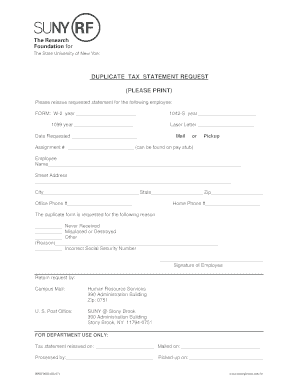
Filling out the Duplicate Tax Statement Request form is a straightforward process that allows you to obtain a copy of your tax statement when needed. This guide will provide clear, step-by-step instructions to help you complete the form efficiently.
Follow the steps to complete your Duplicate Tax Statement Request.
- Press the ‘Get Form’ button to retrieve the Duplicate Tax Statement Request form and open it for completion.
- In the section labeled 'Form,' indicate the type of statement you are requesting by filling in the appropriate year next to 'W-2,' '1099,' or '1042-S' as applicable.
- Enter the date you are requesting the statement in the 'Date Requested' field.
- If applicable, specify your assignment number found on your pay stub for reference.
- Complete the 'Employee Name' field with your full name, followed by your 'Street Address,' 'City,' 'State,' and 'Zip' code.
- Provide both your office phone number and home phone number to ensure you can be contacted easily.
- Select the reason for requesting the duplicate tax statement by marking one of the provided options: 'Never Received,' 'Misplaced or Destroyed,' or 'Other.' If you select 'Other,' include a brief explanation.
- If you experienced an issue with your Social Security number, note the incorrect number in the designated space.
- Sign the form where indicated as the signature of the employee requesting the duplicate tax statement.
- Finally, indicate how you would like to receive the duplicated statement by selecting either 'Mail' or 'Pickup.'
- Submit the completed form by sending it through campus mail or U.S. Post Office to the addresses provided. Ensure to check the instructions regarding how to return the request.
- Once submitted, keep a copy of the form for your records. Monitor for confirmation of processing.
Complete your Duplicate Tax Statement Request online today to obtain your necessary documentation efficiently.
Tax identification numbers or taxpayer-identification numbers come in several different forms. Individuals are assigned TINs in the form of Social Security numbers (SSNs), whereas businesses (e.g., corporations and partnerships) are assigned employer identification numbers (EINs).
Industry-leading security and compliance
US Legal Forms protects your data by complying with industry-specific security standards.
-
In businnes since 199725+ years providing professional legal documents.
-
Accredited businessGuarantees that a business meets BBB accreditation standards in the US and Canada.
-
Secured by BraintreeValidated Level 1 PCI DSS compliant payment gateway that accepts most major credit and debit card brands from across the globe.