Loading
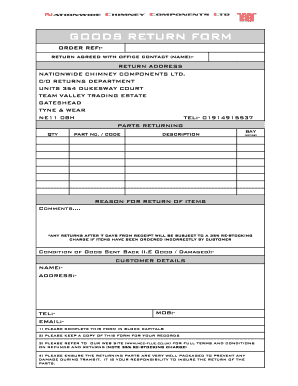
Get Goods Return Form - Nationwide Chimney Components... - Ncc-flue Co
How it works
-

Open form follow the instructions
-

Easily sign the form with your finger
-

Send filled & signed form or save
How to use or fill out the GOODS RETURN FORM - Nationwide Chimney Components... - Ncc-flue Co online
Filling out the Goods Return Form for Nationwide Chimney Components can seem challenging, but with the right guidance, it becomes a straightforward process. This user-friendly guide provides comprehensive steps to complete the form accurately and efficiently.
Follow the steps to fill out the Goods Return Form correctly.
- Click the ‘Get Form’ button to obtain the Goods Return Form and open it in your preferred editing tool.
- Enter your order reference in the designated field to identify the transaction related to your return.
- Provide the name of the office contact you agreed your return with to facilitate communication.
- Fill in the return address, ensuring it matches the address provided: Nationwide Chimney Components Ltd., C/O Returns Department, Units 354 Dukesway Court, Team Valley Trading Estate, Gateshead, Tyne & Wear, NE11 0BH.
- In the 'Parts Returning' section, list the quantity of items you are returning in the 'QTY' field. Next, specify the part number or code for each item in the corresponding field.
- Provide a brief description of each item you are returning to offer clarity for the return process.
- Indicate the reason for your return in the specified section. This is crucial as it helps the company understand return patterns and improve their service.
- Check the condition of the goods you are sending back and indicate if they are 'Good' or 'Damaged' in the specified field.
- Fill in your customer details, including your name, address, telephone number, email, and mobile number, ensuring all information is accurate.
- Complete the form using block capitals as indicated in the instructions for clarity. Keep a copy of this filled form for your personal records.
- Before submitting, make sure the returning parts are securely packaged to prevent any damage during transit. This is your responsibility.
- After verifying that all fields are completed accurately, save any changes made to the form. You may then download, print, or share the form as needed.
Start filling out your Goods Return Form online today to ensure a smooth return process.
Click once in the area of the document to which you want to add the checkbox control. Click the "Developer" tab and find the "Controls" group. Select the "Check Box Content Control" icon, which will insert the control into the Word document.
Industry-leading security and compliance
US Legal Forms protects your data by complying with industry-specific security standards.
-
In businnes since 199725+ years providing professional legal documents.
-
Accredited businessGuarantees that a business meets BBB accreditation standards in the US and Canada.
-
Secured by BraintreeValidated Level 1 PCI DSS compliant payment gateway that accepts most major credit and debit card brands from across the globe.