Loading
Form preview
  • US Legal Forms
  • Form Library
  • More Forms
  • More Uncategorized Forms
  • Avesis Nebraska Medicaid Authorization Form

Get Avesis Nebraska Medicaid Authorization Form

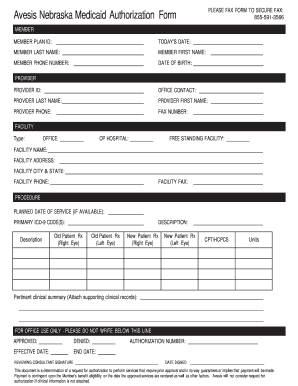
PLEASE FAX FORM TO SECURE FAX: 8555913566 Avesis Nebraska Medicaid Authorization Form MEMBER MEMBER PLAN ID: TODAYS DATE: MEMBER LAST NAME: MEMBER FIRST NAME: MEMBER PHONE NUMBER: DATE OF BIRTH: PROVIDER.

How it works

  1. Open form

    Open form follow the instructions

  2. Easily sign form

    Easily sign the form with your finger

  3. Share form

    Send filled & signed form or save

How to fill out the Avesis Nebraska Medicaid Authorization Form online

This guide provides a comprehensive overview of how to accurately complete the Avesis Nebraska Medicaid Authorization Form online. By following the step-by-step instructions, users can ensure that all necessary information is filled out correctly.

Follow the steps to accurately complete the form.

  1. Click the ‘Get Form’ button to obtain the authorization form and open it in your editor.
  2. Begin by filling in the member's details. Enter the member's plan ID, today's date, last name, first name, phone number, and date of birth in the designated fields.
  3. Next, move to the provider section. Input the provider's ID, office contact name, last name, first name, phone number, and fax number.
  4. Proceed to the facility information. Choose the type of facility (office, outpatient hospital, free-standing facility) and fill in the facility's name, address, city and state, phone number, and fax number.
  5. In the procedure section, indicate the planned date of service if available. Enter the primary ICD-9 code(s) related to the service being requested, along with a description.
  6. Provide the details for any existing patient records. Include the old patient prescriptions for both the right and left eye, as well as the new patient prescriptions for the right and left eye.
  7. Fill in the CPT/HCPCS codes and the number of units required for the service.
  8. Attach a pertinent clinical summary and any supporting clinical records necessary to complete the request.
  9. Before submitting, review all completed sections for accuracy. Once confirmed, you can save changes, download, print, or share the completed form.

Complete your Avesis Nebraska Medicaid Authorization Form online today for efficient processing.

Get form

Experience a faster way to fill out and sign forms on the web. Access the most extensive library of templates available.
Get form

Related content

Avesis Incorporated - Nebraska Department of...
Jan 12, 2017 — 100,000 Medicaid members for full eye care services in rural as well as...
Learn more
Benefits Summary/New Hire Enrollment Guide...
Medicare or Medicaid eligible status – you or your spouse become Medicare or Medicaid...
Learn more

Related links form

- The APA Is Offering The Cultural Formulation Interview (including The Informant Sweetheart Of The Song Tra Bong Pdf Develop And Update Hospitality Industry Knowledge

Questions & Answers

Get answers to your most pressing questions about US Legal Forms API.

Contact support

A checkbox is a form element that allows you to select multiple options from different available options. Checkboxes are created with the HTML <input> tag. It can be nested inside a <form> element or they can stand alone.

Checking if a checkbox is checked First, select the checkbox using a DOM method such as getElementById() or querySelector() . Then, access the checked property of the checkbox element. If its checked property is true , then the checkbox is checked; otherwise, it is not.

To change size, color, or border style of the check box, select the Use a style to format text typed into the empty control box, and then click New Style. Under Formatting, select a font size for the check box. In the Color list, select a color. To select a different border, select Format > Border.

3:30 4:28 How to Insert a Clickable Checkbox in Microsoft Word - YouTube YouTube Start of suggested clip End of suggested clip Select symbol which is right under bullet character. Select the wingdings 2 font choose the checkMoreSelect symbol which is right under bullet character. Select the wingdings 2 font choose the check mark icon. And click ok then ok again. Now you can copy it everywhere you need. It.

Step 1: Place the cursor where you want to add a checkbox. Step 2: Go to the Insert Tab and select Symbols. Step 3: Select the checkbox symbol, as shown in the below screenshot.

A check box is used to select or deselect action items. It can be used for a single item or for a list of multiple items that a user can choose from. The control has three selection states: unselected, selected, and indeterminate.

0:00 0:52 How to Insert a Checkbox in Google Docs - YouTube YouTube Start of suggested clip End of suggested clip Type check in the search box and there are the examples. Click here here here and here close thatMoreType check in the search box and there are the examples. Click here here here and here close that down and there your checkboxes.

3:30 4:28 How to Insert a Clickable Checkbox in Microsoft Word - YouTube YouTube Start of suggested clip End of suggested clip Select symbol which is right under bullet character. Select the wingdings 2 font choose the checkMoreSelect symbol which is right under bullet character. Select the wingdings 2 font choose the check mark icon. And click ok then ok again. Now you can copy it everywhere you need. It.

Get This Form Now!

Use professional pre-built templates to fill in and sign documents online faster. Get access to thousands of forms.
Get form
If you believe that this page should be taken down, please follow our DMCA take down processhere.
Get Avesis Nebraska Medicaid Authorization Form
Get form
  • Adoption
  • Bankruptcy
  • Contractors
  • Divorce
  • Home Sales
  • Employment
  • Identity Theft
  • Incorporation
  • Landlord Tenant
  • Living Trust
  • Name Change
  • Personal Planning
  • Small Business
  • Wills & Estates
  • Packages A-Z
  • Affidavits
  • Bankruptcy
  • Bill of Sale
  • Corporate - LLC
  • Divorce
  • Employment
  • Identity Theft
  • Internet Technology
  • Landlord Tenant
  • Living Wills
  • Name Change
  • Power of Attorney
  • Real Estate
  • Small Estates
  • Wills
  • All Forms
  • Forms A-Z
  • Form Library
  • Legal Hub
  • About Us
  • Help Portal
  • Legal Resources
  • Blog
  • Affiliates
  • Contact Us
  • Delete My Account
  • Site Map
  • Industries
  • Forms in Spanish
  • Localized Forms
  • State-specific Forms
  • Forms Kit
  • Real Estate Handbook
  • All Guides
  • Notarize
  • Incorporation services
  • For Consumers
  • For Small Business
  • For Attorneys
  • USLegal
  • FormsPass
  • pdfFiller
  • signNow
  • altaFlow
  • DocHub
  • Instapage
Form Packages
  • Adoption
  • Bankruptcy
  • Contractors
  • Divorce
  • Home Sales
  • Employment
  • Identity Theft
  • Incorporation
  • Landlord Tenant
  • Living Trust
  • Name Change
  • Personal Planning
  • Small Business
  • Wills & Estates
  • Packages A-Z
Form Categories
  • Affidavits
  • Bankruptcy
  • Bill of Sale
  • Corporate - LLC
  • Divorce
  • Employment
  • Identity Theft
  • Internet Technology
  • Landlord Tenant
  • Living Wills
  • Name Change
  • Power of Attorney
  • Real Estate
  • Small Estates
  • Wills
  • All Forms
  • Forms A-Z
  • Form Library
Customer Service
  • Legal Hub
  • About Us
  • Help Portal
  • Legal Resources
  • Blog
  • Affiliates
  • Contact Us
  • Delete My Account
  • Site Map
  • Industries
  • Forms in Spanish
  • Localized Forms
  • State-specific Forms
  • Forms Kit
Legal Guides
  • Real Estate Handbook
  • All Guides
Prepared for you
  • Notarize
  • Incorporation services
Our Customers
  • For Consumers
  • For Small Business
  • For Attorneys
Our Sites
  • USLegal
  • FormsPass
  • pdfFiller
  • signNow
  • altaFlow
  • DocHub
  • Instapage
Social Media
Call us now toll free:
+1 833 426 79 33
As seen in:
© Copyright 1999-2026 airSlate Legal Forms, Inc. 3720 Flowood Dr, Flowood, Mississippi 39232
  • Your Privacy Choices
  • Terms of Service
  • Privacy Notice
  • Content Takedown Policy
  • Bug Bounty Program