Loading
Get Official Homeschool Transcript - Cn
How it works
-

Open form follow the instructions
-

Easily sign the form with your finger
-

Send filled & signed form or save
How to fill out the Official Homeschool Transcript - Cn online
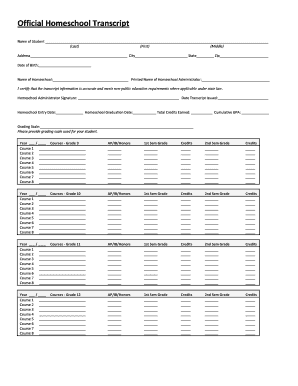
This guide provides comprehensive instructions on completing the Official Homeschool Transcript - Cn online. By following these steps, you will ensure accurate and reliable documentation of your homeschool education.
Follow the steps to complete your transcript accurately.
- Press the ‘Get Form’ button to access the transcript and open it in your preferred editor.
- Enter the name of the student at the top of the form, ensuring to fill in the last name, first name, and middle name where applicable.
- Provide the student's address, including the city, state, and zip code, to complete their contact information.
- Fill in the date of birth of the student to confirm their identity and age.
- Input the name of the homeschool in the designated section, which represents the educational entity responsible for the student's learning.
- Include the printed name of the homeschool administrator, who is responsible for certifying the accuracy of the transcript.
- The homeschool administrator must sign in the provided space to certify that the transcript details are complete and meet state requirements.
- Record the date the transcript is issued for official documentation purposes.
- Specify the homeschool entry date and graduation date to outline the period of education covered in the transcript.
- Calculate and input the total credits earned by the student throughout their homeschool education.
- Enter the cumulative GPA to summarize the student's academic performance.
- Indicate the grading scale used for evaluation in the relevant section to provide clarity on the grading criteria.
- For each grade level (9 through 12), list the courses taken, along with corresponding semester grades and credits for both the first and second semesters.
- After completing all sections, save your changes, download the completed transcript, and print it for your records or distribution.
Complete your Official Homeschool Transcript - Cn online now to ensure accurate educational documentation.
Student information A homeschool transcript should include: ... A section for each grade OR a section for each subject area in which high school courses were completed, with the information below included for each individual course. Number of credits (both cumulative and, if organized by year, for each year)
Industry-leading security and compliance
US Legal Forms protects your data by complying with industry-specific security standards.
-
In businnes since 199725+ years providing professional legal documents.
-
Accredited businessGuarantees that a business meets BBB accreditation standards in the US and Canada.
-
Secured by BraintreeValidated Level 1 PCI DSS compliant payment gateway that accepts most major credit and debit card brands from across the globe.