Loading
Get Dc Amerihealth Caritas 5400acdc-17222
How it works
-

Open form follow the instructions
-

Easily sign the form with your finger
-

Send filled & signed form or save
How to fill out the DC AmeriHealth Caritas 5400ACDC-17222 online
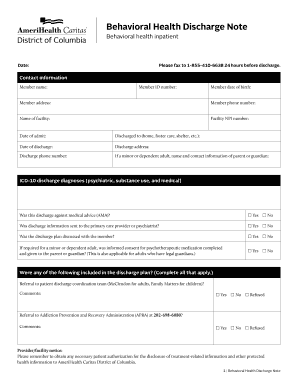
This guide provides a comprehensive walkthrough for users filling out the DC AmeriHealth Caritas 5400ACDC-17222 form. Follow these steps for a user-friendly experience to ensure all relevant information is accurately completed.
Follow the steps to successfully complete the form online.
- Click the ‘Get Form’ button to access the form and open it for editing.
- Begin with the date field. Enter the current date when the form is being filled out.
- Provide the member’s name in the designated field. Ensure the name matches official identification.
- Input the member ID number, which is typically found on their insurance card.
- Enter the member's date of birth in the specified format. This information is crucial for identifying the individual.
- Fill in the member's address, including street, city, state, and zip code.
- Input the member's phone number to ensure effective communication regarding discharge.
- Specify the name of the facility where the member was treated.
- Enter the facility's NPI number, which is necessary for billing and identification purposes.
- Record the date of admission to the facility.
- Indicate where the member is being discharged to, such as home, foster care, or shelter.
- Enter the discharge date in the appropriate field.
- Provide the discharge address if different from the member's home address.
- Fill in the discharge phone number for the place where the member will be staying.
- For minors or dependent adults, include the name and contact information of the parent or guardian.
- List the ICD-10 discharge diagnoses applicable to the member, covering psychiatric, substance use, and medical conditions.
- Indicate whether the discharge was against medical advice (AMA) by checking 'Yes' or 'No'.
- State if discharge information was shared with the primary care provider or psychiatrist.
- Confirm if the discharge plan was discussed with the member.
- For minors or dependent adults, note if informed consent for psychotherapeutic medication was completed.
- Check all applicable items that were included in the discharge plan, such as referrals to various services.
- Document any comments that may help clarify the discharge planning.
- Indicate if any collaboration is needed with specific agencies and provide contact information.
- List all discharge medications, providing details on dosage, frequency, and purposes.
- Answer whether the medications are on the formulary and if they require precertification.
- Confirm if precertification has been received for any required medications.
- Conduct a risk assessment, noting the member's stability at discharge regarding potential risks.
- Enter details for the first aftercare appointment within seven days, including provider name and contact.
- Describe whether a second aftercare appointment is scheduled and provide relevant details.
- List any other providers involved in the aftercare plan, including their contact information.
- Complete the form by entering the name and phone number of the person submitting the form.
- Finally, review all provided information for accuracy before saving, downloading, or printing the completed form.
Complete your DC AmeriHealth Caritas 5400ACDC-17222 form online today for efficient document management.
– AmeriHealth Caritas VIP Care Plus Payer ID is: 77013.
Industry-leading security and compliance
US Legal Forms protects your data by complying with industry-specific security standards.
-
In businnes since 199725+ years providing professional legal documents.
-
Accredited businessGuarantees that a business meets BBB accreditation standards in the US and Canada.
-
Secured by BraintreeValidated Level 1 PCI DSS compliant payment gateway that accepts most major credit and debit card brands from across the globe.