Loading
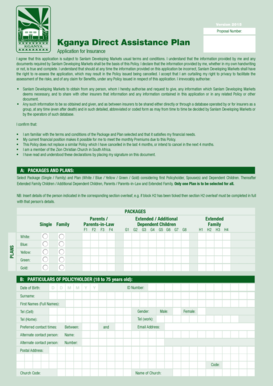
Get Kganya Vacancies
How it works
-

Open form follow the instructions
-

Easily sign the form with your finger
-

Send filled & signed form or save
How to fill out the Kganya Vacancies online
Filling out the Kganya Vacancies form online can be straightforward if you follow the proper steps. This guide provides clear and detailed instructions to help you navigate each section of the form effectively.
Follow the steps to complete the Kganya Vacancies form online.
- Click ‘Get Form’ button to obtain the form and open it in the editor.
- Begin by selecting the desired package, choosing between Single or Family, and then select the applicable plan from the options provided (White, Blue, Yellow, Green, Gold). Ensure that you consider the first Policyholder and their dependents when making your selection.
- Next, fill out the particulars of the Policyholder including date of birth, ID number, full names, gender, and various contact numbers (cell, home, work). Provide the preferred contact times and postal address, along with the church code and church name.
- Enter the bank details for the debit order, including the bank's name, account type, branch name, branch code, and account number. Authorize Sanlam Developing Markets to deduct monthly premiums from your account, specifying the starting date for deductions.
- Complete the details of the spouse(s) if applicable, including their date of birth, ID number, and gender. Repeat this step for each spouse listed in the form.
- Provide the details for dependent children, including their date of birth, ID number, and whether they are permanently disabled. Repeat this for each dependent child you wish to include.
- Fill in the details for parents or parents-in-law, ensuring accuracy in their personal information including date of birth and ID number.
- Complete the section for extended family children, including their date of birth, ID number, and relationship to the Policyholder.
- Finally, review all information for accuracy, and ensure you have signed the application with your full name and date. After confirming everything is correct, you can save changes, download a copy, print it, or share the form as needed.
Take the first step towards your application by completing the Kganya Vacancies form online today!
SAMPLE AFFIDAVIT FOR NAME (Duly Notarised) I say that my true and correct name is…………….. 2. I say that in my graduation certificate or Certificate of Membership by ICAI or aadhar card or PAN Card or any document (mention), my name is mentioned as “…”. The name …. is my mother's name or my father's name or …….
Industry-leading security and compliance
US Legal Forms protects your data by complying with industry-specific security standards.
-
In businnes since 199725+ years providing professional legal documents.
-
Accredited businessGuarantees that a business meets BBB accreditation standards in the US and Canada.
-
Secured by BraintreeValidated Level 1 PCI DSS compliant payment gateway that accepts most major credit and debit card brands from across the globe.