Loading
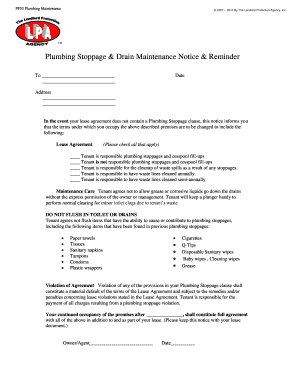
Get Plumbing Stoppage Drain Notice
How it works
-

Open form follow the instructions
-

Easily sign the form with your finger
-

Send filled & signed form or save
How to fill out the Plumbing Stoppage Drain Notice online
Filling out the Plumbing Stoppage Drain Notice is an essential task for ensuring clear communication regarding plumbing responsibilities. This guide offers step-by-step instructions to help you accurately complete the form online.
Follow the steps to complete the Plumbing Stoppage Drain Notice.
- Press the ‘Get Form’ button to access the Plumbing Stoppage Drain Notice and open it in your document editor.
- Begin by entering the date in the designated field. Ensure this reflects the current date or the date you are completing the notice.
- Next, fill in the recipient's name and address in the appropriate fields. This information should clearly identify the person receiving the notice.
- In the Lease Agreement section, check all relevant boxes that apply to the plumbing responsibilities. Choose whether the tenant is responsible for stoppages, cleanup of waste spills, and the frequency of maintenance care.
- Review the maintenance care guidelines. Ensure that the language, including the agreement not to flush certain items down the toilet, is clear and understood.
- Enter any additional items in the violation of agreement section, if necessary. Clearly state any additional points of concern related to plumbing responsibilities.
- Finally, add the owner or agent's signature in the designated area, along with the date to signify agreement with the terms outlined in the notice.
- Once you have completed all sections, save your changes. You may also download, print, or share the completed Plumbing Stoppage Drain Notice as required.
Complete your Plumbing Stoppage Drain Notice online today to ensure clarity in plumbing responsibilities.
The website footer is the section of content at the very bottom of a web page. It typically contains a copyright notice, link to a privacy policy, sitemap, logo, contact information, social media icons, and an email sign-up form. In short, a footer contains information that improves a website's overall usability.