Loading
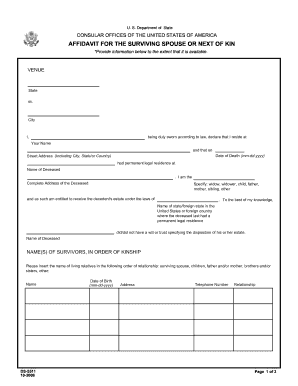
Get Ds-5511 2008-2025
How it works
-

Open form follow the instructions
-

Easily sign the form with your finger
-

Send filled & signed form or save
How to fill out the DS-5511 online
Filling out the DS-5511 online is an essential process for individuals seeking to provide information regarding the surviving spouse or next of kin of a deceased person. This guide will walk you through each section of the form step-by-step to ensure you complete it accurately and efficiently.
Follow the steps to complete the DS-5511 form online.
- Click the ‘Get Form’ button to obtain the form and open it in the editor.
- Begin by entering the venue details. Input the state and city where the declaration is made.
- In the first section, indicate your name and complete address. Include your street address, city, state, and zip code.
- Enter the date of death in the specified format (mm-dd-yyyy).
- Provide the name and complete address of the deceased. Ensure this is their permanent legal residence.
- Specify your relationship to the deceased. Options include widow, widower, child, father, mother, sibling, or other.
- Indicate the state or foreign state where the deceased last had their permanent legal residence.
- Clarify whether the deceased had a will or trust specifying the disposition of their estate by checking either did or did not.
- List the survivors in order of kinship. Provide their names, dates of birth, addresses, telephone numbers, and relationship to the deceased.
- Complete the affidavit by signing as the affiant, typing your name, and dating the declaration.
- Have the form notarized by signing and providing the address and printed name of the notary public.
- Once all sections have been filled out, ensure to save your changes. You can then download, print, or share the completed form as needed.
Complete your documents online today to ensure a smooth filing process.
Begin with your full name and the name of the deceased. Detail the information about the heirs, including their relationship to the decedent. After writing all necessary information, sign the affidavit in front of a notary. Refer to DS-5511 for detailed instructions and sample forms to guide you.
Industry-leading security and compliance
US Legal Forms protects your data by complying with industry-specific security standards.
-
In businnes since 199725+ years providing professional legal documents.
-
Accredited businessGuarantees that a business meets BBB accreditation standards in the US and Canada.
-
Secured by BraintreeValidated Level 1 PCI DSS compliant payment gateway that accepts most major credit and debit card brands from across the globe.