Get Agricultural Financial Statement
How it works
-

Open form follow the instructions
-

Easily sign the form with your finger
-

Send filled & signed form or save
How to fill out the Agricultural Financial Statement online
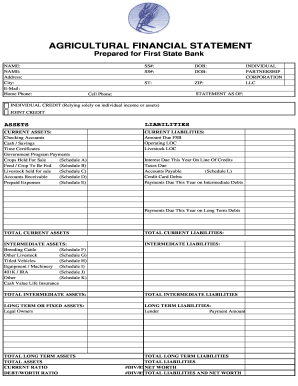
This guide provides clear instructions for completing the Agricultural Financial Statement online. By following the steps outlined below, users can successfully navigate each section of the form to report their financial information accurately.
Follow the steps to complete your Agricultural Financial Statement.
- Click ‘Get Form’ button to acquire the Agricultural Financial Statement and access it for editing.
- In the initial section, provide your full name, address, email, and contact numbers, including home and cell phone details. This information ensures proper identification and communication.
- Next, fill in your Social Security number and date of birth. Ensure that this personal information is entered accurately to avoid future verification issues.
- Indicate your residency state and ZIP code, followed by the statement date. This contextualizes the financial information for the bank.
- Select either 'Individual Credit' or 'Joint Credit' depending on your financial arrangement. This section clarifies the basis of your application.
- Proceed to the assets section. List your current assets, such as checking account balances, cash savings, and any government program payments, along with detailed descriptions as necessary.
- Document your current liabilities, including due amounts for loans, payable accounts, and any credit card debts. This provides an overview of your financial obligations.
- Move on to intermediate assets and liabilities. Include assets like breeding cattle and 401K accounts and their respective values, as well as any intermediate debts.
- Next, report long-term or fixed assets and long-term liabilities. The accuracy of these figures is crucial for a complete financial overview.
- Fill out any additional schedules related to specific asset categories, such as crops held for sale or livestock to be sold. Include descriptions and values as prompted in each section.
- Conclude by reviewing your entries for accuracy. Ensure all fields are filled properly, and reconsider any summaries of ownership interests or pending legal matters.
- Once you have verified all information, save your changes, and select the option to download, print, or share the Agricultural Financial Statement as needed.
Start completing your Agricultural Financial Statement online today to ensure your financial information is accurately represented.
The four primary categories of financial ratio classification are liquidity ratios, profitability ratios, solvency ratios, and efficiency ratios. These ratios provide insights into various aspects of a farm’s financial performance. By analyzing these categories within your Agricultural Financial Statements, you can identify strengths and weaknesses. This information is crucial for making strategic business decisions.
Industry-leading security and compliance
-
In businnes since 199725+ years providing professional legal documents.
-
Accredited businessGuarantees that a business meets BBB accreditation standards in the US and Canada.
-
Secured by BraintreeValidated Level 1 PCI DSS compliant payment gateway that accepts most major credit and debit card brands from across the globe.