Loading
Get Nucleus Pension Account
How it works
-

Open form follow the instructions
-

Easily sign the form with your finger
-

Send filled & signed form or save
How to fill out the Nucleus Pension Account online
Completing your Nucleus Pension Account form is a straightforward process that enables you to express your wishes regarding the distribution of your pension benefits upon your passing. This guide provides clear, step-by-step instructions to assist you in accurately filling out the required information online.
Follow the steps to fill out your Nucleus Pension Account form online.
- Press the 'Get Form' button to access the Nucleus Pension Account form and open it in your preferred editing tool.
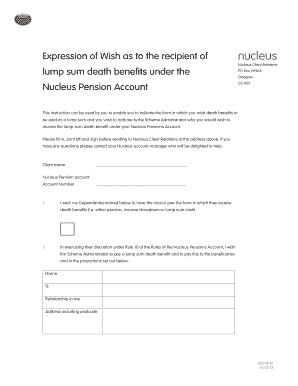
- Begin by entering your full name in the designated field for 'Client name.' Ensure that the name you provide matches the account details.
- In the 'Nucleus Pension Account' section, input your account number accurately to link this expression of wish to your specific pension account.
- Indicate whether you wish your dependants to have the choice over the form in which they receive the death benefits by checking the appropriate box. This can include options for pension, income drawdown, or lump sum cash.
- List the names of the beneficiaries you wish to receive the lump sum death benefit below. For each beneficiary, provide their name, percentage of benefit they should receive, their relationship to you, and their complete address, including postcode.
- If there are any trustees involved, include their names, the date the trust was established, and the name and address of the first named trustee, making sure to include the postcode.
- Review the confirmation statement regarding the declaration of trust over the death benefits, and ensure you understand that this is an expression of your wishes and is not legally binding.
- Sign and date the form in the designated areas to validate your expression of wish. Ensure the date is formatted correctly.
- Once you have completed all sections, save the changes to the form. You may then download, print, or share the document as necessary.
Complete your Nucleus Pension Account form online today to ensure your wishes are clearly expressed.
Getting in touch with us We're around from Monday-Friday from 8.30am-5.30pm, but if you leave a message outside these hours we'll get straight back to you. Please phone us on 0131 226 9800.
Industry-leading security and compliance
US Legal Forms protects your data by complying with industry-specific security standards.
-
In businnes since 199725+ years providing professional legal documents.
-
Accredited businessGuarantees that a business meets BBB accreditation standards in the US and Canada.
-
Secured by BraintreeValidated Level 1 PCI DSS compliant payment gateway that accepts most major credit and debit card brands from across the globe.