Loading
Form preview
  • US Legal Forms
  • Other Templates
  • Industry Forms
  • Industry Bank & Financial Forms
  • Petty Cash/change Fund Reconciliation

Get Petty Cash/change Fund Reconciliation

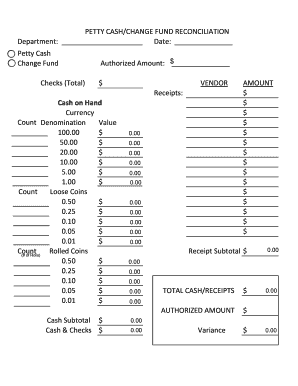
Loose Coins 0.50 $ 0.25 $ 0.10 $ 0.05 $ 0.01 $ Count Rolled Coins (# of Rolls) 0.50 $ 0.25 $ 0.10 $ 0.05 $ 0.01 $ 0.00 0.00 0.00 0.00 0.00 0.00 0.00 0.00 0.00 0.00 AMOUNT $ $ $ $ $ $ $ $ $ $ $ $ $ $ $ 0.00 Receipt Subtotal $ 0.00 0.00 0.00 0.00     TOTAL CASH/RECEIPTS $    AUTHORIZED AMOUNT Cash Subtotal $ Cash & Checks $ 0.00 0.00 $ 0.00 0.00 0.00      Variance $ 0.00 .

How it works

  1. Open form

    Open form follow the instructions

  2. Easily sign form

    Easily sign the form with your finger

  3. Share form

    Send filled & signed form or save

How to fill out the Petty Cash/Change Fund Reconciliation online

This guide provides step-by-step instructions for completing the Petty Cash/Change Fund Reconciliation form online. By following these instructions, you will ensure accurate reporting of petty cash and change fund transactions.

Follow the steps to complete your reconciliation form accurately.

  1. Click ‘Get Form’ button to access the form and open it in your preferred editor.
  2. Begin by filling in the department name and the date on the form. This information is essential for identifying the specific cash fund being reconciled.
  3. In the 'Petty Cash' and 'Change Fund' sections, input the authorized amount corresponding to each section. This amount reflects what should be available for usage.
  4. Next, review the vendor receipts section. This area helps track all receipts against the cash on hand. Enter any relevant vendor receipts appropriately.
  5. Proceed to the 'Cash on Hand' section. Here, you will count and denote the physical currency in different denominations. Enter the count and value for each denomination, including bills and loose coins.
  6. If applicable, complete the 'Amount' section for each coin type, detailing the count of rolled coins. For any rolled coins, specify the number of rolls available.
  7. Calculate the subtotal for receipts and enter it in the 'Receipt Subtotal' field. This sum should match the total of the receipts provided.
  8. Determine the total cash and receipts by adding the cash subtotal and checks, and record this value in the designated field. Ensure all calculations are verified for accuracy.
  9. Finally, calculate the variance by subtracting the authorized amount from the total cash/receipts amount. Document the variance in the provided field.
  10. Once all fields have been completed, review the form thoroughly for any errors or omissions before submitting your reconciliation.
  11. Save your changes, and if needed, download, print, or share the finalized reconciliation form.

Complete your Petty Cash/Change Fund Reconciliation form online today for accurate financial management.

Get form

Experience a faster way to fill out and sign forms on the web. Access the most extensive library of templates available.
Get form

Related content

Citywide Cash Count Audit – Petty Cash and...
The petty cash fund should be reconciled by the custodian on or before the last day of...
Learn more
Petty Cash/Change Fund Reconciliation
PETTY CASH/CHANGE FUND RECONCILIATION. Cash on Hand. Currency. 1.00. $. $. Count. Loose...
Learn more
300_finance [Christian Heritage Academy]
The primary purpose of the petty cash fund is to create cash boxes for making change...
Learn more

Related links form

Myers and Stauffer LC Case Mix ADL Data Tracking Tool by Shift (Month) 2012 MyMove Roommate Chore Chart Mystery Shopper Report Card NA New Group Registration Form

Questions & Answers

Get answers to your most pressing questions about US Legal Forms API.

Contact support

Balance up the petty cash regularly do it every week if there are lots of petty cash payments, that way it's easier to find any mistakes. If you do make a mistake, and the petty cash doesn't balance, make a note of the difference in the petty cash book, and tell other members of the group.

Ascertain stated balance. Review the company's petty cash policy and determine the stated petty cash balance for the fund to be reviewed. ... Obtain reconciliation form. ... Calculate withdrawn cash. ... Summarize vouchers. ... Investigate variances.

Go to the Banking command centre and click Reconcile Accounts. In the Account field, select the petty cash account. in the Bank Statement Date field, enter the current date. Match the payments in the Reconcile Accounts window with your cash receipts, marking the corresponding transactions off as cleared.

Decide on a float and when to replenish. ... Segregation of roles. ... Define the expense limit and approval matrix. ... Use petty cash vouchers for all petty cash transactions. ... Demand receipts to back up the expenses claimed.

If the amount of petty cash is $100, then the Petty Cash account will always report a debit balance of $100. This $100 is the imprest balance. As long as $100 is adequate for the organization's small disbursements, then the general ledger account Petty Cash will never be debited or credited again.

Our company hands over some cash to an employee for meeting day to day petty expenses. Some times the petty cashier puts in cash from his own pocket and spends for the company. When the vouchers are posted, the petty cash account shows a negative balance. ... There should not be any negative cash balance on any day.

Petty cash or petty cash funds is a small amount of money in the form of cash that is kept on hand used for paying small expenses when necessary. By using an invoicing software such as Debitoor, you can easily record all your money expenditure. Try it free for 7 days.

Change fund: A set amount of money used by a department to make change for customers who are purchasing goods or services. The selling of such goods or services must have been previously approved through appropriate channels.

Step #1 - Purchase a Lock Box. ... Step #2 - Assign Responsibility. ... Step #3 - Store the Petty Cash Box and Set a Limit. ... Step #3 - Deposit Cash into the Petty Fund. ... Step #5 - Create a Transaction Log. ... Step #6 - Track the Petty Cash Fund on the Accounting Records of Your Business. ... Step #7 - Account For Petty Cash Transactions.

Get This Form Now!

Use professional pre-built templates to fill in and sign documents online faster. Get access to thousands of forms.
Get form
If you believe that this page should be taken down, please follow our DMCA take down processhere.
Get Petty Cash/Change Fund Reconciliation
Get form
  • Adoption
  • Bankruptcy
  • Contractors
  • Divorce
  • Home Sales
  • Employment
  • Identity Theft
  • Incorporation
  • Landlord Tenant
  • Living Trust
  • Name Change
  • Personal Planning
  • Small Business
  • Wills & Estates
  • Packages A-Z
  • Affidavits
  • Bankruptcy
  • Bill of Sale
  • Corporate - LLC
  • Divorce
  • Employment
  • Identity Theft
  • Internet Technology
  • Landlord Tenant
  • Living Wills
  • Name Change
  • Power of Attorney
  • Real Estate
  • Small Estates
  • Wills
  • All Forms
  • Forms A-Z
  • Other Templates
  • Legal Hub
  • About Us
  • Help Portal
  • Legal Resources
  • Blog
  • Affiliates
  • Contact Us
  • Delete My Account
  • Site Map
  • Industries
  • Forms in Spanish
  • Localized Forms
  • State-specific Forms
  • Forms Kit
  • Real Estate Handbook
  • All Guides
  • Notarize
  • Incorporation services
  • For Consumers
  • For Small Business
  • For Attorneys
  • USLegal
  • FormsPass
  • pdfFiller
  • signNow
  • altaFlow
  • DocHub
  • Instapage
Form Packages
  • Adoption
  • Bankruptcy
  • Contractors
  • Divorce
  • Home Sales
  • Employment
  • Identity Theft
  • Incorporation
  • Landlord Tenant
  • Living Trust
  • Name Change
  • Personal Planning
  • Small Business
  • Wills & Estates
  • Packages A-Z
Form Categories
  • Affidavits
  • Bankruptcy
  • Bill of Sale
  • Corporate - LLC
  • Divorce
  • Employment
  • Identity Theft
  • Internet Technology
  • Landlord Tenant
  • Living Wills
  • Name Change
  • Power of Attorney
  • Real Estate
  • Small Estates
  • Wills
  • All Forms
  • Forms A-Z
  • Other Templates
Customer Service
  • Legal Hub
  • About Us
  • Help Portal
  • Legal Resources
  • Blog
  • Affiliates
  • Contact Us
  • Delete My Account
  • Site Map
  • Industries
  • Forms in Spanish
  • Localized Forms
  • State-specific Forms
  • Forms Kit
Legal Guides
  • Real Estate Handbook
  • All Guides
Prepared for you
  • Notarize
  • Incorporation services
Our Customers
  • For Consumers
  • For Small Business
  • For Attorneys
Our Sites
  • USLegal
  • FormsPass
  • pdfFiller
  • signNow
  • altaFlow
  • DocHub
  • Instapage
Social Media
Call us now toll free:
+1 833 426 79 33
As seen in:
© Copyright 1999-2026 airSlate Legal Forms, Inc. 17 Station Street, Suite 303, Brookline, MA 02445
  • Your Privacy Choices
  • Terms of Service
  • Privacy Notice
  • Content Takedown Policy
  • Bug Bounty Program