Loading
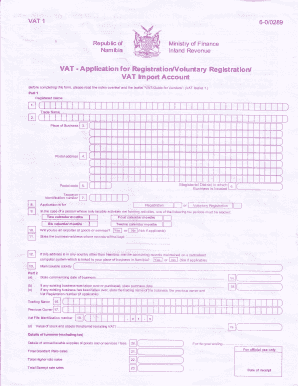
Get Tr Trtr Tr Tr - Fcs Namibia
How it works
-

Open form follow the instructions
-

Easily sign the form with your finger
-

Send filled & signed form or save
How to fill out the Tr Trtr Tr Tr - FCS Namibia online
This guide provides step-by-step instructions on how to accurately complete the Tr Trtr Tr Tr - FCS Namibia form online. Following these instructions will ensure that your application is filled out correctly and efficiently.
Follow the steps to complete the Tr Trtr Tr Tr - FCS Namibia form online.
- Press the ‘Get Form’ button to access the Tr Trtr Tr Tr - FCS Namibia form and open it in your preferred editing tool.
- In Part 1, enter your registered name accurately, which should reflect the legal entity as it appears on legal documents. If it is a partnership, include the names of the partners.
- Provide the trade name of your business if it differs from the registered name.
- Indicate the full address of your main place of business.
- Fill in the postal address to use for mailing purposes.
- Insert the postal code if you have one; leave blank if not.
- Specify the magisterial district where your business is located.
- List your taxpayer identification number, which can be obtained from your income tax certificate.
- Select the type of application you are making: for registration, voluntary registration, or VAT import account.
- If applicable, indicate whether you will be an exporter of goods or services.
- Provide the business address where accounting records will be kept.
- Confirm if your accounting records are maintained on a centralized computer system if located outside Namibia.
- Describe the main taxable activity of your business, such as wholesale or retail.
- Enter the commencing date of the business.
- If you took over an existing business, include the date of purchase.
- Provide details about any previous owner and their VAT registration number if applicable.
- State the value of stock and assets transferred at the time of acquisition.
- Detail your turnover excluding tax, including total annual taxable supplies of goods and or services.
- Estimate your total standard rate, higher rate, and exempt rate sales.
- If applicable, include details of branches and specify if they have an independent accounting system.
- Present the completed form to your bank for confirmation of your bank account.
- Declare under your signature that all particulars given are correct and submit the application.
- Finally, you can save changes, download, print, or share your completed form.
Complete your documents online today for a seamless experience.
Related links form
The ICAO phonetic alphabet has assigned the 26 code words to the 26 letters of the English alphabet in alphabetical order: Alfa, Bravo, Charlie, Delta, Echo, Foxtrot, Golf, Hotel, India, Juliett, Kilo, Lima, Mike, November, Oscar, Papa, Quebec, Romeo, Sierra, Tango, Uniform, Victor, Whiskey, X-ray, Yankee, Zulu.
Industry-leading security and compliance
US Legal Forms protects your data by complying with industry-specific security standards.
-
In businnes since 199725+ years providing professional legal documents.
-
Accredited businessGuarantees that a business meets BBB accreditation standards in the US and Canada.
-
Secured by BraintreeValidated Level 1 PCI DSS compliant payment gateway that accepts most major credit and debit card brands from across the globe.