Loading
Get Tuition Commitment Deposit Form - Qc.cuny.edu - Qc Cuny
How it works
-

Open form follow the instructions
-

Easily sign the form with your finger
-

Send filled & signed form or save
How to fill out the Tuition Commitment Deposit Form - Qc.cuny.edu - Qc Cuny online
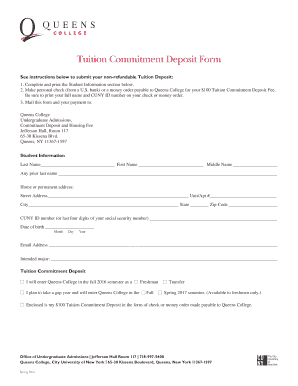
Filling out the Tuition Commitment Deposit Form is an essential step for enrolling at Queens College. This guide will walk you through the process of completing the form online, ensuring that you provide all necessary information accurately and efficiently.
Follow the steps to successfully complete the Tuition Commitment Deposit Form.
- Click the ‘Get Form’ button to access the Tuition Commitment Deposit Form and open it in your preferred editor for online completion.
- Begin filling out the Student Information section by entering your last name, first name, and middle name. Include any prior last name if applicable.
- Provide your home or permanent address, ensuring you fill in the street address, unit or apartment number (if applicable), city, state, and zip code.
- Enter your CUNY ID number or the last four digits of your Social Security number for identification purposes.
- Fill in your date of birth, including the month, day, and year.
- Complete your email address to facilitate communication regarding your application.
- Indicate your intended major to help the admissions team with your application process.
- Select whether you will enter Queens College as a freshman or as a transfer student. For those planning to take a gap year, specify the semester you plan to enter.
- Make your personal check or money order for the $100 Tuition Commitment Deposit Fee payable to Queens College. Don’t forget to print your full name and CUNY ID number on the payment.
- Finally, ensure all sections are completed accurately, then save your changes. You can download, print, or share the completed form and payment for submission.
Complete your Tuition Commitment Deposit Form online today to secure your place at Queens College.
Undergraduate Students Log in to your CUNYfirst account. Navigate to your Admissions Center > View My Application Status > My Application > View Details > Application Information > Accept The Offer. Click the link to pay your deposit by credit or debit card.
Industry-leading security and compliance
US Legal Forms protects your data by complying with industry-specific security standards.
-
In businnes since 199725+ years providing professional legal documents.
-
Accredited businessGuarantees that a business meets BBB accreditation standards in the US and Canada.
-
Secured by BraintreeValidated Level 1 PCI DSS compliant payment gateway that accepts most major credit and debit card brands from across the globe.