Loading
Form preview
  • US Legal Forms
  • Form Library
  • Foreign Forms
  • Foreign India Other Forms
  • India Annexure S2

Get India Annexure S2

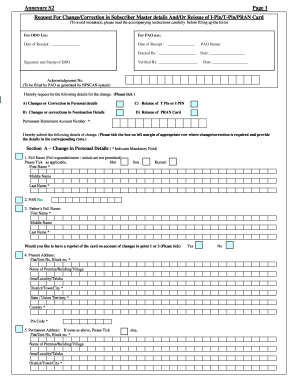
–Request for Reissue of I-PIN/T-PIN I hereby, request you to reissue the following T-PIN I-PIN Section D –Request for Reissue of PRAN card. I hereby request for reissue of PRAN card on account of Loss of PRAN card Damage to old card I _____________________________________________________________ , the applicant, do hereby declare that what is stated above is true to the best of my information & belief. Date : D D M M Y Y Y Y Signature/Left Thumb Impression of Subscriber INSTRUCT.

How it works

  1. Open form

    Open form follow the instructions

  2. Easily sign form

    Easily sign the form with your finger

  3. Share form

    Send filled & signed form or save

How to fill out the India Annexure S2 online

This guide provides a comprehensive overview for users looking to complete the India Annexure S2 form online. By following the steps outlined, you can ensure that your changes or requests regarding personal details or PRAN card issues are efficiently processed.

Follow the steps to accurately fill out the form online.

  1. Click ‘Get Form’ button to access the Annexure S2 form and open it in the designated editor.
  2. Begin by entering your Permanent Retirement Account Number (PRAN) at the top of the form. This is essential for identifying your account.
  3. Select the reason for your request by ticking the appropriate box: changes in personal details, changes in nomination details, reissue of T-PIN or I-PIN, or reissue of the PRAN card.
  4. Fill in your personal details in Section A. Make sure to provide your full name, PAN number, father’s full name, and your current and permanent addresses. Always tick the box for the same address if applicable.
  5. Enter your contact information including your phone number, mobile number, and email ID. This information is crucial for communication regarding your request.
  6. Complete your bank details, including your bank account number, bank name, bank branch, and bank’s MICR code.
  7. Proceed to Section B to fill out the nomination details. You can nominate up to three individuals, providing their names, dates of birth (if minors), relationships with you, and percentage shares.
  8. In Section C, indicate if you are requesting a reissue of your T-PIN or I-PIN by ticking the appropriate box.
  9. In Section D, request the reissue of your PRAN card if necessary, selecting the reason for reissue.
  10. Review all entered information for accuracy. Ensure all mandatory fields marked with an asterisk are completed.
  11. Once completed, save your changes, download the filled form, print it if needed, or share it as required.

Complete your India Annexure S2 form online to ensure swift processing of your request.

Get form

Experience a faster way to fill out and sign forms on the web. Access the most extensive library of templates available.
Get form

Related content

1 Malaria Elimination Demonstration Project, ...
by H Rajvanshi · 2021 · Cited by 22 — In the year 2018, this number rose to 95%, and...
Learn more
annexure s2 form | Latest: Registration of...
Form -ISS (Ver 1.2) Page 3 FOR THE I. If the application form is in order, CRA shall...
Learn more

Related links form

VICS BOL Supplement to the Bill of Lading EPA 6100-2 2015 EPA 7520-16 2011 EPA Form 8700-12 8700-13 A/B 8700-23

Questions & Answers

Get answers to your most pressing questions about US Legal Forms API.

Contact support

You can submit your NPS withdrawal form at any designated Point of Presence (POP) or through the NPS online portal. Ensure that all required fields are filled out and documents attached. If your withdrawal pertains to the India Annexure S2, make sure to mention this to expedite the process.

To change your bank account details in NPS online, log into your NPS account and navigate to the 'Modify' section. Here, you can update your banking information securely. If you're dealing with the India Annexure S2, ensure that the new account details align with the requirements outlined in the form.

Filling up the NPS S2 form involves entering your personal details and selecting the appropriate options for your investment choices. Take your time to review each section to avoid mistakes. For clarity on how the India Annexure S2 fits into your overall NPS submission, check the instructions provided alongside the form.

To log in to your NPS account, visit the official NPS website and click on the login option. Enter your user ID and password, then click on 'Login'. If you need further assistance with your account or integrating the India Annexure S2, refer to the guidance provided on the site.

To submit an NPS form, you need to fill out the necessary details on the form, including your personal information and financial data. Once completed, you can submit it through the relevant NPS portal or via a Point of Presence (POP). If you're working with the India Annexure S2, make sure to follow the submission guidelines carefully to ensure a smooth process.

Filling an NPS form involves providing your personal and financial details accurately. You should have essential information ready, such as your PAN and bank account information. Make sure to refer to the India Annexure S2 if needed, as this may guide you through any specifics necessary for your application.

To correct your NPS details, first identify the inaccuracies present in your account information. You will need to complete the NPS correction form, often accompanied by the India Annexure S2 for specific changes. Submit this form through your NPS provider's online platform or in person to ensure updates are processed effectively.

Annexure S2 is a vital document used within the National Pension System (NPS) framework. It typically addresses specific changes or updates regarding individual subscriber information. Understanding its purpose is important for maintaining accurate records and ensuring that your NPS details align with your expectations.

To request subscriber shifting in NPS, complete the relevant form that accompanies your India Annexure S2. Make sure to provide accurate details about your existing and new accounts. Once completed, submit it to your current NPS provider or on the official portal to process your request seamlessly.

In the context of NPS, an i-PIN is an Internet Personal Identification Number, which allows you to access your NPS account online. The t-PIN, or Transaction Personal Identification Number, is used for authorizing transactions, especially when using mobile services. Both are essential for securely managing your account and making updates, including those related to the India Annexure S2.

Get This Form Now!

Use professional pre-built templates to fill in and sign documents online faster. Get access to thousands of forms.
Get form
If you believe that this page should be taken down, please follow our DMCA take down processhere.

Industry-leading security and compliance

US Legal Forms protects your data by complying with industry-specific security standards.
  • In businnes since 1997
    25+ years providing professional legal documents.
  • Accredited business
    Guarantees that a business meets BBB accreditation standards in the US and Canada.
  • Secured by Braintree
    Validated Level 1 PCI DSS compliant payment gateway that accepts most major credit and debit card brands from across the globe.
Get India Annexure S2
Get form
Form Packages
Adoption
Bankruptcy
Contractors
Divorce
Home Sales
Employment
Identity Theft
Incorporation
Landlord Tenant
Living Trust
Name Change
Personal Planning
Small Business
Wills & Estates
Packages A-Z
Form Categories
Affidavits
Bankruptcy
Bill of Sale
Corporate - LLC
Divorce
Employment
Identity Theft
Internet Technology
Landlord Tenant
Living Wills
Name Change
Power of Attorney
Real Estate
Small Estates
Wills
All Forms
Forms A-Z
Form Library
Customer Service
Your Privacy Choices
Terms of Service
Privacy Notice
Legal Hub
Content Takedown Policy
Bug Bounty Program
About Us
Help Portal
Legal Resources
Blog
Affiliates
Contact Us
Delete My Account
Site Map
Industries
Forms in Spanish
Localized Forms
State-specific Forms
Forms Kit
Legal Guides
Real Estate Handbook
All Guides
Prepared for You
Notarize
Incorporation services
Our Customers
For Consumers
For Small Business
For Attorneys
Our Sites
US Legal Forms
USLegal
FormsPass
pdfFiller
signNow
altaFlow
DocHub
Instapage
Social Media
Call us now toll free:
+1 833 426 79 33
As seen in:
  • USA Today logo picture
  • CBC News logo picture
  • LA Times logo picture
  • The Washington Post logo picture
  • AP logo picture
  • Forbes logo picture
© Copyright 1997-2026
airSlate Legal Forms, Inc.
3720 Flowood Dr, Flowood, Mississippi 39232
Form Packages
Adoption
Bankruptcy
Contractors
Divorce
Home Sales
Employment
Identity Theft
Incorporation
Landlord Tenant
Living Trust
Name Change
Personal Planning
Small Business
Wills & Estates
Packages A-Z
Form Categories
Affidavits
Bankruptcy
Bill of Sale
Corporate - LLC
Divorce
Employment
Identity Theft
Internet Technology
Landlord Tenant
Living Wills
Name Change
Power of Attorney
Real Estate
Small Estates
Wills
All Forms
Forms A-Z
Form Library
Customer Service
Your Privacy Choices
Terms of Service
Privacy Notice
Legal Hub
Content Takedown Policy
Bug Bounty Program
About Us
Help Portal
Legal Resources
Blog
Affiliates
Contact Us
Delete My Account
Site Map
Industries
Forms in Spanish
Localized Forms
State-specific Forms
Forms Kit
Legal Guides
Real Estate Handbook
All Guides
Prepared for You
Notarize
Incorporation services
Our Customers
For Consumers
For Small Business
For Attorneys
Our Sites
US Legal Forms
USLegal
FormsPass
pdfFiller
signNow
altaFlow
DocHub
Instapage
Social Media
Call us now toll free:
+1 833 426 79 33
As seen in:
  • USA Today logo picture
  • CBC News logo picture
  • LA Times logo picture
  • The Washington Post logo picture
  • AP logo picture
  • Forbes logo picture
© Copyright 1997-2026
airSlate Legal Forms, Inc.
3720 Flowood Dr, Flowood, Mississippi 39232