Loading
Get Msf 4201 Rev 10 18
How it works
-

Open form follow the instructions
-

Easily sign the form with your finger
-

Send filled & signed form or save
How to fill out the Msf 4201 Rev 10 18 online
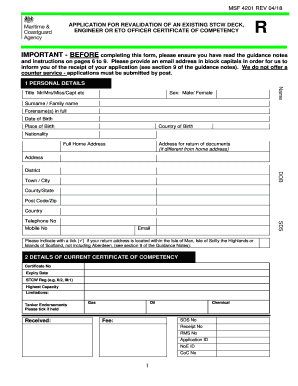
The Msf 4201 Rev 10 18 form is essential for the revalidation of an existing STCW deck, engineer, or ETO officer certificate of competency. This guide provides step-by-step instructions to assist users in accurately completing the form online.
Follow the steps to successfully complete the Msf 4201 Rev 10 18 application online.
- Click ‘Get Form’ button to access the Msf 4201 Rev 10 18 form and open it in your preferred online document editor.
- Begin by entering your personal details in section 1. Provide information such as your name, date of birth, nationality, and full home address. Ensure all details are correct and match your identification documents.
- In section 2, input details about your current certificate of competency, including the certificate number, expiry date, and any tanker endorsements held.
- Section 3 focuses on your sea service. List all relevant sea service, including vessel names, types, and durations. You must verify this information with proper documentation, such as discharge books or testimonials.
- Move to section 4 to review the checklist for all applicants. Ensure you gather and prepare any required documents, including your current certificate of competency and any relevant photographs.
- If applicable, complete section 4B regarding additional documentation for the 2010 Manila Amendments, ensuring you include necessary training completion evidence.
- In section 5, read and sign the declaration to verify the accuracy of the information provided. Include the date of signature as required.
- Proceed to section 6 to fill in the payment information. Choose your payment method and enter the necessary card details or cheque information.
- Upon completing all sections, review the entire form for accuracy. Save changes as needed, and prepare the application for submission.
- Lastly, follow the instructions to download, print, and mail your completed application, ensuring you include all required documents.
Begin the process of completing the Msf 4201 Rev 10 18 online today.
Steps to apply for issuance/revalidation of COP/COC in the MISMO: Log-in using your MISMO account; Select transaction and select/choose certification; Select the type of transaction and application; Click for acknowledgement/confirmation: Click proceed (upload the required documents); and. Click submit.
Industry-leading security and compliance
US Legal Forms protects your data by complying with industry-specific security standards.
-
In businnes since 199725+ years providing professional legal documents.
-
Accredited businessGuarantees that a business meets BBB accreditation standards in the US and Canada.
-
Secured by BraintreeValidated Level 1 PCI DSS compliant payment gateway that accepts most major credit and debit card brands from across the globe.