Loading
Get Renewal Payment Confirmation Form - Gs1 India
How it works
-

Open form follow the instructions
-

Easily sign the form with your finger
-

Send filled & signed form or save
How to fill out the Renewal Payment Confirmation Form - GS1 India online
Filling out the Renewal Payment Confirmation Form - GS1 India is a crucial step for maintaining your subscription. This guide provides clear, step-by-step instructions to help you complete the online form accurately and efficiently.
Follow the steps to fill out the Renewal Payment Confirmation Form.
- Press the ‘Get Form’ button to access the Renewal Payment Confirmation Form and open it in the editor.
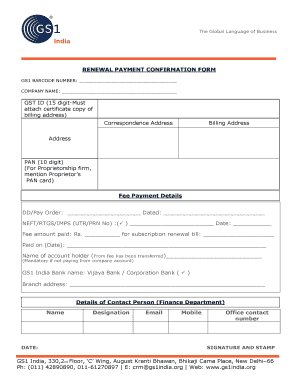
- Enter your GS1 barcode number in the designated field. This unique number is essential for identifying your subscription.
- Fill in your company name in the appropriate section. Ensure that the name matches the registered name of your organization.
- Provide your GST ID, ensuring that it is a 15-digit number. Remember to attach a certificate that confirms your billing address.
- Input your correspondence address in the specified field. This address will be used for official communications.
- Provide your billing address in the appropriate section. This may be the same as your correspondence address or different, based on your requirements.
- Enter your PAN in the designated field (10-digit). If you are representing a proprietorship firm, please include the Proprietor’s PAN card information.
- Detail your fee payment information. Specify whether you used a DD/Pay Order or NEFT/RTGS/IMPS, and provide the corresponding transaction details, including the date and any reference numbers.
- State the amount of the fee paid for the subscription renewal and the renewal period end date.
- Indicate the date on which the payment was made.
- Enter the name of the account holder from which the fee was transferred. This information is mandatory unless the payment was made from the company account.
- Select the bank name, which could either be Vijaya Bank or Corporation Bank.
- Provide the branch address of the selected bank.
- Fill in the details of the contact person in the finance department, including their name, designation, email address, mobile number, and office contact number.
- Finally, sign the form and affix your company stamp if applicable. Ensure that all information has been reviewed for accuracy.
- Once completed, save your changes, and you may download, print, or share the form as needed.
Complete your Renewal Payment Confirmation Form online efficiently today!
GS1 India is a global, supply chain Standards organisation, set up by Ministry of Commerce and Industry, Government of India, CII, FICCI, ASSOCHAM, FIEO, IMC, APEDA, Spices Board, IIP and BIS. GS1 standards enable improved efficiency, safety and visibility of supply chains across physical and digital channels.
Industry-leading security and compliance
US Legal Forms protects your data by complying with industry-specific security standards.
-
In businnes since 199725+ years providing professional legal documents.
-
Accredited businessGuarantees that a business meets BBB accreditation standards in the US and Canada.
-
Secured by BraintreeValidated Level 1 PCI DSS compliant payment gateway that accepts most major credit and debit card brands from across the globe.