We use cookies to improve security, personalize the user experience, enhance our marketing activities (including cooperating with our marketing partners) and for other business use.
Click "here" to read our Cookie Policy. By clicking "Accept" you agree to the use of cookies. Read less
Read more
Accept
Loading
Form preview
  • US Legal Forms
  • Form Library
  • More Forms
  • More Uncategorized Forms
  • Presentation Observation Feedback Form

Get Presentation Observation Feedback Form

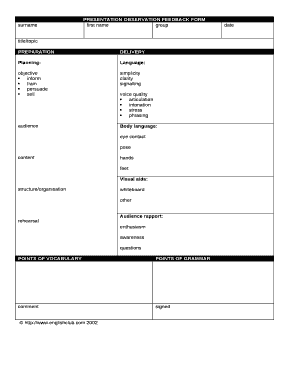
PRESENTATION OBSERVATION FEEDBACK FORM surnamefirst name group date title/topicPREPARATION DELIVERYPlanning:objective inform train persuade sellaudiencecontentstructure/organisationrehearsalLanguage:simplicity clarity signallingvoice.

How it works

  1. Open form

    Open form follow the instructions

  2. Easily sign form

    Easily sign the form with your finger

  3. Share form

    Send filled & signed form or save

How to fill out the PRESENTATION OBSERVATION FEEDBACK FORM online

Completing the PRESENTATION OBSERVATION FEEDBACK FORM online is a straightforward process that allows users to provide valuable feedback on presentation skills. This guide will help you navigate the form efficiently and effectively.

Follow the steps to successfully complete the form.

  1. Click ‘Get Form’ button to access the form and open it in your selected editor.
  2. Begin by filling in your surname and first name in the appropriate fields. This ensures that your feedback is attributed correctly.
  3. Specify your group by entering the relevant group information in the designated area.
  4. Enter the title or topic of the presentation. This provides context to the feedback you are about to give.
  5. Evaluate the preparation aspect of the presentation by providing comments under the preparation section.
  6. Assess the delivery of the presentation. Include detailed feedback regarding planning, language, and the overall objective such as whether it was to inform, train, persuade, or sell.
  7. Evaluate the simplicity, clarity, and signaling employed in the presentation to gauge effectiveness.
  8. Provide insight into how the presenter connected with the audience and their body language, including aspects such as eye contact and pose.
  9. Offer feedback on the voice quality including articulation, intonation, stress, and phrasing.
  10. Make comments on the visual aids used, assessing their structure and organization, along with any specific tools like a whiteboard.
  11. Comment on the rehearsal of the presentation and its impact on delivery.
  12. Evaluate the rapport established with the audience through enthusiasm, awareness, and engagement with questions.
  13. Provide feedback on points of vocabulary and grammar used throughout the presentation.
  14. Use the comment section at the end to include any additional thoughts or suggestions.
  15. Once all sections are completed, you have the option to save changes, download, print, or share the feedback form as necessary.

Start completing your feedback form online today to enhance presentation skills!

Get form

Experience a faster way to fill out and sign forms on the web. Access the most extensive library of templates available.
Get form

Related content

Feedback Forms
Performance Indicator Feedback Form. Teacher: ... General Observation Feedback Form...
Learn more
Presentation Evaluation Form
Presentation Evaluation Form. Participants - Your opinion matters to us. Using the survey...
Learn more
Instructor Development Instructor Development...
Time for general course feedback and individual written course evaluations. ... At the...
Learn more

Related links form

Produktionsgemeinschaft F - Members Aon Bkk Mobil Oil Lastschriftmandat What Is The Keyword For Way2go Card Application Form For Mobile Banking - Assam Gramin Vikash ...

Questions & Answers

Get answers to your most pressing questions about US Legal Forms API.

Contact support

Feedback is important because it can be used as a gauge for audience engagement. As perfect as we'd like to think we are, everyone has an opportunity to grow. Even a good presentation has at least a couple of things in which it can improve on. With opportunities to grow means feedback to be received.

3. Ask the right questions to provoke honest feedback. What was the most important concept/idea you took away today? What could I have explained more clearly or more in-depth? What could I have left out? What could I have added? Were there spots in my presentation where I lost you or that you weren't interested in?

It's always a good idea to ask your audience for feedback after a presentation. This can come in the form of a Q & A session or a survey. But how you phrase your presentation feedback questions can affect your audience's perception of you. It's important to use positive language to increase positive feedback.

Dear (Name), We are always looking for ways to improve at (company name), and I would like to request your feedback on our latest project/service etc. Your opinions matter to us and your feedback is used to improve how we work and ensure we deliver a consistently high-quality service.

How to Write a Presentation Evaluation Name of the presenter or presenters. Title of the presentation. Date of when the evaluation was conducted. Date of when the presentation was done. Aspects of the presentation the must be rated. A rating system which shows how these aspects are rated.

Your content was relevant and your format was visually appealing and easy to follow and understand. Great job! You're a real designer at heart! You always remain consistent with the way you present and often your presentations have the same style and layout.

There are five tips that immediately come to mind: (1) focus on description rather than judgment; (2) focus on observation rather than inference; (3) focus on observable behaviors; (4) share both positive and constructive specific points of feedback with the presenter; and (5) focus on the most important points to ...

3 Best Questions To Ask Your Audience After A Presentation What did you find most useful? Assuming you did not totally crash and burn this question will get your audience thinking about the positives from your presentation. ... How can you implement this? ... What will you do if you hit a roadblock?

Get This Form Now!

Use professional pre-built templates to fill in and sign documents online faster. Get access to thousands of forms.
Get form
If you believe that this page should be taken down, please follow our DMCA take down processhere.

Industry-leading security and compliance

US Legal Forms protects your data by complying with industry-specific security standards.
  • In businnes since 1997
    25+ years providing professional legal documents.
  • Accredited business
    Guarantees that a business meets BBB accreditation standards in the US and Canada.
  • Secured by Braintree
    Validated Level 1 PCI DSS compliant payment gateway that accepts most major credit and debit card brands from across the globe.
Get PRESENTATION OBSERVATION FEEDBACK FORM
Get form
Form Packages
Adoption
Bankruptcy
Contractors
Divorce
Home Sales
Employment
Identity Theft
Incorporation
Landlord Tenant
Living Trust
Name Change
Personal Planning
Small Business
Wills & Estates
Packages A-Z
Form Categories
Affidavits
Bankruptcy
Bill of Sale
Corporate - LLC
Divorce
Employment
Identity Theft
Internet Technology
Landlord Tenant
Living Wills
Name Change
Power of Attorney
Real Estate
Small Estates
Wills
All Forms
Forms A-Z
Form Library
Customer Service
Terms of Service
Privacy Notice
Legal Hub
Content Takedown Policy
Bug Bounty Program
About Us
Help Portal
Legal Resources
Blog
Affiliates
Contact Us
Delete My Account
Site Map
Industries
Forms in Spanish
Localized Forms
State-specific Forms
Forms Kit
Legal Guides
Real Estate Handbook
All Guides
Prepared for You
Notarize
Incorporation services
Our Customers
For Consumers
For Small Business
For Attorneys
Our Sites
US Legal Forms
USLegal
FormsPass
pdfFiller
signNow
altaFlow
DocHub
Instapage
Social Media
Call us now toll free:
+1 833 426 79 33
As seen in:
  • USA Today logo picture
  • CBC News logo picture
  • LA Times logo picture
  • The Washington Post logo picture
  • AP logo picture
  • Forbes logo picture
© Copyright 1997-2025
airSlate Legal Forms, Inc.
3720 Flowood Dr, Flowood, Mississippi 39232
Form Packages
Adoption
Bankruptcy
Contractors
Divorce
Home Sales
Employment
Identity Theft
Incorporation
Landlord Tenant
Living Trust
Name Change
Personal Planning
Small Business
Wills & Estates
Packages A-Z
Form Categories
Affidavits
Bankruptcy
Bill of Sale
Corporate - LLC
Divorce
Employment
Identity Theft
Internet Technology
Landlord Tenant
Living Wills
Name Change
Power of Attorney
Real Estate
Small Estates
Wills
All Forms
Forms A-Z
Form Library
Customer Service
Terms of Service
Privacy Notice
Legal Hub
Content Takedown Policy
Bug Bounty Program
About Us
Help Portal
Legal Resources
Blog
Affiliates
Contact Us
Delete My Account
Site Map
Industries
Forms in Spanish
Localized Forms
State-specific Forms
Forms Kit
Legal Guides
Real Estate Handbook
All Guides
Prepared for You
Notarize
Incorporation services
Our Customers
For Consumers
For Small Business
For Attorneys
Our Sites
US Legal Forms
USLegal
FormsPass
pdfFiller
signNow
altaFlow
DocHub
Instapage
Social Media
Call us now toll free:
+1 833 426 79 33
As seen in:
  • USA Today logo picture
  • CBC News logo picture
  • LA Times logo picture
  • The Washington Post logo picture
  • AP logo picture
  • Forbes logo picture
© Copyright 1997-2025
airSlate Legal Forms, Inc.
3720 Flowood Dr, Flowood, Mississippi 39232