Loading
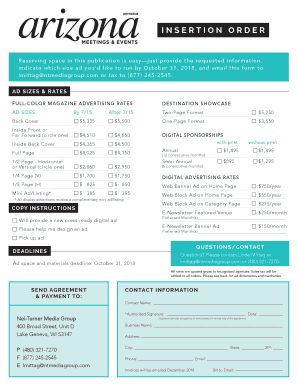
Get Insertion Order - Azmeetings.com
How it works
-

Open form follow the instructions
-

Easily sign the form with your finger
-

Send filled & signed form or save
How to fill out the INSERTION ORDER - Azmeetings.com online
Filling out the insertion order for Azmeetings.com is an important step in securing your advertising space. This guide provides you with a comprehensive overview of each section of the form to ensure a smooth and efficient completion.
Follow the steps to successfully complete your insertion order.
- Click the ‘Get Form’ button to access the insertion order document and view it in your preferred browser.
- Begin by entering your contact information in the designated fields including your name, business name, address, city, state, ZIP, phone, and email.
- In the ‘Ad Sizes & Rates’ section, choose the type and size of advertisement you wish to purchase. Be sure to indicate your preference by circling the appropriate option.
- Specify your preferred month(s) for the ad to run under the ‘Preferred Month(s)’ section. If you are providing a new press-ready digital ad, indicate that here.
- Review the 'Delivery & Contact Information' section to ensure all details are correct and complete, including the contact name and method of submission (email or fax).
- If you have any specific instructions for ad design, you can provide those in the designated field. Note if you will need design assistance.
- Before submitting, ensure that you have signed and dated the form in the ‘Authorized Signature’ section, which denotes your acceptance of the terms and conditions.
- Once you have filled out all necessary sections, you can save your changes, download the document, print a copy for your records, or share it via email.
Complete your insertion order online today to secure your advertising space!
Select Insertion Orders from the main menu. Select Create order > Insertion order to open the order form. Select the account. Enter the Start date, and the End date, which can be a specific end date, or no end date, and Budget amount, which can be a set amount, or unlimited.
Industry-leading security and compliance
US Legal Forms protects your data by complying with industry-specific security standards.
-
In businnes since 199725+ years providing professional legal documents.
-
Accredited businessGuarantees that a business meets BBB accreditation standards in the US and Canada.
-
Secured by BraintreeValidated Level 1 PCI DSS compliant payment gateway that accepts most major credit and debit card brands from across the globe.