Loading
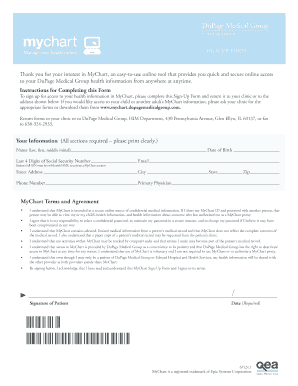
Get Dupage Medical Group My Chart
How it works
-

Open form follow the instructions
-

Easily sign the form with your finger
-

Send filled & signed form or save
How to fill out the Dupage Medical Group My Chart online
This guide provides a comprehensive overview of how to fill out the Dupage Medical Group My Chart sign-up form online. By following these steps, you will ensure a smooth process in accessing your health information securely and conveniently.
Follow the steps to complete your My Chart sign-up form online.
- Click ‘Get Form’ button to access the sign-up form and open it in the designated editor.
- Begin by entering your personal information in the required fields. Ensure you print clearly while inputting your name, including last name, first name, and middle initial.
- Input your date of birth in the appropriate format to confirm your identity.
- Provide the last four digits of your Social Security Number. This is necessary for identity verification.
- Enter your email address, as this will be used for communication and account access.
- Fill in your street address, including city, state, and zip code to ensure accurate correspondence.
- Include your phone number for contact purposes.
- State your primary physician’s name to connect your health information with the correct medical provider.
- Read the MyChart Terms and Agreement carefully. Make sure you understand the responsibilities regarding your MyChart account.
- Sign the form to acknowledge your understanding of the terms and include the date of your signature.
- Once all sections are completed, save changes or print the form as needed. Then, submit the form to your clinic or the specified address. Alternatively, you may choose to fax it to the provided number.
Start completing your documents online today for easy access to your health information.
MyChart is used in the US and other countries to access doctors' records and for billing purposes. It is used by 150 million patients across the US.