Loading
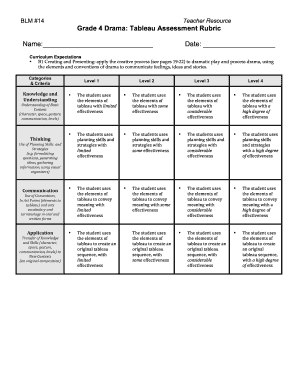
Get Grade 4 Drama: Tableau Assessment Rubric
How it works
-

Open form follow the instructions
-

Easily sign the form with your finger
-

Send filled & signed form or save
How to fill out the Grade 4 Drama: Tableau Assessment Rubric online
Filling out the Grade 4 Drama: Tableau Assessment Rubric online is a straightforward process that can enhance your ability to evaluate student performances effectively. This guide provides step-by-step instructions to ensure that you can complete the form accurately and confidently.
Follow the steps to fill out the Grade 4 Drama: Tableau Assessment Rubric online
- Press the ‘Get Form’ button to acquire the form and open it in your preferred editor.
- Begin by entering the student's name in the designated space. Ensure that the name is spelled correctly for accurate identification.
- Next, fill in the date of the assessment. This date should reflect when the rubric is being completed.
- Move on to the 'Curriculum Expectations' section. Review each expectation carefully, as they guide the assessment criteria.
- In the 'Categories & Criteria' section, assess the student’s performance level based on your observations. Use the detailed descriptions for Knowledge and Understanding, Thinking, and Application to determine the appropriate level from 1 to 4.
- Provide feedback or remarks related to the student's strengths and areas for improvement, if applicable. This qualitative feedback is essential for the student's growth.
- Once all sections are complete, ensure that all information is accurate before saving your changes. You can then choose to download, print, or share the form as required.
Start filling out your documents online today to streamline your assessment process!
Singular Tableau – A single tableau which portrays an idea, message, emotion, etc. Silent Story Tableaux – A number of tableaux which tells a story without using spoken dialogue. Narrative Tableaux – A narrator (who can still be a part of the tableaux) tells a story which is represented in the tableaux.